Documentation
Integration
Translation webhooks: trigger builds on updates
Webhooks are custom HTTP callbacks from WebTranslateIt to any URL you specify. They are called whenever a translation is made on WebTranslateIt.
Setup a Webhook
A webhook can be setup in your project settings. Provide the webhook section with the URL of your webservice and WebTranslateIt will request a HTTP POST request everytime a translation was made on your project.
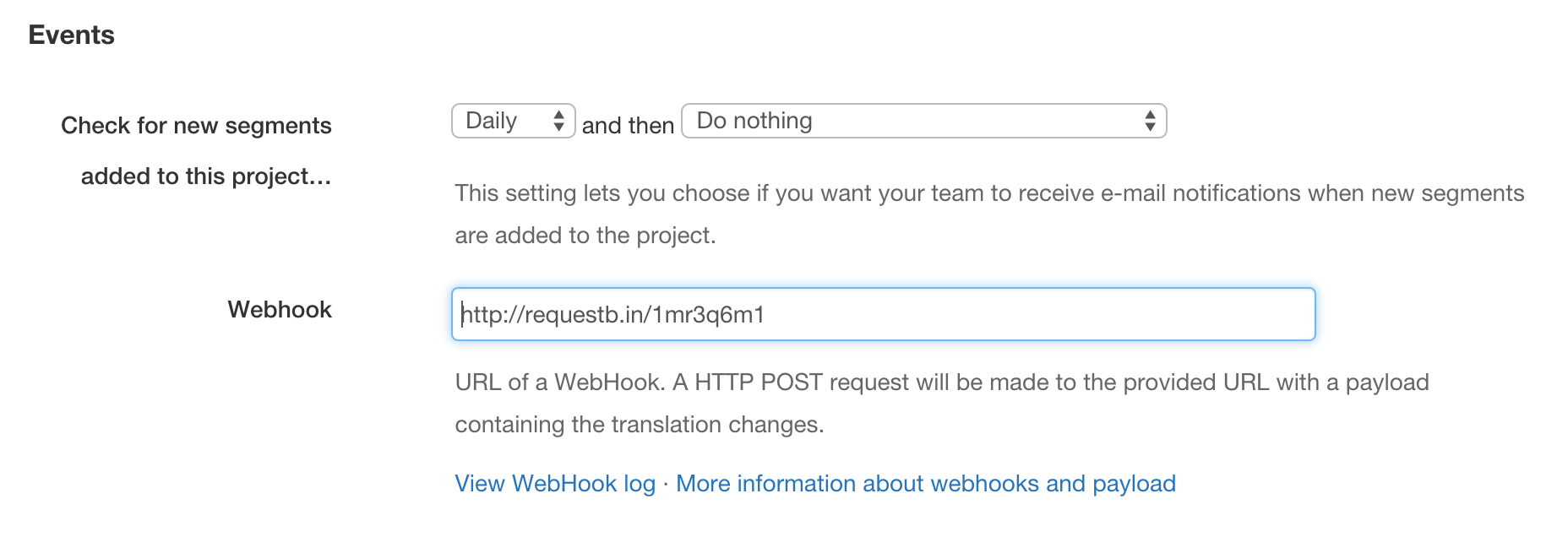
The HTTP POST request made contains a so-called payload which are attributes indicating what was updated.
You can also use a Slack Incoming Webhook to have WebTranslateIt post about translation updates in a channel.
Webhook requests are made in the background so there can be a small delay between the moment a translation is saved and the time the webhook request is made. Timeout is set to drop requests exceeding 10 seconds.
There are two different kinds of payloads, single payloads and multiple payloads.
Single Payload
A single payload is a payload sent for a single translation made from the web interface. Here is an example payload.
{ "payload": [{
      "project_id": 123,
      "string_id": 1234,
      "user_id": 1,
      "locale": "fr",
      "file_id": 12345,
      "api_url": "https://webtranslateit.com/api/projects/:api_token/files/12345/locales/fr",
      "translation": {
        "id": 3388316,
        "locale": "fr",
        "text": "Are you sure you want to delete this comment?",
        "status": "status_unproofread",
        "created_at": "2011-03-23T19:27:54Z",
        "updated_at": "2013-04-12T14:37:25Z",
        "version": 16,
        "string": {
          "id": 772316,
          "key": "_comment.delete_are_you_sure",
          "plural": false,
          "type": "String",
          "dev_comment": null,
          "status": "Current"
        }
      }
    }
  ]
}
Multiple Payload
A multiple payload is a payload for a group of translations that were made from a batch operation or a file upload. Instead of sending thousands of single payloads WebTranslateIt sends a payload containing an array of translation changes. In order not to make too large requests, requests are capped to 50 changes.
{
    "payload": [{
            "project_id": 123,
            "string_id": 1234,
            "user_id": 123,
            "locale": "fr",
            "file_id": 12345,
            "api_url": "https://webtranslateit.com/api/projects/:api_token/files/12345/locales/fr",
            "translation": {
                "id": 3388316,
                "locale": "fr",
                "text": "Are you sure you want to delete this comment?",
                "status": "status_unproofread",
                "created_at": "2011-03-23T19:27:54Z",
                "updated_at": "2013-04-12T14:37:25Z",
                "version": 16,
                "string": {
                    "id": 1234,
                    "key": "_comment.delete_are_you_sure",
                    "plural": false,
                    "type": "String",
                    "dev_comment": null,
                    "status": "Current"
                }
            }
        },

        {
            "project_id": 123,
            "string_id": 1235,
            "user_id": 123,
            "locale": "fr",
            "file_id": 12345,
            "api_url": "https://webtranslateit.com/api/projects/:api_token/files/12345/locales/fr",
            "translation": {
                "id": 3388317,
                "locale": "fr",
                "text": "Another translation",
                "status": "status_unproofread",
                "created_at": "2011-03-23T19:27:54Z",
                "updated_at": "2013-04-12T14:37:25Z",
                "version": 16,
                "string": {
                    "id": 1235,
                    "key": "Another segment",
                    "plural": false,
                    "type": "String",
                    "dev_comment": null,
                    "status": "Current"
                }
            }
        }
    ]
}
What can you do with a webhook?
You could use a webhook to:
- download the latest version of your linguistic file on your webserver, so translators can live-reload your website.
- create a new build of your software and make it available to download.
- automatically commit the new version of the file to your Version Control System.
- send an e-mail notification or write a line on Campfire, Slack or IRC.
Debugging a webhook: the webhook log
A webhook that silently does nothing is the most common problem people hit, and it is usually one of two things: the URL is wrong, or the endpoint is rejecting our request. The webhook log tells you which.
Every project keeps a log of its webhook activity. You will find a View webhook log link next to the webhook field in your project settings; it opens the log as plain text in a new tab.
The log records:
- a line each time WebTranslateIt calls your webhook, and how many segments were included in that call,
- and a line for each failure, with the error we got back.
Reading it, remember that calls are sent in batches of 50 segments. Saving 120 translations produces three calls, not one and not 120 — so seeing several entries in a row is normal, not a sign of a retry loop.
Two things the log is good at telling you apart:
- No entries at all after a translation was saved means WebTranslateIt never tried to call you. Check that the webhook URL is actually saved in your project settings.
- Entries with errors mean we called you and it did not work. The recorded error distinguishes a malformed URL from a connection that failed, timed out, or was refused by your server.
The log is capped in size and rotates, so it shows recent activity rather than a permanent audit trail. If you need a lasting record of translation events, log them on your own side when your endpoint receives them.
More information about webhook
Next Up: Language file converter. Convert a language file from one format to another — Apple .strings to Android .xml, .po to .json… »