The WebTranslateIt Blog · Page 4

i18n news and Product Updates about WebTranslateIt · Page 4

New in WebTranslateIt: E-mail notifications about segments to verify and to proofread

By Edouard · October 30, 2017

Today we released another of our most requested features. As many of you know, it is possible to receive e-mail notifications about new segments to translate.

If you don’t know about it, it’s super easy to set up. Go to your project settings and look for “Events » Check for new segments to work on”, select a frequency (daily or hourly) and who to notify.

Until today this feature was only sending e-mail notifications about new segments being added to a project. But what about segments needing proofreading or verification?

From now on, we will now send e-mails about segments being modified and needing to be worked on like for instance new segments to proofread or new segments to verify.

Hi,

There has been some changes in the project WebTranslateIt. Here’s what needs to be done:

In French:


Cheers,
– WebTranslateIt

Also, if you are a user having translation rights to multiple languages you will get a notification e-mail about the multiple languages.

Hi Edouard,

There has been some changes in the project WebTranslateIt. Here’s what needs to be done:

In German:


In English:


In Spanish:


In French:


In Italian:


In Russian:


In Swedish:


Cheers,
– WebTranslateIt

Note: We initially released this feature on the 25th of September but rolled it back due to our user’s feedback. We re-released it today with the ability to fine-tune what gets sent to our users. You can now control if you want your users to receive e-mails about new segments to translate, or about segments to proofread or to verify.

I hope you will find this improvement useful. Thank you for using WebTranslateIt.


Want more? Follow us on Facebook, Twitter and LinkedIn.

Have you heard about the European Resistance Archive?

By Estelle · October 16, 2017

By Oliver Grimm, Technical Lead – European Resistance Archive

Oliver Grimm, Technical Lead – European Resistance Archive

The European Resistance Archive (ERA) is an online video archive featuring interviews with women and men who tell their individual stories of resistance to the terror, humiliation and despair fascism cast over Europe at the beginning of the twentieth century.

Why ERA?

The idea for the ERA was born in 2005 in Reggio Emilia, northern Italy, where the local historical institute Istoreco integrated former partisans into their educational programs. The living participants met with school classes and youth groups to share their personal experiences; what happened to them in the second world war, how they encountered the rise of fascism, and their individual path into the resistance movements.

Unfortunately, the majority of former partisans have already died, and in a few years there will be no one remaining who can directly remember that time. Keeping these memories, this precious knowledge alive, making it accessible to everyone everywhere was and still is the motivation behind the European Resistance Archive.

Keeping these memories, this precious knowledge alive, making it accessible to everyone everywhere was and still is the motivation behind the European Resistance Archive.

Realization of the project

Istoreco managed to organize partners and groups in six European countries, and thus the project was accepted and funded by the European Commission in 2006. In the process of creating the ERA, young people participated actively in the realization of the project, in the form of conducting the interviews, collecting images and documents, writing down biographies, and transcribing interviews. Historians, memory workers, and a professional video-team guided the young participants in their work. Overall more than 80 people were involved.

The result is an online archive – a collection of 21 video interviews with contemporary eyewitnesses from Poland, France, Slovenia, Italy, Austria, and Germany. In addition, the archive provides an overview of each of these countries’ respective resistance movements, so as to better set the interviews in their proper historical context.

10 years later

A small internet agency in Kreuzberg (Berlin, Germany) was responsible for the technical production. At the time of its launch, in May 2007, the ERA was a state of the art project, but after almost ten years later it had become outmoded. Much of it was technically outdated and none of the video clips could be played on mobile phones or tablets.

The latter problem was a real show stopper, because mobile phones and tablets are what the majority of the target audience – pupils and young people – are using.
A complete technical revision of the ERA became inevitable and was started in mid 2017. The aim was to eliminate the technical issues, to modernize the design, and to adapt the display for different screen sizes.

Missing translations and WebTranslateIt

The ERA version 2.0 was launched in fall 2017. While the aforementioned issues have been solved, the archive has still only been fully translated into English, and the rest of the content is only partly available in other languages.
In order to get all of the content translated into all “ERA languages” a Github-based open source project was initiated, so that the effort could be crowd-sourced. This even got support from Babbel volunteers.

Unfortunately it turned out very quickly that that approach was too tech-heavy. Instead of working on the actual translations, most of the volunteers struggled with the technical terminology, the git flow and the principles of “pull requests”…

The solution best suited to this less than satisfactory situation was to switch to a professional translation tool. One of the candidates was WebTranslateIt, which Babbel uses to translate their platform and Apps. After a short evaluation period everyone involved voted for the switch.

WebTranslateIt did not hesitate to classify the ERA as open source project, which provides free access to all WTI features. As there is no proper funding for the ERA, WebTranslateIt’s support is highly appreciated.

What’s next? You!

While WebTranslateIt yielded a significant performance boost, there is still a lot of work to do, and a lot of content to be translated. Want to contribute to the ERA translation project ? Do you speak French, German, Italian, Polish, Slovenian, or English? Just go to http://www.resistance-archive.org/en/participate/ and sign up.

Are you a non-profit organization in need of translating a project on a budget? Don’t hesitate to contact us and we’ll help out.


Want more? Follow us on Facebook, Twitter and LinkedIn.

An ever-lasting issue for multilingual websites: which language icon?

By Edouard · October 13, 2017

Finding a simple visual cue that can be inserted on your front page to notify your users that your website is available in several languages is a tough problem to solve. Here are 4 classic ways to implement a language switcher, plus a lesser known way.

1. Just listing your languages

The most simple and effective way to let people switch language is to just list the languages you support. This is what Facebook does that and so do we. People expect this list to be in your footer, and the languages should be listed in their original, non-translated names. English for English, Français for French, Deutsch for German, etc.

Pros & Cons

On the upside, your users will eventually find a language that they know if it’s listed there.

The downside is that it takes up a lot of space in your design, so you might be temped to only use this on your landing page. Facebook trims it to the list of the most used languages and adds a “plus sign” to view all their supported languages.

2. A language dropdown menu

You can also insert a drop-down menu set by default on the current language, like English for instance. This is what Stripe does this for instance.

Pros & Cons

On the upside, it takes up less space in the footer compared to the previous solution.

The downside is that it lacks clarity for a user browsing the website in a language that he doesn’t know. As you can see on the image below I would get lost on the Chinese version of Stripe’s website 😅

This is where an icon helping foreign users identify the language switcher would come handy.

3. A language dropdown menu using country flags

Some multilingual websites who make the choice of using an icon often use a country flag which changes with your choice of language. This is how Slack does it for instance.

Pros & Cons

On the upside colorful flags attract attention. They also are universally known and people understand that they might be able to change some kind of regional setting here.

The downside is clear: country flags represent countries, not languages and some users won’t like it. Users visiting your website from the United Kingdom may not like to see the stars and stripes banner. Also, an American user might not like to see the Union Jack banner. Besides, English isn’t the only language spoken in UK. What about Welsh, Scottish, Gaelic? Basically, you may hurt people’s sensitivity.

4. A language dropdown menu using neutral icons

Designing an icon conveying the meaning of “Changing Language” is hard. Popular choices are icons of a globe, or a flag, or a globe in a flag, as Apple does.

Pictures of “exotic” characters such as 文 are popular too. This is what Google and Microsoft use in their user interfaces.

Pros & Cons

The upside is that while these icons are clearly visible, they won’t hurt anyone’s sensitivity.

The downside is that these icons aren’t unified across software vendors so it might be difficult for a user to identify quickly and precisely what this icon means unlike the hamburger button or cog icon which are now known by many people using computer interfaces.

Now, wouldn’t it be nice if there was an widespread, already existing user interface icon that conveys the idea of changing languages? Well, you know what? There kind of is.

The language Icon project

The language icon project attempts to change that. The language icon icon was designed during a competition in 2011.

The initiative is very interesting and the design clever.

Some could argue that this design, if never seen before, might not straight away be perceived as a language icon, but it surely would if it was used more by software vendors.

It is meant to be used for commercial and non-commercial projects. It was released under a CC license with following terms: Relax-Attribution. It means that if you use it, you are suggested but not required to attribute the work to its creator when using for internet or digital use.

If software vendors were to use it more, it would become the norm like our beloved hamburger button, and it would become an obvious choice for any developer when localizing their software.

And who knows, maybe an even better Language Icon or —even better— an Emoji defining “Change Language” will pop up one day?


Want more? Follow us on Facebook, Twitter and LinkedIn.

New in WebTranslateIt: Improvements to the character counter

By Edouard · October 11, 2017

We just released a few improvements to how characters are counted on WebTranslateIt.

First of all, we now display a character counter at the bottom of each translation box.

For those of you unfamiliar with this kind of counter (it is quite widespread on translation tools), the number on the left is the amount of characters in the source text and the number on the right is the amount of characters in the target text.

If a lot of text is being typed in the translation box you will notice that the target text character count turns orange. It’s a sign that your translation could be too verbose.

We also revamped how the character counter works on segments including a character limit.

Finally, we also added one project setting to let you choose how you want WebTranslateIt to count characters: by characters or by bytes. By default we count a character as a character (using a grapheme counter).

It means that “A” is 1 character, “🤔” is 1 character and “की” is 1 character.

However, we know that some tools you rely on still count characters using bytes, and some characters are made of several bytes, so for some tools “A” would be 1 character and “🤔” and “की” would be 2 characters.

We hope you will find these improvements useful. Until then, don’t hesitate to follow us on Facebook, Twitter and LinkedIn.

Update to WebTranslateIt’s search engine

By Estelle · September 22, 2017

We just released an update to WebTranslateIt’s search engine.

The first thing you will notice is that the “Ignore Case” checkbox is now checked by default. It was previously off by default, mainly because case sensitivity only applied to regex searches.

It means that you can now run a basic search with case sensitivity turned on or off. This allows you to search for things more precisely.

Case sensitive results:

Case insensitive results:

We also changed how searching for Source or Target text works. It now searches for stand-alone words.

Here’s an example. On this project we have many segments containing air:

Now by default, searching for air on the source text will only list text containing the word air like MacBook Air, a fresh breath of air. Previously it would had also matched words containing air like Go to the repair shop.

If you’d like to use the old behavior and search for everything containing air then just tick the “regex search” box.

We really think that the new defaults will make searching for segments easier, while by using advanced options lets you search even more precisely. We hope you will like it. Thank you for using WebTranslateIt.

Want more? Follow us on Facebook, Twitter and LinkedIn.

New in WebTranslateIt: Improvements to PHP Laravel and JSON files support

By Estelle · September 19, 2017

We released an update to the language file handler on WebTranslateIt. We improved the Laravel file handler and the JSON file handler. Other improvements will come along the way.

Support for short-hand arrays in PHP Laravel files

WebTranslateIt now supports short-hand arrays in PHP Laravel files.

Instead of uploading PHP Laravel files containing arrays defined like this:

<?php
return array(
  'foo' => array(
    'subject' => 'Test'
  ),
  'bar' => array(
    'subject' => 'Test 2'
  )
);

You can now upload and download language files looking like that:

<?php
return [
  'foo' => [
    'subject' => 'Test'
  ],
  'bar' => [
    'subject' => 'Test 2'
  ]
];

Custom indentation for JSON files

WebTranslateIt indents all the language files with spaces 😂 but we believe that it is a matter of taste and we shouldn’t impose our spaces indentation. It also makes huge diffs when you download back your language files to version control.

Starting today when uploading a JSON file it detects which kind of indentation you are using (2 spaces, 4 spaces, 1 tab, 2 tabs) and it saves this information to database. When generating your JSON language file we will put your original indentation back on.

More importantly, we laid the ground work for having this feature working for all files handlers. We’ll add custom indentation support for all the other file formats soon.


Want more? Follow us on Facebook and Twitter

Have you heard about the JavaScript XMPP Client?

By Estelle · September 18, 2017

WebTranslateIt has always had a policy of offering free subscriptions to non profit organizations so that they can translate their projects. Over the years, we’ve been joined by people giving life to some very interesting open source projects, like the JavaScript XMPP Client.

We asked Klaus Herberth, lead developer of JSXC to tell us more about it.

WTI: Can you tell us exactly what the JavaScript XMPP Client is?
K.H.: The JavaScript XMPP Client (JSXC) aims to expand every web application by a real-time communication center with end-to-end encrypted two-party chat, video calls, file transfer, group chat and a lot more. Beside some already adapted packages for Nextcloud, Ilias, Wordpress, SOGo and other open source projects, you can easily integrate JSXC with just a few lines of code into your website.

WTI: Who are the people who started it?
K.H.: I started JSXC as part of my Bachelor Thesis and now it’s developed by me, some colleagues from the Distributed Systems Laboratory at the University of Konstanz, Germany and a growing community.

Meet the JSXC core team.

WTI: What was your main motivation?
K.H.: The idea was to create a simple to use, secure and privacy-aware chat application which can be integrated into every website, so that people around the world can share their ideas and opinions without fear.

WTI: Why create a free product when it could have been commercialized?
K.H.: We love open source software and think thats the only way to go if you like to have a secure product. Nobody can trust in closed source software, because you don’t know what’s going on in that black box.

WTI: And finally, can you tell us how WebTranslateIt helped you along the way?
K.H.: It helped us to engage non-technical persons to the project, who like to contribute but need an easy to use interface with a clear work flow.

Klaus and his team have started translating their project into more than 20 languages and we are proud to help them reach to worldwide users.
If you are interested in the JavaScript XMPP Client, want to use it or would like to help develop it or translate it, don’t hesitate to reach out to Klaus at klaus@jsxc.org.

Want more? Follow us on Facebook and Twitter

WebTranslateIt has reached carbon neutrality

By Estelle · September 11, 2017

We believe it is now impossible to deny global warming and the fact that we are all responsible for it, this is why we have decided to offset our carbon footprint.
We first had to calculate it, which was not easy because many websites claim to give accurate results. The best carbon footprint calculator we found was CarbonFootprint.com. The list of questions they ask is very thorough but it is still easy to answer all of them as long as you have access to your company’s expenses.

To our surprise, we discovered that the biggest impact didn’t come from our travels, electricity or water consumption but from the manufactured goods we are buying, especially high-tech ones: laptops, phones. We work remotely, so we don’t have to commute, and our servers are hosted in an already carbon-neutral datacenter in the Netherlands (Leaseweb’s amazing AMS-01).

We looked for solutions to compensate our carbon footprint for the past year and fortunately there are quite a few non-profit organizations that will offer you to participate to projects helping develop sustainable energies all over the world, especially in developing countries, or even just initiatives as simple as reforestation.

We decided to get involved with the Fondation Goodplanet which was created by the photographer and environmentalist Yann Arthus-Bertrand.

We are now really proud to announce that WebTranslateit is

We will keep making daily efforts to change our consuming habits and will collaborate further with the Fondation Goodplanet. Join us in the fight, we believe climate change is not a fatality.

Want more? Follow us on Facebook and Twitter

New in WebTranslateIt: HTML validations

By Edouard · August 10, 2017

We released an update to the translation validator so that it now inspects and detects eventual problems in the HTML code in the translations.

If some HTML code of a translation is missing or differs from the HTML code of the source text a warning message will be displayed. This will help increase the quality of the translator’s translations.

Here’s an example of when a translation’s HTML tag is missing or is completely different:

And when a translation HTML code is not properly balanced.

We also added new validation code to check the number of line breaks is identical in the source and target text:

As usual, validation warning messages are just warnings. You can always click on “Skip Validation” to save your translation anyway.

We hope you will find these improvements useful. Thank you for using WebTranslateIt.

Want more? Follow us on Facebook and Twitter

WebTranslateIt now sponsors Málaga Bikes

By Estelle · August 7, 2017

WebTranslateIt’s owner Edouard has been into cycling for a few years now, from the long and flat roads of the French Atlantic coast up through the wilderness of Connemara and down to the Andalusian mountains of Málaga.

It just seemed natural that if we ever were to sponsor any sport event, it would be bike related. And after a few interesting encounters, we were given the opportunity to sponsor not only an event, but a team.

There are many cycling clubs in Andalusia, for its climate allows the sport all year round —just be an early riser in the Summer!— and we decided to help a new club start out. Málaga Bikes was created in June 2017 by Bruno Cuesta and counts 8 members such as Victor Cardenas and Alejandro Paez, Andalusian mountain bike and road bike rising stars.

If you want to know more about their exploits, don’t hesitate to follow them on Strava. We are really proud of our guys!

Want more? Follow us on Facebook and Twitter

New File Format supported: YAML files for Hugo Framework

By Edouard · July 31, 2017

You can now translate Hugo .yml files with WebTranslateIt.

Hugo YAML files are special YAML files which are parsed in a specific way by WebTranslateIt. You can read more about it in our documentation about YAML files.

We hope you will find this new file format useful. Thank you for using WebTranslateIt.

Want more? Follow us on Facebook and Twitter

Let us introduce our newest team member: Jet

By Estelle · July 26, 2017

After spending a few years travelling the world, Jet has decided it would be time to use his boundless knowledge and experience to help WebTranslateIt’s community to reach out to worldwide customers.

Let’s all welcome Jet for on the long and windy road to globalization, he is going to take you far far away. And fast.

Get on board!

Follow his new adventures on Facebook and Twitter.

New in WebTranslateIt: Better Attributions

By Edouard · July 23, 2017

We made an update about how translation changes are attributed to people on WebTranslateIt.

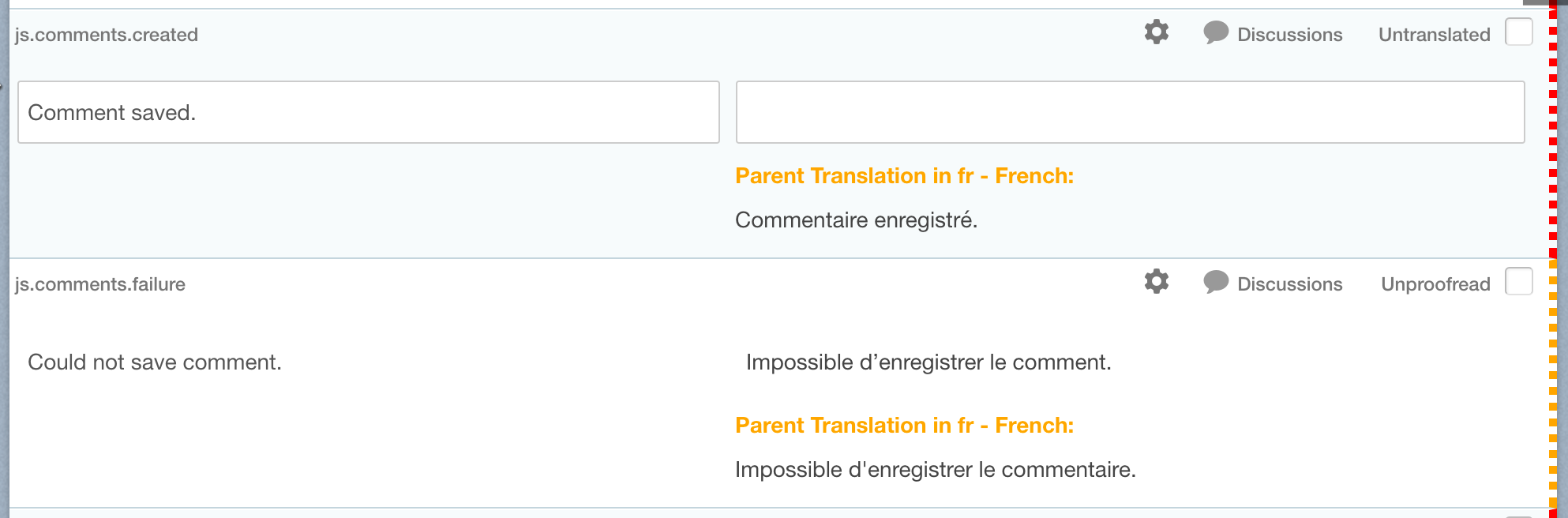
Before this update, any translation change made was getting attributed to the name of the person making that change. While this is correct most of the time, it wasn’t right to say that a person translated a segment if the only thing that person did was flagging a translation as “to verify”.

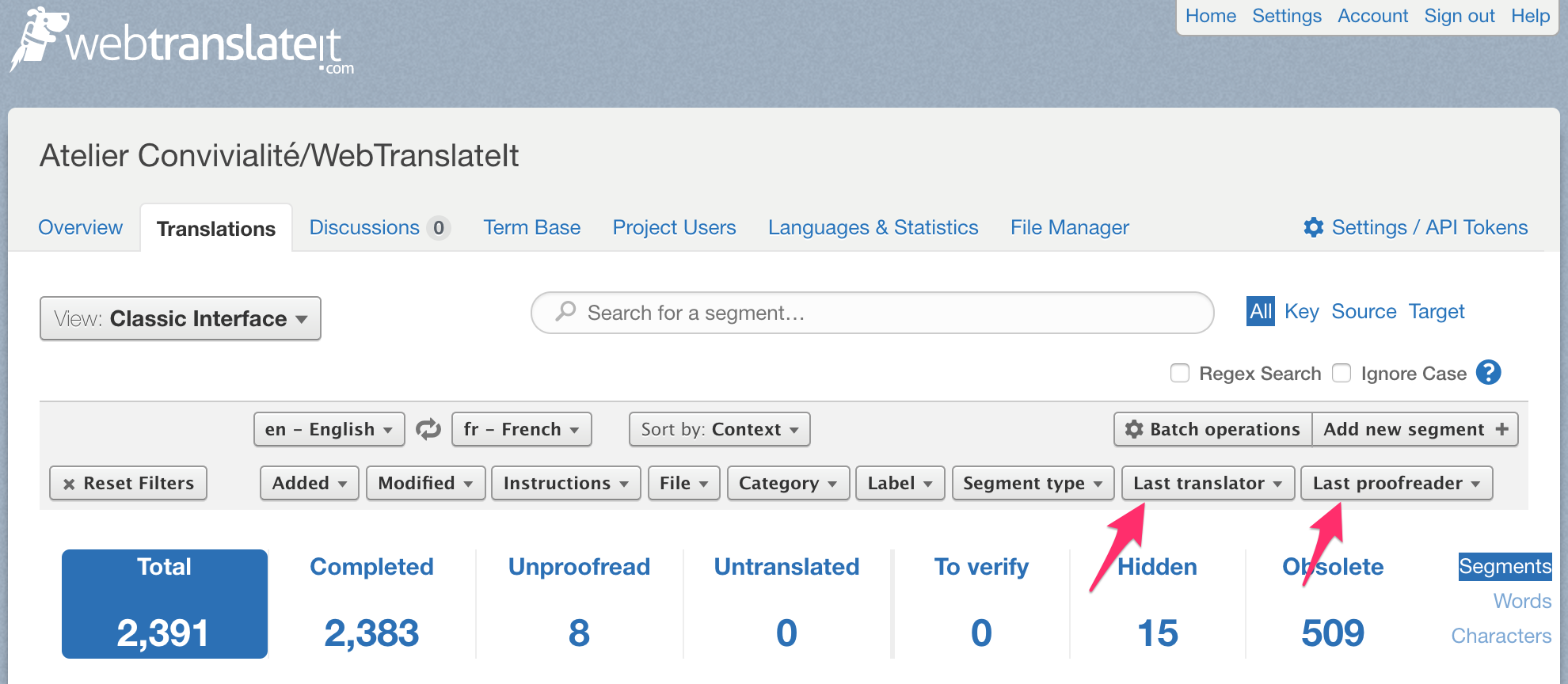
From now on, instead of only tracking the person who made the last change, WebTranslateIt now tracks the name of the last translator and the name of the last proofreader and displays this information when you update a translation.

This change also now makes it possible to filter segments by last translator and last proofreader, which is useful if you want to check on the work translated by a specific translator. You will find these new filters in the filters section at the top of the translation interface.

We hope you will find these improvements useful. Thank you for using WebTranslateIt.

Want more? Follow us on Facebook and Twitter

Why Translating your application

By Edouard · July 5, 2017

Why should you translate your application?

Because it will open your app to new markets. You will get new customers/visitors

Only 26% of the world’s Internet population understands English. By localizing your application to their languages you will therefore gain customers.

Localization only is an accelerant, though. An application currently having a poor market fit in its current market probably won’t magically work in foreign markets too. You need to already have traction in order to get more revenue. Localizing an app which has troubles finding its market niche is likely to cost you more money than you will earn.

Let’s say your software’s annual revenues are $10,000 per year. You estimate that translating your app in Chinese will open you to the Chinese market and will make your revenue grow 10% a year thanks to that.

10% of $10,000 is $1,000. Given that translating your app into Chinese cost you $1000 it might be worth spending that money into development work or marketing in order to increase revenue before thinking about localizing your application.

Now, if your software annual revenue is $100,000 a year, this is a whole different story. 10% revenue growth represents $10,000 more per year. Growing your company worldwide can be a great way to increase your revenue, at the cost of an increased complexity.

Localizing increases complexity

By making your application available into more languages you will increase complexity. If you regularly update your application with new feature, your development team could deploy new features whenever they were ready.

Now the development team will deploy the new feature whenever the new feature is translated and the translations tested.

If your team has more than a few developers it is likely you will need to set up a strict workflow so new features are only deployed after they are translated and so that translators can work on a stable environment where no new segments to translate creep in while they are currently working. This typically slows down a new feature release by about a week. We’ll write an article about workflows for internationalization in the future.

It’s not only complexity due to translations

A few week in after having defined a proper workflow having a internationalized application will feel easier. After all with a good process in place and outsourcing the work to good companies things aren’t too difficult. But growing your organization worldwide is not only about translation work.

If you handle tech support for your app you will have to handle it in the supported languages too. It might mean hiring and training customer representatives in these new supported languages.

It might also mean to adapt your application to the local laws, secure local domain names, …

https://jedmahonisgroup.com/blog/localization-the-best-way-to-increase-international-sales-of-your-app

http://developingperspective.com/2014/01/22/171/

Get Started translating your application (part 1)

By Edouard · July 5, 2017

1.2 The fun part: extracting strings

In any case, internationalizing your application is a manual process where you extract all the translatable text out of file, and place it in a linguistic file, which compiles all the translatable text of your application.

Then, a mechanism to retrieve the translated text is setup, which lets the application display the translated text from a linguistic file, depending on the requested language.

Will that slow down my application? Usually no. Templates are usually cached into memory. In the rare case it’s not the linguistic file content is likely to be loaded in memory, and the lookup to find the translation is negligible on today’s hardware.

1.3 Best practices to write code and copy for i18n

Translators are not programmers. Writing good copy for i18n is not always easy for developers. Here are a few rules to write better copy for your internationalization.

1.3.1 Extract simple, complete sentences

Try to extract complete sentences that will make sense to a translator.

Original text: “Hello, good to see you.”

GOOD: Hello, good to see you # Perfect, the sentence makes sense
BAD: Hello,
good to see you # It can be hard for a translator to understand the context of one or the other string.

1.3.2 Include variables if your internationalization framework supports interpolations

Most internationalization frameworks let you interpolate variables. Choose your variable names appropriately, so translators can understand the segment in context.

Original text: Hello #{user.name}, Good to see you.

GOOD: Hello %{user_name}, good to see you # Perfect, the sentence makes sense
BAD: Hello
good to see you # Context can be difficult to understand.
# You don’t necessarily greet people “Hello username” in this order in other languages.
SO-SO: Hello %{var}, good to see you # Context is a bit difficult to understand.
# Give the variable a better name.

1.3.3 Don’t include untranslatable content

If something is not translatable, don’t include it in a linguistic file.

{$starttime|displaydatenotz:'hour'}

1.3.4 Avoid including code in text

Original text: <a href="urlblah" title="Hello!" onClick="$('thingy').toggle(); style="color: pink; font-size: 12px">Hello there!</a>

GOOD: Hello!
Hello there! # Perfect, the sentence makes sense, no code.
BAD: <a href="urlblah" title="Hello!" onClick="$('thingy').toggle(); style="color: pink; font-size: 12px">Hello there!</a> # Too much code! Translators will make mistakes in the code,
# which will break the feature.

Sometimes you have to, though:

Original text: Hello <strong>#{user.name}</strong>!

GOOD: Hello <strong>%{user_name}</strong> # Perfect, the sentence makes sense.
# There are some code but this is acceptable.
BAD: Hello # Context can be difficult to understand.
# You don’t necessarily greet people “Hello username” in this order
# in other languages.
BAD: Hello <strong>%{user_name} # As a rule of thumb, if you include some code in the translatable text,
# include it all the way.

1.3.5 Do repeat yourself

Remember, translators are not programmers! Translatable text is not the place to write clever code. In my experience, it’s better to repeat yourself than to write a clever sentence translators will have troubles translating.

Example:

Hi {if $to}{$to->getLinkText()}
{else}there{/if},
{if $user}{$user->name} {else}{$fromname} ({$fromemail})
was on our awesome website and {/if}{if $attending}thinks you should come along to
{if !$eventname}see{/if}{else}thinks you might be interested in
{if !$eventname}seeing{else}going to{/if}{/if}
{if $eventname}{$eventname}{else}{$headliner->getLinkText()}{/if} at
{$venue->getLinkText()} on {$startdate|displaydate:'shortdmy'}.

This kind of code needs a complete rewrite. It’s best to write conditionals, each containing one full sentence.

1.3.6 Use pluralization (if your framework supports it)

Pluralization is a way to change the spelling of a noun depending of the plurality of a variable.

Let’s consider this example: Less than #{@count} minutes.

It displays:

  • Less than 0 minutes if @count equals 0, which is correct.
  • Less than 3 minutes if @count equals 3, which is correct too.
  • Less than 1 minutes If @count equals 1, which is incorrect English.

Developers usually get around this by writing conditional around this sentence, creating two strings for the translators:

if @count equals 1
  then display “Less than 1 minute”
else
  then display “Less than %{@count} minutes”

The problem is that pluralization differs from one language to another. In French for instance, it’s spelled:

  • Moins de 0 minute if @count == 0
  • Moins de 1 minute if @count == 1
  • Moins de 3 minutes if @count == 3

So, the conditional works in English, but doesn’t work in French.

Even worse: languages such as Polish or Arabic have 4 and 6 plural rules, and languages such as Chinese or Japanese have no plural rules at all!

Thankfully Unicode publishes and maintains CLDR, a database listing the plural rules of most languages. Also, good internationalization frameworks take care of this complexity for you, so you will have to use it.

In your application, you will extract the text like so:

t(“less_than_x_minutes”, :count => @dogs.count)

And in your linguistic in English will look like so:

less_than_x_minutes:
  one: “less than %{count} minute”
  other: “less than %{count} minutes”

Which will translate in French:

less_than_x_minutes:
  one: “moins de %{count} minute”
  other: “moins de %{count} minutes”

In Russian:

less_than_x_minutes:
  one: "меньше %{count} минут"
  few: "меньше %{count} минут"
  many: "меньше %{count} минуты"
  other: "меньше %{count} минуты"

In Chinese:

less_than_x_minutes:
  other: "不到 %{count} 分钟"

1.4 Internationalizing database content

Internationalize database content is tricky. Handling the translation of this content depends on the nature of the content itself.

Is you database content static? For instance, is it a list of countries or a list of languages, then I would recommend using a unique identifier (such as a country code or language code), and translate this content in a linguistic file.

On my web application for instance I have a database containing all the languages in the world. Each language is identified by a ISO language code. I then use the language code to get the name of the country from a linguistic file.

Linguistic file:

languages:
  en: English
  fr: French
  es: Spanish
  da: Danish

The advantages are multiple. First, the kind of content is standard. It comes, once again from Unicode’s CLDR, which means it’s likely to be correct and won’t offend anyone. Second, this data was already translated on the CLDR repository, so I won’t have to translate this content by myself (This repository contains translated languages, scripts and territories in a YAML format). Lastly, we’re dealing with the real world, and this content is subject to changes: new counties appear, some disappear or get renamed. If that’s the case, it’s just a matter of updating this linguistic file from the source.

If you database content is fairly “dynamic”, for instance it is a list of products in a shop, then save the translations in database.

If you only need to translate one table, add one new column per language in your table to handle the translations. If you need to translate several tables, then create a dedicated table containing the translations of all tables.

[TODO: Develop]

1.5 Internationalizing Javascript

If you develop a web application containing Javascript, then you’re probably wondering how to internationalize the text contained in the Javascript code.

The good news is that there are several plugins for Javascript to help you with this task. For instance i18n-js i18n-node or i18next. They all work by extracting the translatable text into a separate file containing a JSON hash.

If you don’t have much text to translate, a leaner solution is to extract the translatable text to a file compatible with your server i18n framework, and make your server dump these translations as a JSON hash inside your HTML body like so.

window.I18n = {"translations":{"key1":"text1.","key2":"text2."}}

You can then recover your translations in Javascript by calling window.I18n[“translations”][“key1”].

Word

By Edouard · July 5, 2017

i18n

By Edouard · July 5, 2017