I just released a new version of Web Translate It that brings up a few new features and a lot of bug fixes.
Add strings manually
Until now, you could only add strings by uploading a language file. However, depending on your workflow, it could make sense to author these language files directly from Web Translate It’s interface.
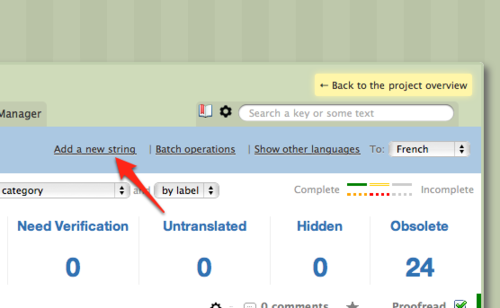
You can now create new strings manually. On your project’s translation interface, click on the new “Add a new string” link.
A modal window will appear, letting you create your new string.
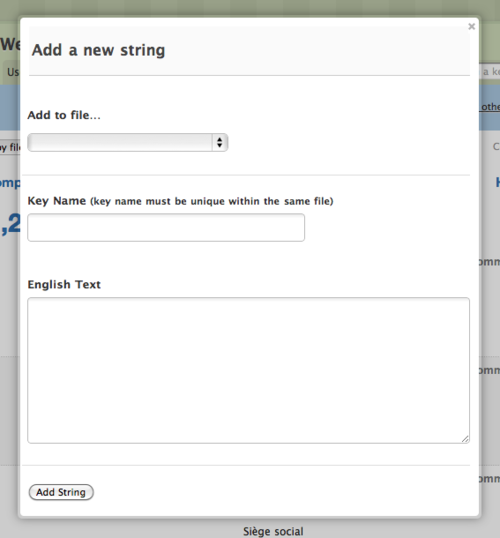
New strings are added to a file of your choice. This feature is only available to managers.
String sorting
We used to sort strings by alphabetical order in the language files generated by Web Translate It. We now conserve the original order of your strings in most language files (in fact in all of them, except in YAML files due to technical limitations).
Hidden and Obsolete
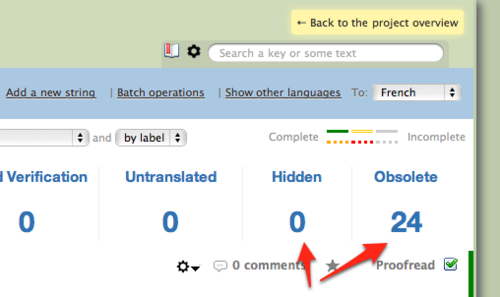
Hidden strings are now separated from Obsolete strings in the translation interface.
Batch Operations to timeline
Batch Operations are now logged to the timeline.
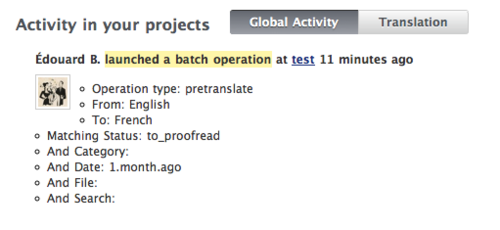
Batch operations are actions managers can apply on a large selection of strings. You can read the introduction blog post about it.
One less feature: Update file periodically
We now longer propose to update your remote language file periodically. This feature wasn’t used much and wasn’t working very well, as some language file hosts have moved the URLs of their files and following their redirects could be the root of security issues.
Bug fixes
- Fix: Make it impossible to push target, hash-based language files (.txt, .textile, .html, .markdown) through the API.
- YAML: language root code now respects underscore or dash setting in the project settings
- YAML: digits are now exported as
Integers. Everything used to be converted to String. This was causing troubles for Rails’s active support strings.
- YAML: Fix parsing bug happening on language files having flat keys.
- Labels are no longer displayed in the translation interface if no strings have been labelled.
- Fix bug with
EF BB BF BOMs not being stripped by the parsers, resulting in parsing failures.
- Fix display bugs with Chrome
- API: Faster project endpoints
- Fix: don’t send comments to the same person more than once, also don’t send comment the person authoring the comment.
- Fix: Handle more gracefully cancelled invitations.
Miscellaneous
- We now have a brand new status website, courtesy of Pingdom: http://status.webtranslateit.com
- We’ve been working a lot on bettering our average response time, which wasn’t so good. We’ve been averaging 1,200 ms in February, we’re now down to less than 500 ms today. We’ll post another post explaining in details the improvements we did.
I just released a new version of our synchronisation client for Web Translate It. The Web Translate It client (also known as wti) is a powerful command line tool to synchronise your local translation files with the Web Translate It service.
Many bug fixes and small improvements were made since the version 1.7.1.0. Here’s what new in a nut:
wti pull is much faster
New command: wti addlocale to add new locales to your project. You can also chain locales, for instance: wti addlocale fr en es
New: wti server is now logging to log/webtranslateit.log
New courtesy option: --low_priority. You can use it when you upload language files en masse. Your files will be processed when Web Translate It’s server are idle. Use it like so: wti push --all --low_priority.
For more information, I invite you to have a look at the detailed changelog.
To upgrade to the latest version, gem install web_translate_it.
Are you a Microsoft Windows user? We now have some installation instructions for you.
Edit: web_translate_it 1.7.1.4 contains a small bug, which has been fixed in 1.7.1.5.
Here’s a quick system update regarding Web Translate It’s system and your data.
This morning we completed our upgrade to Rails 3, a new version of our programming framework. We also upgraded ruby, our programming language to the newest version.
We also made important changes on how your data is saved. Until today, your data was hosted on a server located in Newark, USA. A backup of the database was made 4 times a day, was encrypted and then sent to Amazon S3.
This was good, although if a big problem happened, in the worst case scenario we could potentially had lost up to 6 hours of data (this is the data added or changed between each backup).
To fix this issue, we now have a second server located in London, UK, whose only job is to replicate the database. The data is constantly streamed and replicated between the two servers.
PostgreSQL 9’s new replication feature wasn’t too difficult to set up. It was the reason we upgraded our database server 2 weeks ago.
We’re stoked to make Web Translate It more reliable.
Thank you for making 2010 the biggest year for Web Translate It so far!
Stay tuned, we’ve got big plans for 2011!

I just pre-released a new version of the web_translate_it gem. This new version dramatically improves the performance of wti pull and wti server. It also fixes a few other bugs.
See the changelog for more information.
To update your client: gem install web_translate_it --version 1.7.1.pre
Web Translate It could be unavailable for a few minutes on Sunday, Dec 26th, 8:00 GMT as we will release an important update to the service. We expect the downtime to not exceed 1 hour.
This is the second step of a major service shift (the first step was upgrading our database server). This time, we’ll upgrade our programming framework Ruby on Rails (from 2.3 to 3.0), as well as the programming language Ruby (from 1.8.7 to 1.9.2).
We’re working on this project on and off since June and we’re stoked to finally release it.
As always, you should follow @webtranslateit on Twitter for live updates.
We had planned 1-hour maintenance window today to upgrade our database server. Unfortunately, we encountered some unexpected issues while upgrading and the service went back up around 10.30AM.
Your data is safe and the database upgrade went fine. However we’re still working on recovering full capacity at the moment.
What happened
=========
After upgrading the database I decided to upgrade a few other components on the web server, which required to restart the server. For reasons that remain unclear the server failed to restart, at which point I decided it would be faster to set up a new instance of Web Translate It on a fresh server.
We’re still working on recovering full capacity.
Known issues
=========
Here are a few known issues:
Accessing https://webtranslateit.com displays a security warning. The certificate is currently unsigned. However the connection between you and Web Translate It is secure and encrypted. UPDATE 13.39 PM: Fixed
Search engine is currently down UPDATE 11.35 AM: Search engine up and running
E-mail notifications are currently delayed UPDATE 11.12 AM: Fixed
We’re currently working with only 1 background worker, instead of 4. Some features might run a bit slow. UPDATE 11.36 AM: We’re back at full capacity
We’ll keep you updated here and on Twitter as soon as we have more information.
We’re deeply sorry about the extended outage, and we apologise for the inconvenience this may have caused.
UPDATE 13.42 PM: All fixed! Thanks for bearing with us.
Web Translate It will be unavailable on Sunday, Dec 12th, 08:00 GMT as we upgrade our database to PostgreSQL 9. We expect the downtime to not exceed 1 hour.
This is the first step of a major service overhaul. This upgrade will allow to implement database replication on a spare database server.
You should follow @webtranslateit on Twitter for live updates.
I just released an enhancement on the comments system. This update will help large teams to communicate more efficiently.
Comments can now be separated by languages. A French translator is now able to comment only in French (which will only be visible to the managers and other French translators) or globally (visible by everyone).
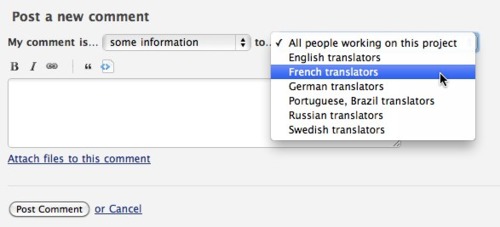
It is no longer possible to notify a specific user. Instead, target the the whole team by selecting for which language team you want to post.
Finally, managers will notice the project home page now features a locale selector, which allows you to filter the comments by language.
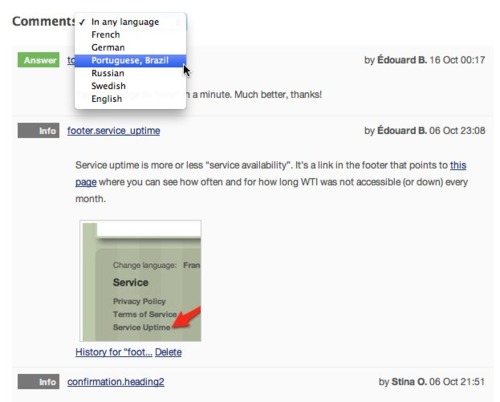
I hope you will find this update useful. Thank you for using Web Translate It!
I just added a new batch operation to Web Translate It: Search and Replace.
Search and replace will allow you to quickly search for some text and replace it, directly from the translation interface.
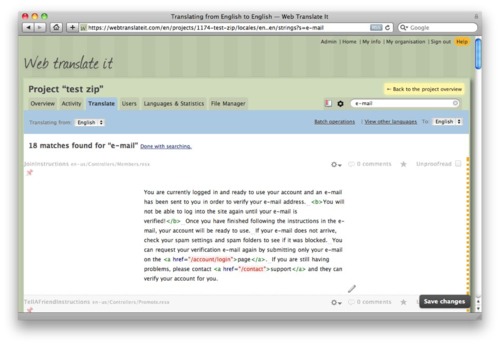
Let’s say we want to replace “email” by “e-mail” throughout a project.
We’ll start by searching entries having the word “email”.
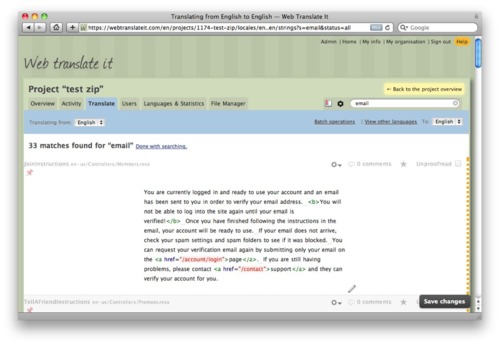
Then we click on the “batch operations” link to toggle the operations.

Click “replace with” and type “e-mail” in the box that appears.
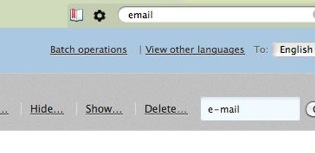
That’s it! All the words “email” will be replaced by “e-mail”. It’s that simple.
We hope you will like this feature, and we’ll be glad to hear your feedback on our support forum. Thank you for using Web Translate It.
It has been a while since I posted an update. Rest assured that Web Translate It is regularly updated with timely bug and security fixes.
I released two important new features to Web Translate It this week.
Fallback parser
The fallback parser will allow you to import virtually any kind of files to Web Translate It.
When you upload a language file to Web Translate it, the file goes through a parser which extracts each entries to translate, and displays them nicely in the translation interface.
I developed a bunch of parsers so most people are able to translate their apps.
But what if you use a file format that’s not supported? Until today you were out of luck. This new update brings the ability to import unsupported files “as a whole”. Meaning that if you use a custom or exotic file format for your internationalisation, Web Translate It will now import the whole file without extracting the entries.
This is a huge improvement as you can now use Web Translate It to translate virtually anything.
Enhancements to team page
The new team page makes it easier to message your team members, or to message the whole team.

This is a first step towards improving communication within large translation teams. Important changes to the commenting system are in the works and coming soon.
Other changes
Many small improvements, bug and security fixes were made.
- Security: Application cookies are now secured. They cannot be transferred by other means but encrypted through SSL.
- Bug: E-mail addresses to sign in the site are now case insensitive. According to the RFC 5321 specification it is technically possible to have multiple email addresses whose local-parts are the same characters but of different case. However this is extremely rare and confusing users: if you signed up using
John@example.com you couldn’t sign in using john@example.com.
- Bug: File Fetch API now returns the status
102 Processing if the user attempts to download the language file whilst being imported.
- Bug: Deleting a string from the web interface now rebuilds the language files
- Bug: Searching for text having a dash (for instance “e-mail”) is no longer incorrectly considered as a negation search by the search engine.
- Enhancement: Support for multiline comments in Apple .strings files
- Enhancement: Enhancements to the PHP .ini parser. The parser now supports entries unquoted, quoted with a single quote, and quoted with a double quote.
- Enhancement: Updated the JSON parser to spit out more meaningful parsing error messages.
- Enhancement: .resx files generated by Web Translate It don’t include empty comment tags if there are no comments to export.
- Enhancement: Entries in language files are now sorted by key name, case insensitive.
- Enhancement: It is now possible to choose whether your locale names use dashes (for instance
en-US) or underscores (en_US). This is a project setting that affects the file names.
- Enhancement: Fix empty translation suggestions from Google Translate. Web Translate It’s requests were not getting any results.
- Enhancement: Add
updated_at timestamp for each files on the Project API. You can expect a much faster version of the web_translate_it rubygem coming soon.
- Enhancement: Add support for .conf files.
That’s about it! I hope you will find these improvements useful. Thank you for using Web Translate It.
This minor release adds support for synchronisation through a proxy.
To update your client: gem install web_translate_it.
Cloudsafe is a secured platform for storing data online. They use Web Translate It to manage their copy and translations and wrote about the 3rd party tools they use.
Here’s a mention about Web Translate It:
In our view, a cost-effective solution for creating and editing all texts which are required in our web application and have to be translated into several languages. This tool has provided us with a web frontend for writers and translators, without interfering with the developers work. A small script would export all text resources from the source code repository and re-import all revised and translated text snippets back. In our case this included more than 300 individual files on the staging server that were easily updated with a single command.
Best wishes to the Cloudsafe team!
This minor new version improves the performance of the synchronisation server for projects having many files.
To update your client: gem install web_translate_it.
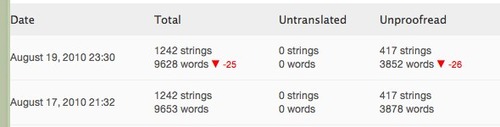
We released today a fix to Web Translate It to account for a lack of accuracy in the string word count algorithm.
We’re currently recalculating stats for all the projects hosted on Web Translate It. You may notice your project’s stats page display less words than it used to.
We apologise for the inconvenience this may have caused.
We are now testing statistics widgets for public projects.
Many projects use Web Translate It to crowd-source their translations. For instance TV Shows, Rhythmbox radio browser or MyDrumPad are all public projects, which means any visitor can browse their project in Web Translate It and request an invitation to help translating the software to their languages.
If you want to drive visitors from your project website to Web Translate It, we made a really simple widget you can embed on any website, so your users can see where help is needed and can request an invitation to help your translate your software.
Here’s how the stats widget looks like.
To get your statistics widgets, head over your project settings and make sure your project is open publicly. For confidentiality reasons, stats widgets are only available for private projects.
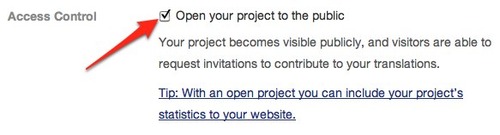
Click on the link to get to the charts page, and copy and paste the code given. You can tweak it a little bit if you want.
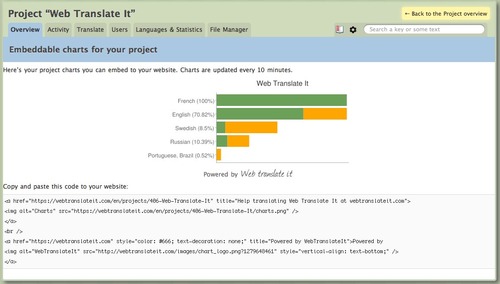
That’s it! We hope you will find this widget useful.
We added support for XLIFF files. XLIFF (stands for XML Localisation Interchange File Format) is an XML-based format created to standardize localization.
View all the file formats supported in the documentation.
I plan to add this summer the ability to dump and import entire projects under the XLIFF format, which is perfect choice for backup and interoperability between different translation tools.