The WebTranslateIt Blog · Page 7

i18n news and Product Updates about WebTranslateIt · Page 7

web_translate_it rubygem v2.1.1 released

By Edouard · 15 avril 2013

I released a new version of the web_translate_it gem, the open-source synchronization tool for Web Translate It.

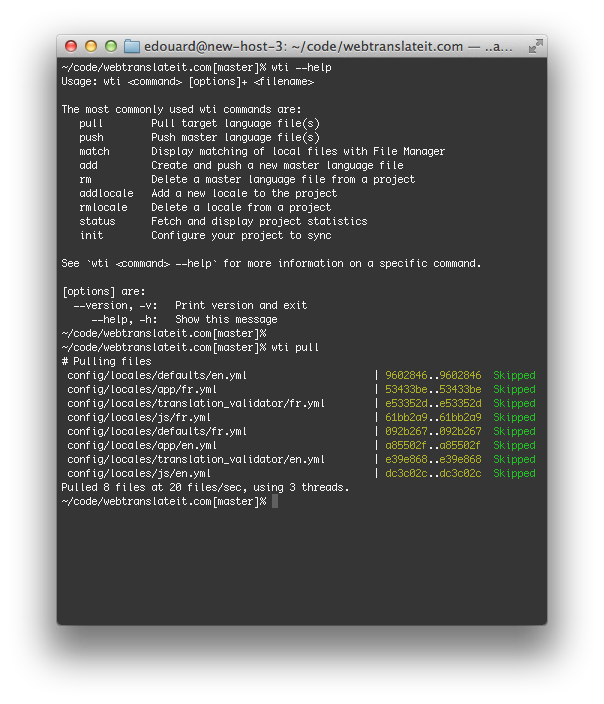
wti synchronization tool

This new version fixes an issue with connections to WebTranslateIt hanging indefinitely when running on ruby 2.0.


Install or Upgrade

To install web_translate_it, please refer to the gem documentation.

As usual, upgrade web_translate_it to its latest version by typing in a terminal: gem install web_translate_it.

Improvements to the Batch Operations

By Edouard · 15 avril 2013

We just released a batch of improvements to the Batch Operations feature in WebTranslateIt.

Batch Operations is a feature on WebTranslateIt which lets you update a batch of segments in just a few clicks.

This new release focused on making it easier to run a new batch operation, as well as providing better feedback to the user.

Start a batch operation

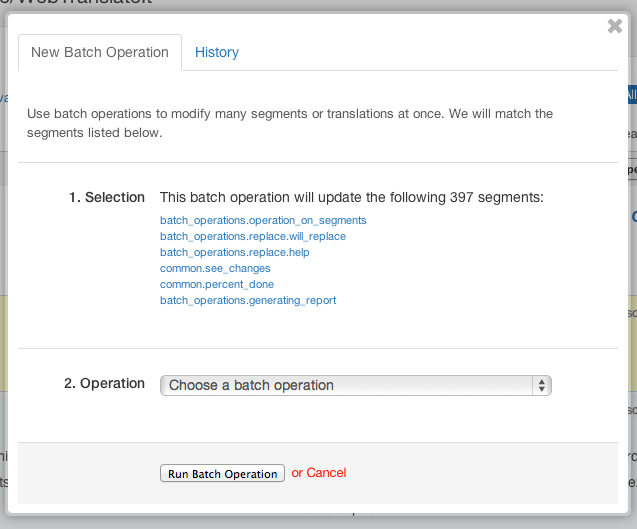
We completely revamped the page to start a batch operation. It now lets you see how many segments and which segments will be updated by the batch operation.

New Batch Operation

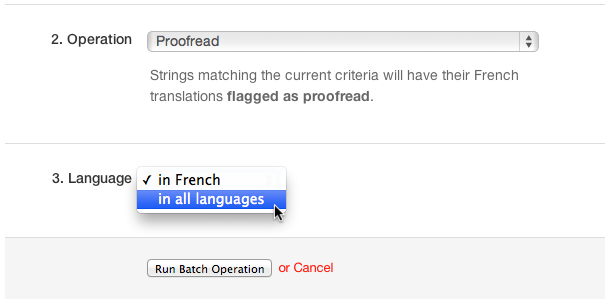
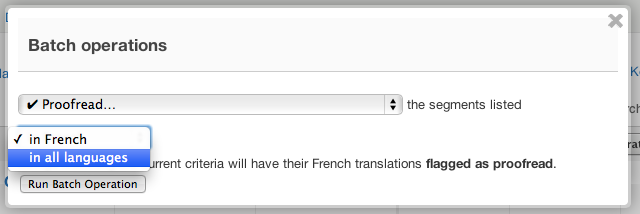
If you select a batch operation updating translations, a third option lets you chose if you want to perform a batch operation in the current language or in all languages.

Mutlilingual Batch Operation

Batch Operation status

A progress bar now lets you see the status of each of you batch operations.

Progress bar batch operations

You can now see if your batch operation is currently running or has finished.

Review changes

After your batch operation has finished running a link invites you to review the changes made:

See changes

Your batch operations are now logged to your project Activity Feed:

See changes

You can also review the details of the changes:

Review changes

New filter: Filter by changes made a Batch Operation

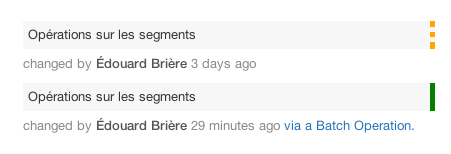
But that’s not it. Now translation changes made via a batch operation appear as such in the translation history.

See changes

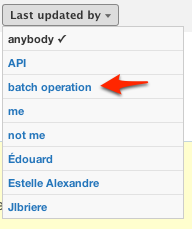
And translations are now filterable by “last edited via a batch operation” in the translation interface.

See changes

We hope you will find this improvement useful. Thank you for using WebTranslateIt.

web_translate_it rubygem v2.0.8 released

By Edouard · 10 avril 2013

I released a new version of the web_translate_it gem, the open-source synchronization tool for Web Translate It.

wti synchronization tool

This new version fixes an issue connecting securely to WebTranslateIt on some versions of ruby.


Install or Upgrade

To install web_translate_it, please refer to the gem documentation.

As usual, upgrade web_translate_it to its latest version by typing in a terminal: gem install web_translate_it.

4 new features to WebTranslateIt

By Edouard · 8 avril 2013

We added a bunch of new features and refinements to the interface during these last two weeks.

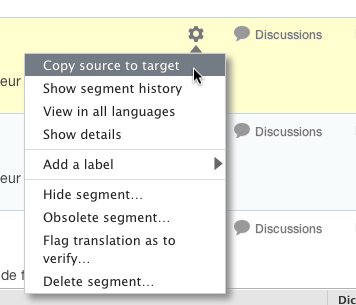
Operations in all locales (for managers)

Managers can now perform some operations in all locales:

Operation in all locales

Operation in all locales

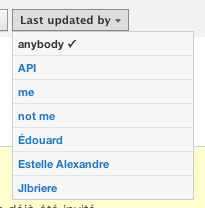
Filter segments last updated by… the API

The new “last updated by” filter introduced a few weeks ago is immensely useful. It lets you filter segments by who translated it last. We added a new option to this filter which lets you filter segments by the segments which were last updated by the API.

Last Updated By API

Term and TermTranslation autocompletion

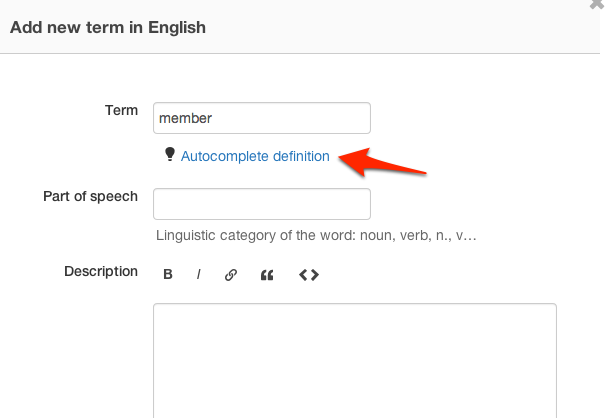
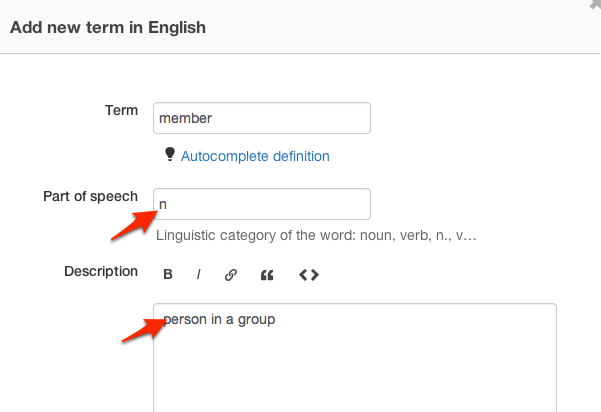
This is one of my favourite new feature. When adding a new term to the TermBase, you can now ask WebTranslateIt to auto-complete its definition and part-of-speech fields (if your source language is compatible with our dictionaries)

Just click on “autocomplete term” to automatically complete the definition and part-of-speech.

Term Autocompletion 1

You can then review and amend the definition, and save the term.

Term Autocompletion 1

The same suggestions system exists for completing term translations.

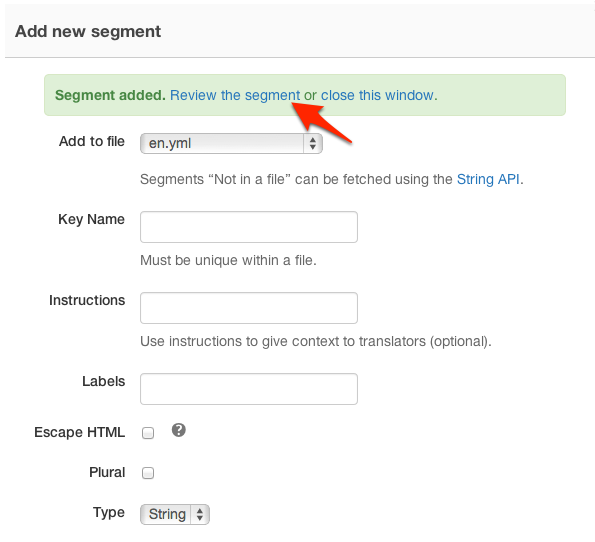
Better interface for creating and updating a segment

Finally, we also refined the interface for creating and updating a segment. These actions should now report better error messages, and you can now also review the segment you just added or removed

UX for adding new segment

I hope you will find these improvements useful. Thank you for using WebTranslateIt.

Improving WebTranslateIt’s performance

By Edouard · 4 avril 2013

For us, speed is a feature. It’s always nice to work with faster tools after all. So we released a batch of performance improvements to WebTranslateIt throughout these last two weeks.

All these new features improve the website’s speed, so enjoy a faster website! And read on for the technical details.

Improving the translation interface’s speed

We spent a lot of time by refactoring and improving the code. As a result, we’ve cut the translation interface’s page load time in half. Working on the translation interface and loading new translation pages should feel much faster now.

Instant Statistics

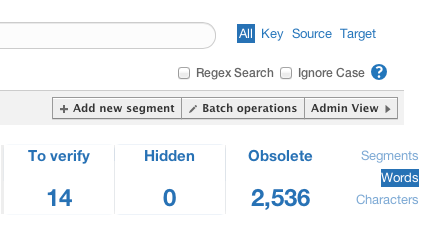
While the translation interface is now faster than ever, we also improved the statistics. Statistics used to be generated offline by background workers. We improved the system so they are now calculated as you load the translation interface. They are always up to date. And since recently they also count everything: segments, words and characters.

Statistics

Instant Suggestions

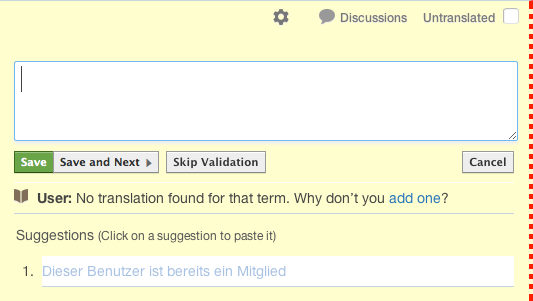
The translation suggestions are suggestions fetched from the Translation Memory or from Machine translation services are very useful to translators. It’s best not to wait too long before getting them.

Suggestions should now load pretty quickly. WebTranslateIt now pre-fetch suggestions and load them before you even load the form to translate a segment, so you get translation suggestions before at the same time you load the translation form.

Translation Suggestions

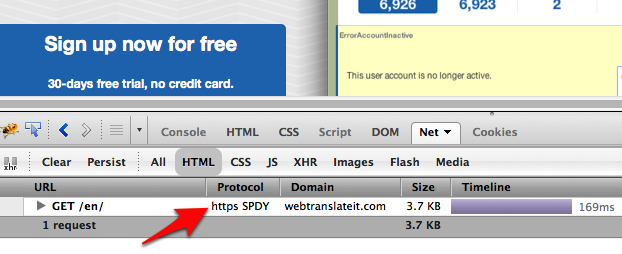
SPDY

SPDY is a new network protocol developed by Google to improve page load speed, reduce web page latency and improve web security.

Google Chrome, Mozilla Firefox and Opera web browsers have already implemented this feature.

We’ve enabled the SPDY protocol on WebTranslateIt, so if you use one of these supported browser, you will browse WebTranslateIt using SPDY, which is slightly faster.

WebTranslateIt and SPDY

New filters on WebTranslateIt

By Edouard · 19 mars 2013

Théo released two new useful filters you can use in the translation interface.

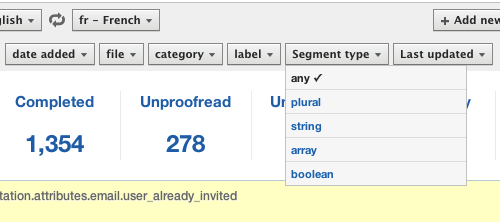
The first filter lets you filters segments by type.

You can use this filter to see only all the plural segments, or only the segments that are a array, which is useful when reviewing translations.

The other new filter is my new favourite and lets your filter translations by who updated it last.

It’s great to review work you or someone else did. You can filter segments by:

  • Segments you worked on last,
  • Segments you didn’t work on last, which is great to review another person’s work,
  • Segments worked by a specific person from the current language team.

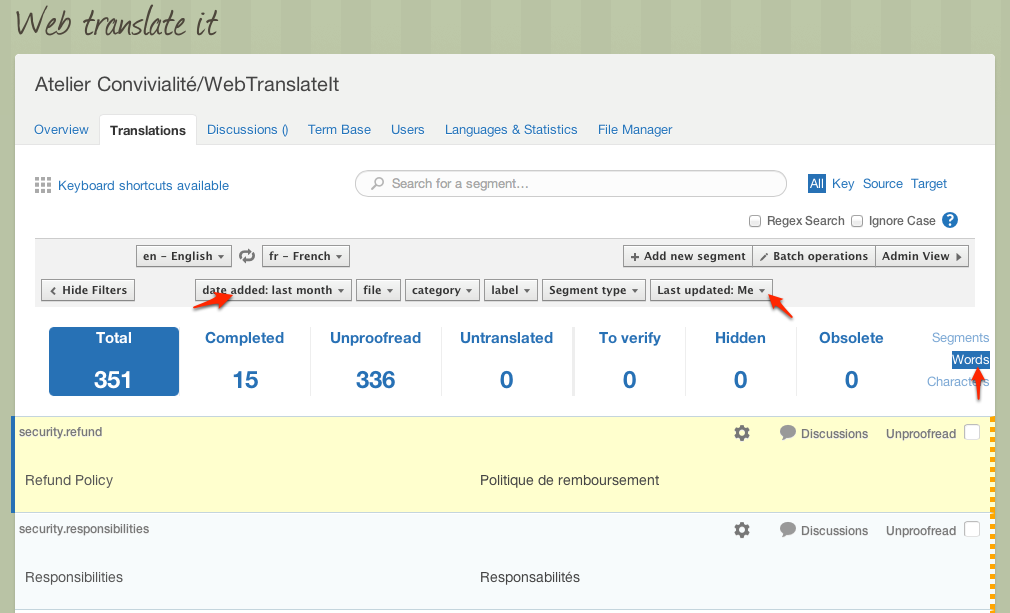
And, cherry on the cake: you can combine these new filters with the other filters to get a detailed word count of your work.

For instance, here’s to check the segments I updated in the last month:

I hope you will find these new features useful. Thank you for using WebTranslateIt!

New in WebTranslateIt: Easily edit source text

By Edouard · 14 mars 2013

Managers often need to make amendments to the source text on a project to fix a typo or reword a sentence.

Until today, it was only possible to amend the source text by browsing to the translation interface and set the languages to translate from English to English (if your source locale is English).

This update of WebTranslateIt makes it much easier for managers to change the source text from the web interface.

Edit source text

It’s super easy to use: just click on the text to the left to start editing it.

I hope you will find this new feature useful. Thank you for using WebTranslateIt!

Introducing our intern wunderkind: Theo Delaune

By Edouard · 14 mars 2013

The team at WebTranslateIt is very small. And that’s an understatement: until this week it was only me.

Things tend to get a little busy, so I am happy to announce a great new addition to the team, Théo, who will help me with the development of WebTranslateIt.

Théo will work on implementing new features on WebTranslateIt. He has only been here a few days so far and has already fixed many bugs and implemented new features we will release shortly.

Théo Delaune

Théo hails from Nantes, France and you can follow him on Twitter and GitHub.

web_translate_it rubygem v2.0.6 released

By Edouard · 13 mars 2013

I released a new version of the web_translate_it gem, the open-source synchronization tool for Web Translate It.

This new version lets you pass a file path to the wti push command, so you can now do: wti push path/to/file.

This version also removes a dependency on the JSON library, so it should now be possible to web_translate_it without building tools installed.


Install or Upgrade

To install web_translate_it, please refer to the gem documentation.

To upgrade web_translate_it to its latest version, type in a terminal: gem install web_translate_it.

Counting characters in WebTranslateIt

By Edouard · 13 février 2013

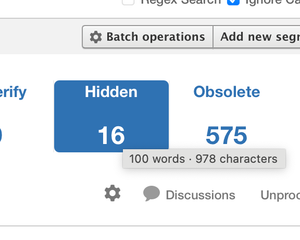
You can now count how many characters contains a project in WebTranslateIt. This is useful for billing translators, as in some languages pairs rates can be calculated by the amount of characters to translate (instead of the amount of words to translate).

The Detailed Stats page has been updated to display this new information.

Character count on the detailed stats page

As usual, you can find this information directly in the translation interface by hovering the stats with your mouse, as explained in this tip.

Hover stats in the translation interface to reveal quick stats

Export your projects as a TMX file

By Edouard · 11 février 2013

Last August I added the ability to download a whole project content as a CSV file that you can open with any spreadsheet tool.

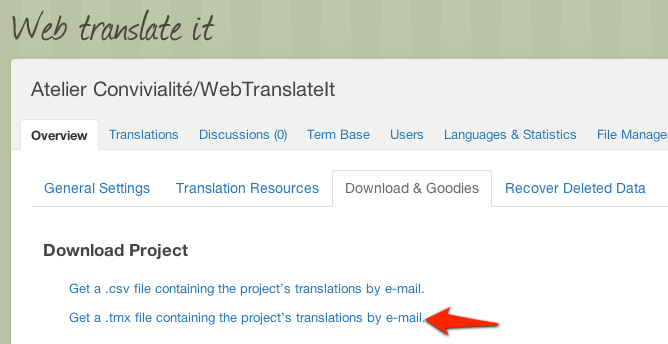
Getting your data out of WebTranslateIt is a important as getting it in, so you can now download your project as a TMX file.

TMX (Translation Memory Exchange) is a standard to share translation memories between tools. So you can now re-use your translations from WebTranslateIt to use them in another tool’s Translation Memory.

This feature is located in your project settings, under “Download & Goodies”.

Multilingual batch operations

By Edouard · 11 février 2013

I improved the Batch Operation feature today. You can now run a multilingual batch operation.

Multilingual batch operations are great if you need to run the same operation for all the languages of your project. For instance you could want to proofread all the translations of your project in all languages.

Before this update you had to run a separate batch operation for each language. You can now do this in just one click.

New in WebTranslateIt: Paste your files

By Edouard · 7 février 2013

You can now create or update master files from the web interface by pasting its content in the File Manager.

You will find a new Clipboard button which lets you do that.

This feature is useful if you want to create a file directly from WebTranslateIt instead of creating it on your computer and then uploading it to WebTranslateIt.

New in WebTranslateIt: A quicker way to add terms to your TermBase

By Edouard · 7 février 2013

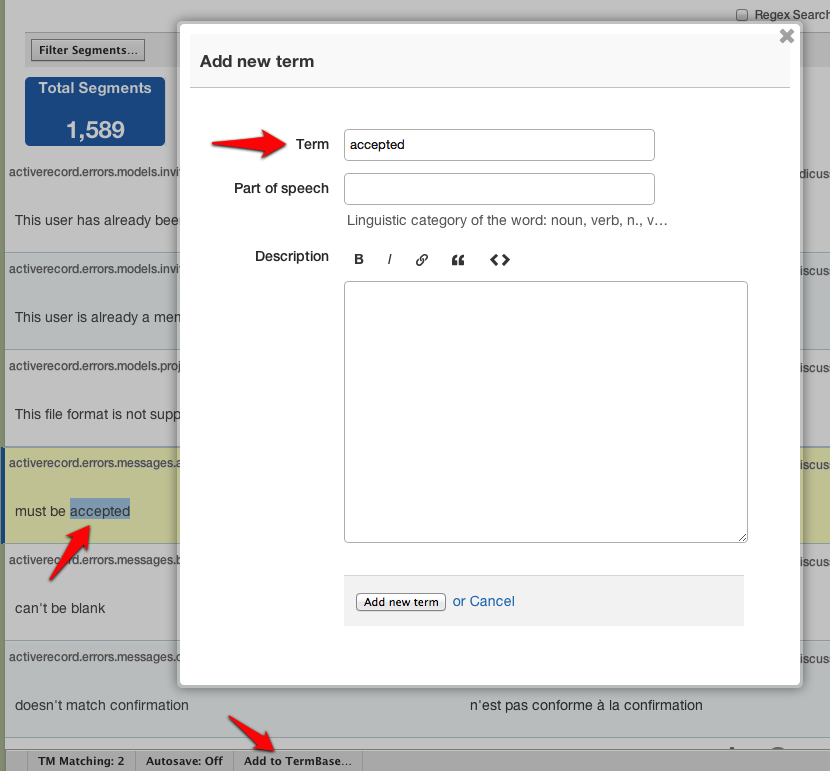
You can now quickly add terms to your WebTranslateIt TermBase without leaving the translation interface.

In the translation interface select a word or a group of words, click on “Add to TermBase” in the toolbar and a modal window will let you add the term your selected to your TermBase.

It’s a great way to add new terms on the go.

I hope you will find this improvement useful. Thank you for using WebTranslateIt!

New in WebTranslateIt: Project Activity Feeds

By Edouard · 17 décembre 2012

I just released a new feature to WebTranslateIt: Project Activity Feeds.

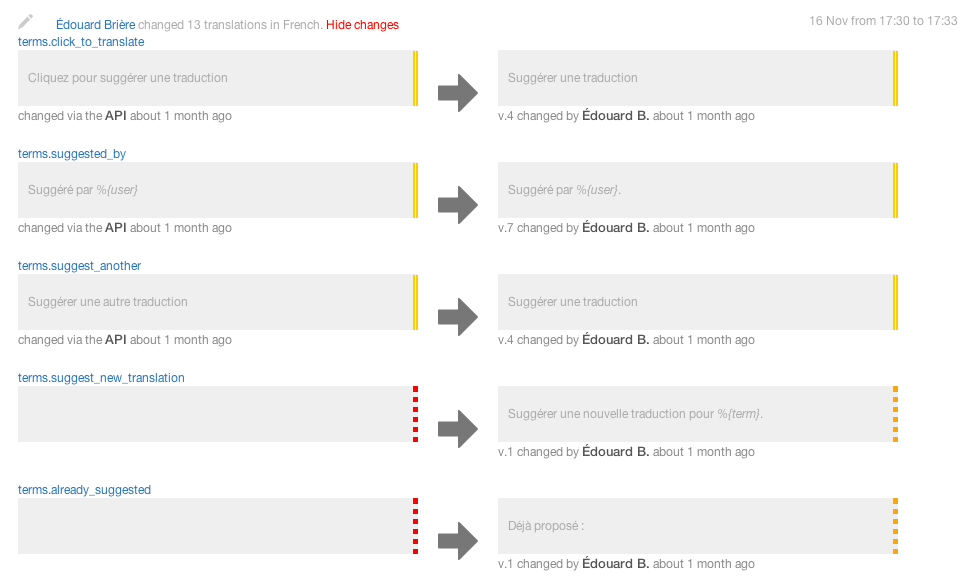
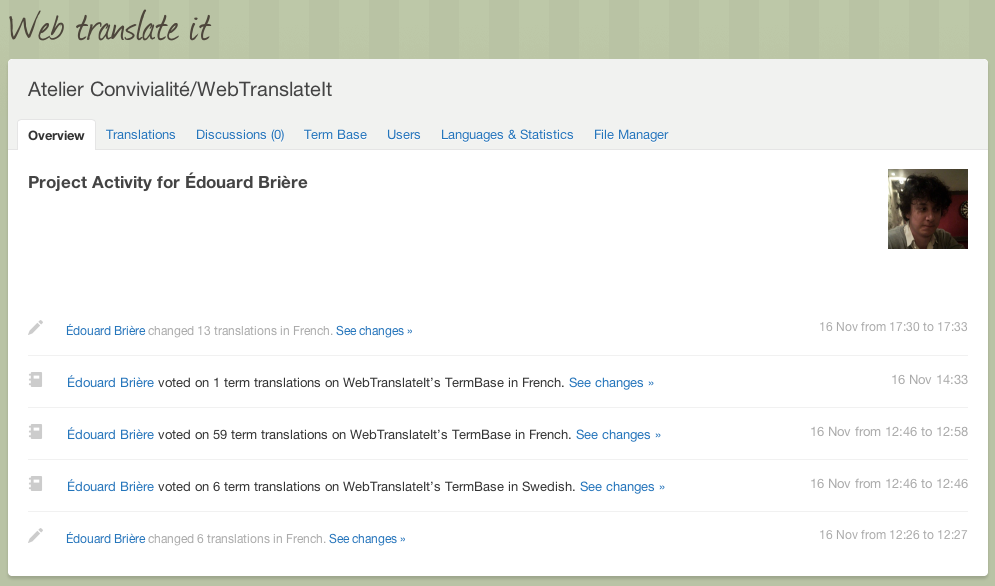
Project Activity Feeds are a great way to see what is happening on a project. All the actions happening on a project are logged and displayed on your project overview page, where you can easily see who did what, and why it happened.

By default, recurring actions are grouped by type and displayed as a short excerpt.

You can dive into the details by clicking on “See changes”.

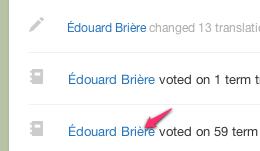
Need to see what a colleague did on a project recently? You can filter the activity feed by user:

Click the user’s name to view her activity:

If you’re into RSS, Project activity feeds are also available as an Atom feed. Just click on the “Atom Feed” icon to get your project activity.


I hope you will find this new feature useful. Thank you for using WebTranslateIt.

Voting for terms translations

By Edouard · 16 novembre 2012

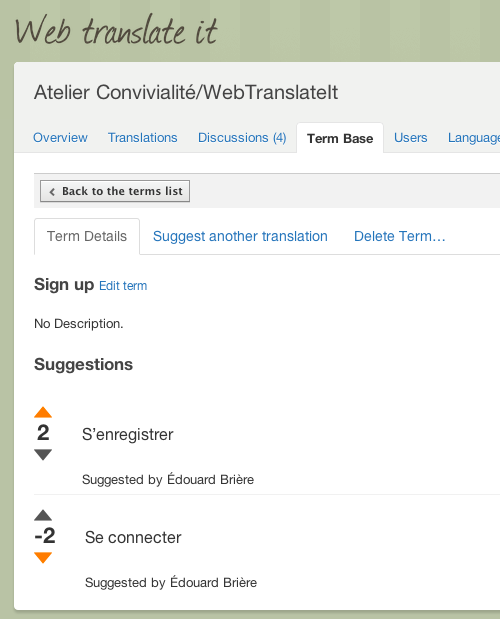
New in WebTranslateIt: voting for translations in the Term Base is now a bit more democratic! Every translator in the project can now upvote or downvote a translation.

Using this feature, your team can now easily decide of the translation of the key words of your application.

New in WebTranslateIt: upload spreadsheet files to your TermBase

By Edouard · 15 novembre 2012

Do you use a TermBase file made of a spreadsheet file (Microsoft Excel .xls or .csv files) or perhaps you have a TermBase Exchange (.tbx) file?

You can now upload these files to your WebTranslateIt TermBase in order to get useful suggestions while translating.

WebTranslateIt recognize 2 kinds of term files: Term Base Exchange (TBX) files and spreadsheet files (Excel or CSV).

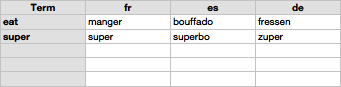
If you’re using a spreadsheet file, it must to be organized in a very specific way. At a minimum, WebTranslateIt requires your spreadsheet file to be organized like this:

You can optionally add a Part of Speech (eg. noun, verb), which will be imported in the TermBase:

Or a definition:

Or both:

I hope you will find this new feature useful. Thank you for using WebTranslateIt.

New in WebTranslateIt: Disaster Recovery

By Edouard · 1 novembre 2012

As WebTranslateit grows, emergency support e-mails asking “I deleted a file and all of its translations. What can I do?” become more frequent.

When this happens, I can always recover your deleted language files in a matter of minutes. I store every customer’s language files in a huge git repository, updated every five minutes, which is backed up on a secondary server.

But while this solution is efficient, it isn’t elegant. First, you’d loose all your discussions, translation history and statuses, and you need me to do it. And it would go faster if you recover your data by yourself, wouldn’t it?.

Introducing Disaster Recovery

Disaster Recovery is a new feature in WebTranslateIt. When you delete a project, a file, a language or a segment, it will act as if it was deleted. But in fact, we keep all the things you deleted around for 3 months. After 3 months, you probably won’t ever need this data and we delete it forever.

This feature comes for free: deleted resources don’t count against your segment limit, so you can keep the same plan and enjoy this additional safety net.

What’s best is that you can recover your deleted things by yourself, and it’s super easy to do so.

Recovering Projects

Let’s assume you deleted a project by mistake. Head over to your organization page. On the “Projects” tab, you’ll be greeted with this message.
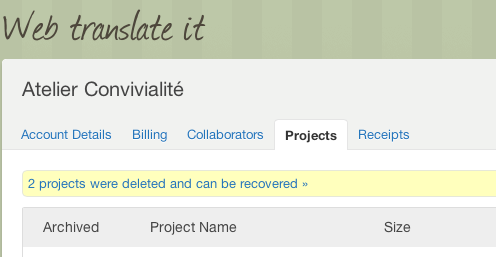
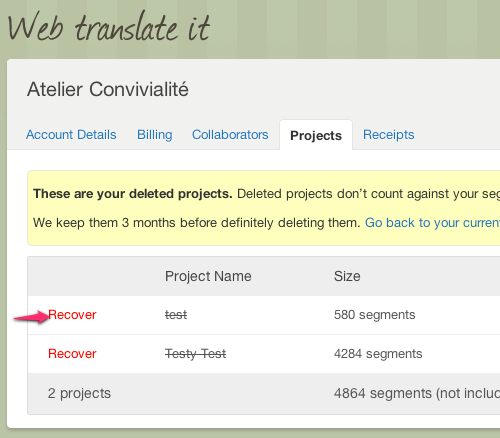
Click on the message to view the deleted projects, and recovering them by clicking on “Recover”. That’s it!
Recovering Files, Languages and Segments

It’s just as easy to recover files, languages or segments. If you deleted something you shouldn’t have, head over to your project settings. There, click on the new “Recover Deleted Data” tab.
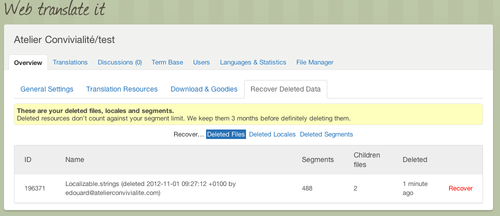
You can filter your deleted data by kind: files, languages or segments. When you’re ready to recover something, click on the “Recover” button and… that’s it!

I hope you will find this new feature useful. Thank you for choosing WebTranslateIt!