The WebTranslateIt Blog · Page 2

i18n news and Product Updates about WebTranslateIt · Page 2

What’s new in WebTranslateIt? A 2022 Recap

By Edouard · October 11, 2022

We’ve been busy working on the app. Here’s an update of what we’ve been up to.

A large infrastructure update

We have spent a few months working on upgrading our app framework Ruby on Rails to the latest version 7. We also upgraded ruby to the latest version 3.1.

While doing so, we also worked on increasing our test code coverage. We also ran tools such as rubocop to standardize our code.

We also upgraded our translation serialization system which previously relied on a custom serializer using YAML to use native Postgres JSONB fields. It looks like nothing, but migrating close to 90 million translations took us over a week!

Overall these upgrades were a lot of work, but were worth it, as they helped us increase our software quality, standardize the way we write code and increased the website performance while lowering our resources usage.

We have replaced our Translation Memory engine

We have been using Sphinx Search for almost 10 years (we’re not getting any younger are we? 😳) and it has served us well. However our database server PostgreSQL now integrates a great full-text search engine, and it is easier to maintain it than having both PostgreSQL and Sphinx running side by side. So we simplified our stack and now use PostgreSQL to run our translation memory.

We have also set up a series of tests and benchmarks to maintain and improve the translation memory speed and relevance, and we will keep improving on it.

All our infrastructure and providers are now in the European Union & GDPR compliant 🇪🇺

We hired a GDPR specialist and revised our Data Processing Agreement and improved our GDPR support.

We were also advised to make some changes on the providers we use (namely Amazon S3 hosted in the US and Mailchimp) to use similar services hosted in the European Union. Our Amazon S3 assets are now hosted in Germany and our newsletter by MailJet. You can see a list of all our providers on our Privacy page.

We value our users’ privacy so we’re now proudly made and hosted in the EU, and we’re also Carbon Neutral since 2017.

New homepage

We have a new homepage! You can see it when you are signed out of WebTranslateIt. The new homepage uses a new responsive design and includes a lot of new illustrations.

Auto-Translate

We’ve released a new feature for the organisations on the Enterprise plan: Auto-Translate.

Auto-Translate is a feature that lets you use the translations hosted on the different projects on your organization and automatically apply them to your projects right when a new translation candidate appears.

For instance if you add segments to a project and some of these new segments’ text have already been translated elsewhere (on your project or on another project hosted on your organization) it will use the other translations and apply them to your new segments.

It also works if a translator translates a segment on a project and if another similar segment exists elsewhere on your organization: as the first segment gets translated, the similar segments will get translated automatically.

New versions of the wti CLI tool

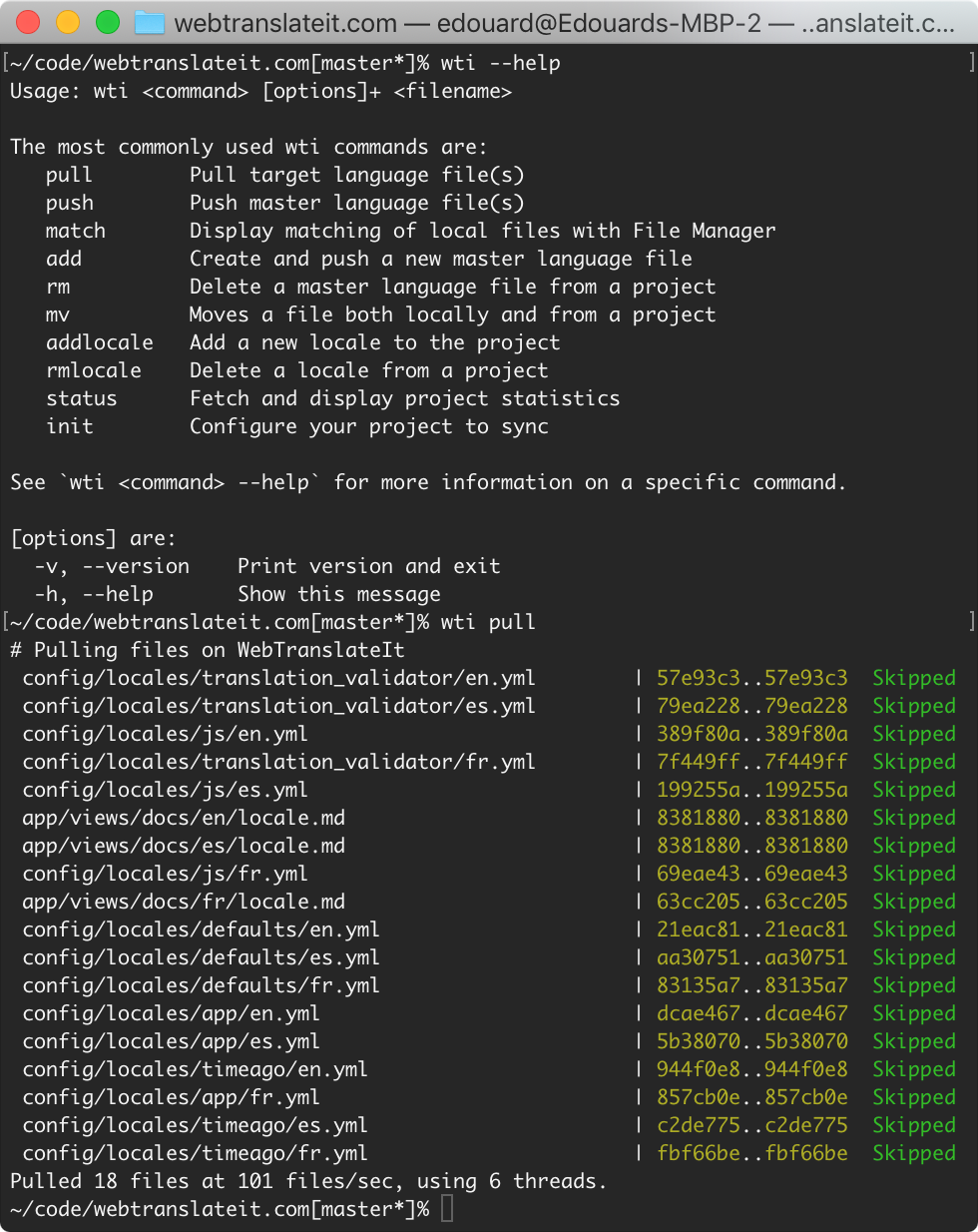
We’ve released several versions of our synchronisation tool wti. The latest changes include compatibility with ruby 3.1 and we’ve just added a new subcommand wti status path/to/file to see the translation statistics about a file.

If you don’t know about wti, you should try it it’s a great command-line tool to easily sync your language files with WebTranslateIt.

We also now have a docker package for wti.

Update to the Translation Interface

We’ve updated the Translation Interface with a brand new search bar which integrates case-sensitive and regex search. We hope you like these changes.

Follow us on Facebook, Twitter and LinkedIn for instant updates.

New Organization API Endpoint: Delete a collaboration

By Edouard · September 29, 2022

Today we released a new API endpoint to delete a Collaboration.

A collaborator is a person working on your organization and projects. Deleting a collaboration does the following:

  • it removes the user from the organization,
  • it removes any project memberships,
  • it cancels any unaccepted invitations on your organization’s projects,
  • it removes any team memberships,
  • it cancels any unaccepted invitations on your organization’s teams.

So that person won’t be able to access anything on the organization.

I hope you will find this new feature helpful to manage your users. Thank you for using WebTranslateIt!

We’re deprecating JSONP support on our API

By Edouard · September 28, 2022

We’re removing JSONP support on all our API endpoints. JSONP (JSON with Padding) is a historical JavaScript technique for requesting data by loading a <script> element, and is ancient technology now.

It could be used to load data from our API using Javascript from another domain, by bypassing same-origin policy, which disallows running JavaScript code to read media DOM elements or XMLHttpRequest data fetched from outside the page’s originating site.

JSONP has been superseded with CORS in modern applications.

We’ve monitored our API usage over the past few days and nobody is using JSONP, so this deprecation shouldn’t impact anyone.

The character counter and character limits in WebTranslateIt

By Edouard · April 12, 2022

Do you translate? Do you know what the character counter is? Here is another trick for our power-translators out there.

When translating software, it is important to keep the size of the text your type as concise as possible, as it can cause size problems (text overflowing elements or going out of the viewport, etc). The character counter you can see at the bottom right of the translation text area gives you a soft warning when the text you typed in is more than twice as large as the size of the source text.

When translating size-constraint segments, the character counter gives you a hard warning that you went over the limit, and actually prevents you from saving your translation.

This is the sixth episode of our new series of posts with short, useful tips showing you how to use some of the most advanced features in WebTranslateIt that maybe you didn’t know existed.

Do you find these tips and tricks useful? Let us know on Twitter @webtranslateit if you like this series of posts.

Related Posts

How to filter segments by more than one label

By Edouard · March 29, 2022

Did you know you could filter segments by more than one label? Well you can. This trick is for power users.

In the Translation Interface, click on the first label you’d like to filter by. Then, go to the address bar and search for the label parameter. Replace the label name by square brackets [ ] and then type in the label names you want to search by separated by commas. You should have something like labels=[label1,label2].

This is the fourth episode of our new series of posts with short, useful tips showing you how to use some of the most advanced features in WebTranslateIt that maybe you didn’t know existed.

Do you find these tips and tricks useful? Let us know on Twitter @webtranslateit if you like this series of posts.

Related Posts

web_translate_it rubygem v2.6.0 released

By Edouard · March 24, 2022

We have released a new version of the web_translate_it gem, the open-source synchronization Command Line Interface tool for Web Translate It.

This new version brings a few improvements:

  • Better support for before_pull, after_pull, before_push, after_push hooks. They now display the command output, and write an error message if the exit status of the command was not successful.
  • Add ability to ignore files from pulls with a setting in the .wti file. It lets you ignore a specific file, or use a glob to ignore a series of files. Example: ignore_files: ['**/fr.yml', 'config/locales/js/*.yml', 'config/locales/app/fr.yml']
  • Remove silence_errors = true option that could be put in the configuration file, which was silencing SSL connexion errors. SSL is important, and if it isn’t properly configured, it needs to be fixed on your machine by updating your cert chain.
  • We have also updated our documentation to show how you should use wti to handle multiple projects.

wti synchronization tool


Install or Upgrade

To install web_translate_it, please refer to the gem documentation.

As usual, upgrade web_translate_it to its latest version by typing in a terminal: gem install web_translate_it.

Follow us on Twitter, LinkedIn & Facebook for instant updates.

We’ll retire 4 obsolete file formats

By Edouard · March 18, 2022

We’ve had a look at the file formats we support and noted that 4 of them are now obsolete. In order to streamline our code we will retire these file formats on June 1st, 2022.

The obsolete file formats are:

Want more information? Follow us on Facebook, Twitter and LinkedIn.

2 ways to paste translation suggestions in WebTranslateIt

By Edouard · March 15, 2022

Do you use suggestions? Here is another trick for our power-translators out there.

When you click on a suggestion, the text in the text area is replaced by the suggestion. Did you know that if you hold the Ctrl key (Command key on a Mac) while clicking on the suggestion, the suggested text is inserted where your cursor is?

We also have a lot of keyboard shortcuts for power-translators out there. Just press the H key anywhere on WebTranslateIt to see them.

This is the fourth episode of our new series of posts with short, useful tips showing you how to use some of the most advanced features in WebTranslateIt that maybe you didn’t know existed.

Do you find these tips and tricks useful? Let us know on Twitter @webtranslateit if you like this series of posts.

Related Posts

Check if you can translate your app with WebTranslateIt

By Edouard · March 10, 2022

Today we’re very happy to release an updated section to our documentation regarding File Formats.

We have been working several weeks on that update, and we internally find it quite useful, as it’s compiling information from all over internet about which language file formats can be used on which platform (meaning which software framework, programming language or ecosystem).

We also now have a new page showing our supported frameworks and programming languages.

Each programming language or framework page includes information about which language file format can be used on that platform, some links of interest including i18n libraries for that platform on GitHub, and some explanations on how to localize it.

Here for example is the page about Node.js, another one about Python, Laravel and Ruby on Rails.

As indicated on each page, let us know if you found an error or would like to submit a useful library for internationalizing a platform. We really value your feedback.

With that, thanks for reading!

Follow us on Facebook, Twitter and LinkedIn for instant updates.

Now is not the time to be neutral

By Estelle · March 8, 2022

As we all know, Western international institutions are taking severe economical measures in an attempt to paralyze Russia’s financial means and force them to back down and people from all over the world are donating money to charities helping out Ukrainians during this atrocious time.

Meanwhile in Russia, social networks are being censored by the government and independent journalists are being silenced by a draconian law adopted on the 4th of March that makes the publication of “false” or “mendacious” information about the Russian armed forces punishable by up to 15 years in prison. Russian people are being cut from the only access they had to unbiased sources of information about Russia’s raging war against Ukraine.

As a localization platform, we’ve always supported charity organizations that needed to reach out to a global audience by providing them our services for free. It is essential to global welfare that information regarding world poverty, conflicts, environmental matters circulate freely to raise awareness of what’s wrong in this world, who are the people trying to solve these issues and how the public can help out.
The thought of the Russian people losing access to essential information, information that should make them want to overthrow their leader, is unbearable.

From now on WebTranslateIt will donate to Reporters Without Borders the money earned every month with our Russian customers’ subscriptions, in the hope that they can support independent Russian media and convey the information the Russian people are entitled to.

Every gesture count. If you can, donate too.

The WebTranslateIt Crew

If you wish to learn more about Vladimir Putin’s motivation for launching an attack on Ukraine, here is an educational video made by Vox Media, an independent media group.

How to quickly add a term to the TermBase

By Edouard · March 1, 2022

Do you know the quickest way to add a term to your TermBase? Here’s a cool trick:

Select a word anywhere on WebTranslateIt’s translation interface. Click on “Add to TermBase”. The form will be pre-populated with your word. Then click on “Autocomplete” and we will deduce the part of speech (noun, verb, etc) and a definition.

This is the third episode of our new series of posts with short, useful tips showing you how to use some of the most advanced features in WebTranslateIt that maybe you didn’t know existed.

Do you find these tips and tricks useful? Let us know on Twitter @webtranslateit if you like this series of posts.

Related Posts

Use a specific date in the filters

By Edouard · February 24, 2022

Do you use the Filters feature? Are you annoyed you can only select predefined dates, such as “added in the last 24 hours”, “last month”, etc?

This one is for power users. You can actually set any date by changing the parameter in the URL.

This is the second episode of our new series of posts with short, useful tips showing you how to use some of the most advanced features in WebTranslateIt that maybe you didn’t know existed.

Do you find these tips and tricks useful? Let us know on Twitter @webtranslateit if you like this series of posts.

Related Post

Keep up with new features on WebTranslateIt

By Edouard · February 22, 2022

Hey guys!

We’ve released a bunch of new features on WebTranslateIt in the past few months and we have more to come.

We have realised that our users don’t always know about it, so we’ve just released a feature that let our users know when there is a new feature available to use right on the Dashboard.

If you’re not interested, you can always click on the “X” icon and the notification will close right down.

As always, don’t hesitate to let us know what you think at support@webtranslateit.com

Thanks!
Edouard

Follow us on Facebook, Twitter and LinkedIn for instant updates.

How to use case-sensitive search and regex search with the new search bar

By Edouard · February 17, 2022

Hey guys,

We’re starting a new series of posts with short, useful tips showing you how to use some of the most advanced features in WebTranslateIt that maybe you didn’t know existed. Please follow our blog and follow us on Twitter @webtranslateit if you like this series of posts.

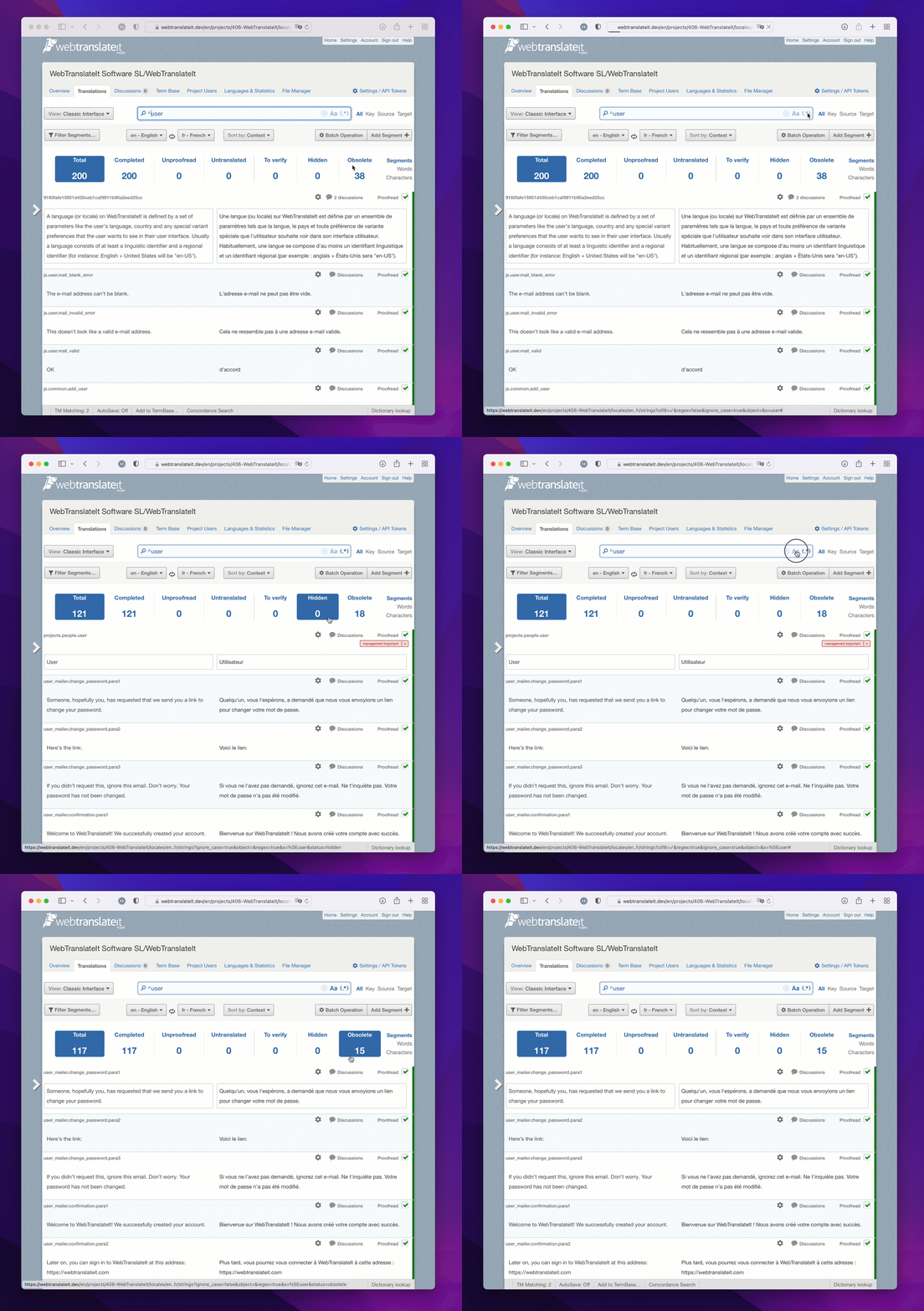
Today I’d like to show you how to use our new search bar. It was introduced during the last design update and includes the case-sensitive search and regex search buttons right inside the search bar.

Case-sensitive Search

First, what does case-sensitive mean? It means that the search engine will differentiate between the search terms User and user, for instance. By default the search engine is case-insensitive, which means searching for user will give both segments having a key name or text containing the words User and user.

Let’s say you want to narrow the search results down to the ones matching User with a capital U, that’s when you’ll need the case sensitive search. Type the text you’d like to search for and click on the Aa button in the search bar. As you can see, it now only lists segments matching exactly User with a capital U.

Regex Search

Regex search is a feature dedicated to our power users. It lets you type in a regular expression. For instance ^user will match all the keys and text starting with the word “user”. It can also be combined with case-sensitive search so you can run case-sensitive regex search.

Just like the new case-sensitive search, type in a regular expression and click on the (.*) button.

I hope you like these updates. Don’t hesitate to give us feedback at support@webtranslateit.com or via @webtranslateit on Twitter. We’re happy to listen or help you with anything*.

* (anything related to software localization. Sadly we can’t do anything about the current pandemic or the world’s current financial volatility 🤓)

web_translate_it rubygem v2.5.3 released

By Edouard · February 17, 2022

We have released a new version of the web_translate_it gem, the open-source synchronization tool for Web Translate It.

This new version brings compatibility to ruby 3.1.

wti synchronization tool


Install or Upgrade

To install web_translate_it, please refer to the gem documentation.

As usual, upgrade web_translate_it to its latest version by typing in a terminal: gem install web_translate_it.

Follow us on Facebook, Twitter and LinkedIn for instant updates.

Update to the language file converter

By Edouard · February 16, 2022

We have been updating our free language file converter tool to now serve pages using HTTPS.

For those of you converting files using its API the server should redirect you from HTTP to HTTPS. If your code doesn’t follow redirects, you should change the code to use HTTPS instead of HTTP 😬

With that, thanks for reading and happy converting!

Follow us on Facebook, Twitter and LinkedIn for instant updates.

New in WebTranslateIt: Updates to our Translation Interface

By Edouard · February 14, 2022

Hey guys,

We’re excited to announce that we’ve updated our user interface! Our users on G2 felt that it was a bit dated and we agreed with that so we’ve made the design more modern and improved usability - and we’ll keep on improving it in the next few months, little by little, so that you can get accustomed to the changes.

You can see the previous version of the translation interface here.

We have also made our buttons and menus bigger and easier to read.

You can see the previous version of the filters and menu

One very new thing is the new search bar which now combines the buttons to perform a regex search and a case-sensitive search inside the search bar. It is also larger so you can see more when searching for longer strings of text. This make the interface look sleeker and frees up some space on the interface header.

If you want to do a case-sensitive search, just type the text to search and click on the Aa icon. Regex search works the same way.

The old search bar can be seen here

We hope you will like these changes. Thanks for using WebTranslateIt!

PS: If you use WebTranslateIt we’d like to see some honest reviews on the SaaS review platforms, like G2, SaaSHub and GetApp

Follow us on Facebook, Twitter and LinkedIn for instant updates.

Fixing up the jobs queue and releasing wti 2.5.0

By Edouard · November 15, 2021

Last week we released an important update to our queuing system. It makes updating your language files work faster and more consistently.

How updating language files work on WebTranslateIt

When a translation is made from the web interface, we don’t directly update the project’s language files. Updating files is a very resource intensive job (it requires thousands of SQL queries) and it would take too long to update the file directly when requesting to download the file. So instead files are pushed to a queue and then updated asynchronously.

We have this system in place since 2009 and it has served us very well. We now have a small army of workers (60 workers working off jobs about files and 20 workers working off jobs to fetch translation suggestions, etc.) and they have been working off over 400 million jobs since its inception. Not too bad!

Hitting the limits of the system

In the past few months, this system has shown its limits under heavy load, so much that it became our first point of failure. Failure means that files were sometimes not being updated in a timely fashion. We’ve tried to add more workers but it wasn’t doing anything.

The problem was due to a handful of large projects hosting very large files (containing over 20.000 segments per file) being translated and generating hundreds of long running jobs each minute.

Updating files for such projects is slow because it involves pulling thousands of segments from the database and generating very large files. It can take over 3 minutes to update such files, compared to a few seconds on a 4.000 segments file. So things quickly go out of hand.

To put things into perspective, 1 translation and 1 proofread on one of these files create two 3-minutes-long jobs. Imagine a team of translators working these files and you have a backlog of tens of thousands of jobs in queue. And since they are working the same file these are actually duplicated jobs! As these large project get translated these jobs pile up and and all our workers are all busy working off the large jobs, and no workers are available to work off other project’s jobs, and they pile up as well. How can we fix that?

How we fixed the queue

First, we focussed on making these jobs finish up quicker. We improved the code and these 3-minutes jobs now finish in about 45 seconds. Not a bad start. We deployed the changes and monitored the queue. We quickly noticed that while there was definitely an improvement, we were still experiencing the same issue of jobs piling up under heavy load. So, what else can we do to completely fix the issue?

We thought: “Could we rate-limit background jobs for these large projects? We could allow each file to be updated once per minute. Large projects wouldn’t even notice the difference and it would actually work better. And also: couldn’t we do it not only for large projects, but for everyone?”

So that’s the new Jobs architecture that we’re currently using. It works great so far. Whenever we need to update a file due to a translation or status change the system flags it as “to update” with an attribute on the File object. Then, each minute, a cron job runs, checks which files need to be updated and then pushes them to the queue. This way, a file is updated at most once per minute.

We immediately noticed that our jobs server load is now lower, the queue is almost always empty and there is never more than 1 minute of delays after a file update. This makes the system work more consistently for everyone.

wti 2.5.0

This update brings another sweet new features to files. Since we now know when the file was last updated (by a translation or a status change) and we also know when the file was last generated, we can now tell if the file we’re currently serving is stale or not.

We’ve updated our Project API to show if the files that are ready to be served are stale or fresh.

And we also updated our synchronization tool wti to make use of that feature.

If at the time you request a wti pull files are fresh, then no problem: you can download them right away. If they are stale, then the system lets you know by displaying a tiny * right next to the language file name. And now you should never have to wait longer than 1 minute with this new system.


We’ll continue to refine this system further and have other updates planned to our wti gem. With that, thanks for reading!

Planned maintenance window on November 13, 2021, 19:00 CEST

By Edouard · November 9, 2021

In order to maintain WebTranslateIt in good shape we will have to take the service down for a hardware maintenance and reorganization.

Our servers will have to be moved to a different rack in our datacenter.

In order to do this upgrade we will need to be unavailable on Saturday, November 13th 2021, 19:00 CEST (Paris Time) as the servers are being moved. We expect the downtime to not exceed 2 hours. The website will be unavailable from Saturday, November 13th 2021, 19:00 CEST to Saturday, November 13th 2021, 21:00 CEST.

I would like to sincerely apologize for this second planned downtime this year. We already had another planned downtime for maintenance last month and we strive to keep our service up as much as possible. Our hosting provider had a very bad planning and overbooked the rack we’re currently in, which requires us to physically move the servers to a different location in the datacenter in order to maintain our network performance.

Note that this hardware move will require us to change our IP addresses, but this shouldn’t change anything on your end.

As always, we’ll keep you updated on this blog post and we’ll also post live updates on @webtranslateit on Twitter.

Planned maintenance window on October 24, 2021, 19:00 CEST

By Edouard · October 22, 2021

In order to maintain WebTranslateIt’s service we will have to take the service down for a hardware maintenance.

One of our database memory module is defective and needs to be replaced.

In order to do this upgrade we will need to be unavailable on Sunday, October 24th 2021, 19:00 CEST (Paris Time) as the server is being repaired. We expect the downtime to not exceed 2 hours. The website will be unavailable from Sunday, October 24th 2021, 19:00 CEST to Sunday, October 25th 2021, 21:00 CEST.

As always, we’ll keep you updated on this blog post and we’ll also post live updates on @webtranslateit on Twitter.

We apologize for this planned downtime and for announcing it at such a short notice, but this is due to an unexpected hardware failure.

Edit 23/10/2021 at 15:08: On top of swapping the memory module, we will perform a full hardware check, which will increase the maintenance window to 30 minutes more. So the website will be down from Sunday, October 24th 2021, 19:00 CEST to Sunday, October 25th 2021, 21:30 CEST.
Edit 24/10/2021 at 20:46: We’re now back online. The faulty RAM module has been successfully changed. Network engineers still need to investigate a network issue which seems to be situated at switch level. Since the issue isn’t urgent and doesn’t require any downtime it will be investigated tomorrow during business hours.