
Markup editor
By Edouard · March 12, 2010
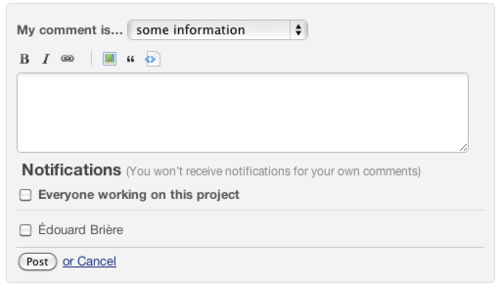
Formatting your comments on Web Translate It is now much easier with the markup editor.
By Edouard · March 12, 2010
Formatting your comments on Web Translate It is now much easier with the markup editor.
By Edouard · March 11, 2010
If you have a look at your projects on Web Translate It, you will notice a new tiny icon.
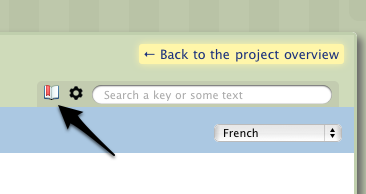
Click on it and it will pop up and new window: the term base.
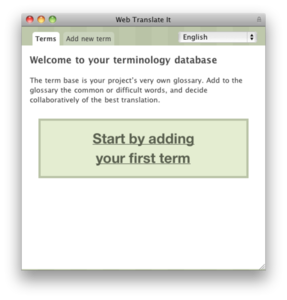
The term base (stands for terminology database) is a glossary of terms you can build collaboratively.
Consistency is important throughout your project, so you better find the best translations and stick to them. Is it sign in, signin, sign-in, sign me in, login, log in, log-in, log me in? The term base will help you to collaboratively decide which term you should use.
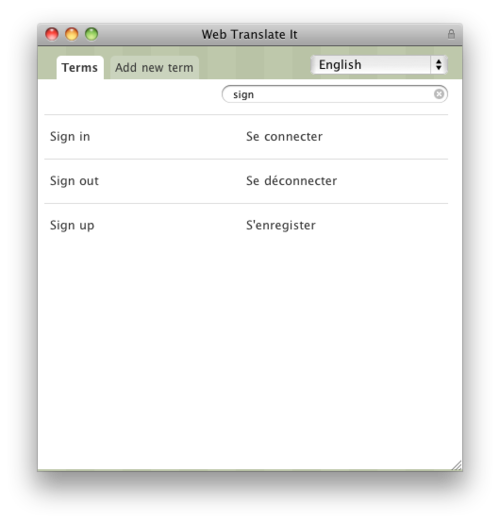
After you add a few terms, you will get a proper glossary:
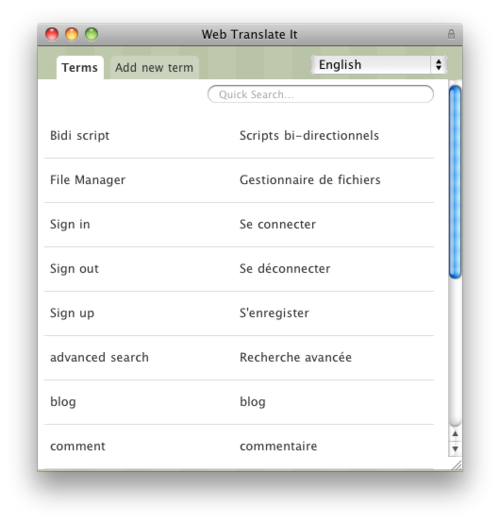
You can search very quickly for terms in the glossary:
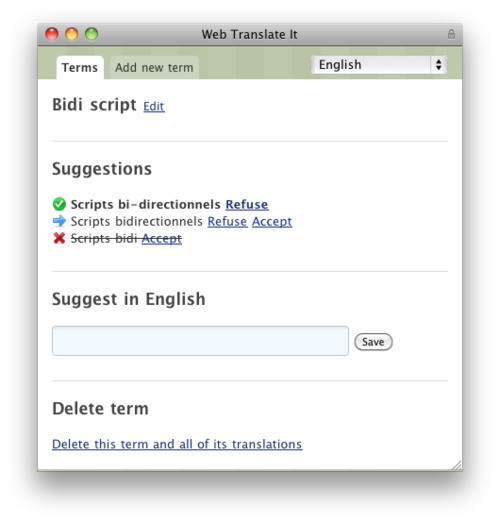
The suggestion system is the core feature of the term base. You can collaboratively work the translation suggestions until you find the perfect one. Only accepted suggestions will become the official ones.
I hope you will find this new feature useful. I am eager to hear from you by e-mail or on the forum if you have any suggestions or feedback to share.
By Edouard · March 9, 2010
A few months ago I introduced my week-end project: the language and territory database which was exposing the data used by Web Translate It to build its locales and handle plural forms.
It contains information about:
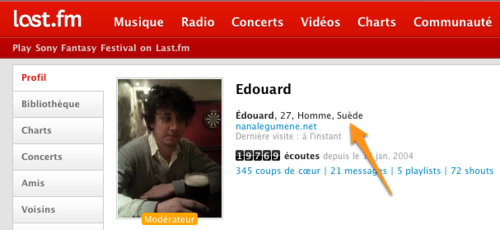
Now you know what looks really bad on a localised software? This:
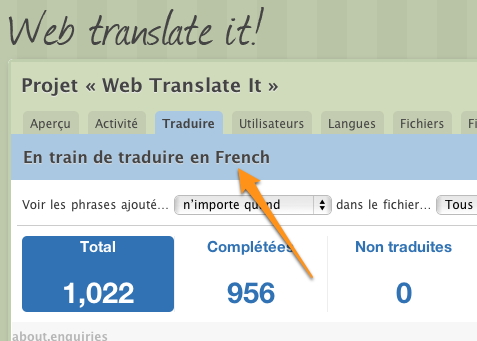
This is actually a common problem software developers have when localising software exposing this kind of data. Should it be a billing address, the user’s current location or stats by countries countries, developers need to localise it.
Maybe I haven’t looked hard enough (in which case, please point me out a database) but I haven’t found any open-source database of localised countries and languages, so this work is repeated over and over. There are about 250 territories and 500 languages to localise into 500 languages, so that’s a lot of work.
I actually need this localised data myself, and Web Translate It is a translation tool after all, so I thought I should make this data translatable and available to the public. Once for all.
So go and help me translate these databases! If you don’t have a user account, you can sign up for free.
When I will have enough data (at least the territories translated into 10 languages) I will release monthly a SQL data dump on Github, under the MIT license, so developers can use it directly in their apps.
All the major cities in the world! “London” is “Londres” in French, and “Brussels” is “Bruxelles”. Wouldn’t that be cool if we had a database of localised cities?
So I also started building a City database you can already help translate, too, although it is still in a early stage.
All of this geographical data (territories, cities) come with geolocation (longitude and latitude), amount of population, and some other extra information, so you can build cool stuff on top of it.
Come and help if you have a little bit of time (and especially if you need this data!)
By Edouard · March 9, 2010
I just pushed a new release to Web Translate It, which includes a few bug fixes, as well as a new API endpoint to serve the project’s statistics.
You can find all the information you need in the API documentation.
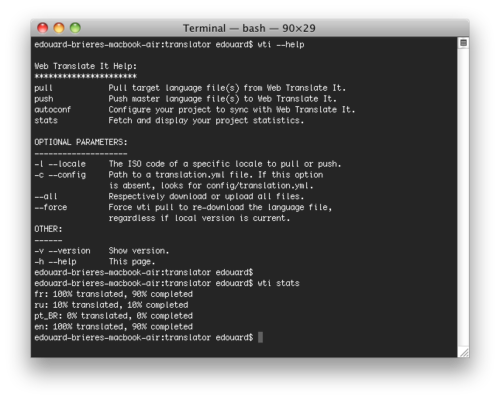
Web Translate It’s ruby client has been updated to 1.5.1 to include a new command to fetch your project’s statistics: wti stats.
By Edouard · March 5, 2010
Today someone asked me if Web Translate It support bidi scripts.
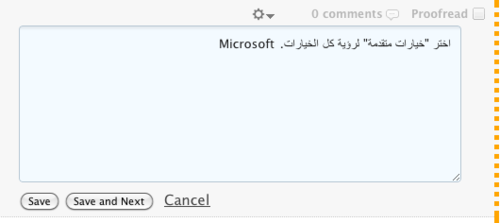
Bi-directionnal scripts is text containing text in both directionalities, that is to say both right-to-left (RTL) and left-to-right (LTR). This is fairly frequent, for example Arab text containing English brand names.
Web Translate It support LTR, RTL and bi-directionnal text in its web interface. More precisely, Web Translate It automatically select the correct text directionality based on the language and script you choose.
Bi-directionnality is a web-browser feature. It works fine with Firefox 3.5, Google Chrome and Safari 4.
Thank you for using Web Translate It!
By Edouard · February 26, 2010
I am really happy to announce that starting today, Matt Hillman joins Atelier Convivialité on a part-time basis. He will work on developing Web Translate It product’s awareness.
Matt is british and moved two years ago from London to the west coast of Sweden. Prior to that, Matt used to play drums in a band and was working for the music team at Last.fm and later on for the marketing team at Record Union.
I am really glad to have Matt onboard. Welcome, Matt!
By Edouard · February 25, 2010
Two weeks ago I soft-launched the french version of Web Translate It, you can visit at webtranslateit.com/fr.
While working on it, I remembered a nifty technique used to propose a localised version of a website to the user. I really like this technique and I thought I should share it here.
There are usually two different techniques to serve a localized version of your service to your users.
The first is a redirection based on IP sniffing, used notably by Google. I don’t really like this solution, because if you browse google.com from Japan, you will get the website in Japanese, which is not so great if you don’t know any Japanese.
It breaks the assumption that one URL equals one website, and not different sites depending on where you are, but it also makes the service unusable to people travelling abroad.
A better solution is browser sniffing. It is about reading a list of preferred languages from the headers sent by the web browser.
Many services use this to redirect you to their available localised services. This is a really good solution, used notably by Facebook.
There is just one downside, though: it is a bit too magical for the end-user. Nobody knows about this browser language preference and many people think this automatic redirection is a bug. Most users don’t understand why a such redirection happens.
So I rediscovered (1) another technique using browser sniffing to propose the user a localised version. I think this is the right way to go and it won’t pester anyone.
If a French user browse Web Translate It in English, she will see a clickable ribbon in the corner saying “Hey! Web Translate It is also available in French!” in French.
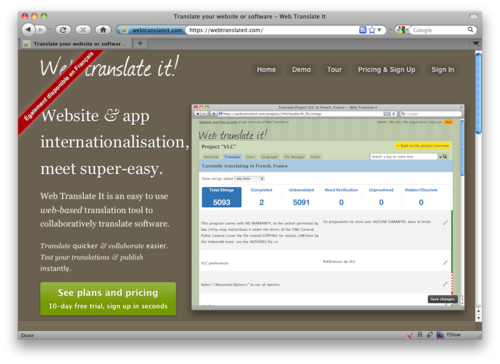
When the user clicks the ribbon, it sends her to the French version of Web Translate It.
Now this is what a user with browser settings set to something else than French will see when browsing the french version of Web Translate It:
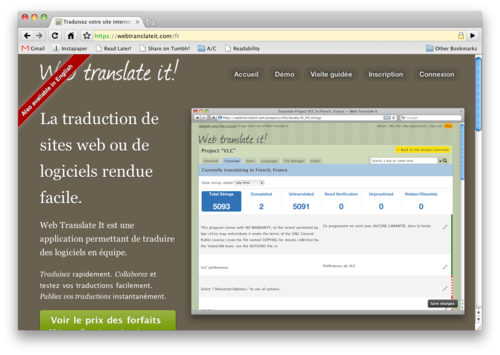
This is easily extendable. If a russian version was available and a russian user browse the French site, a russian ribbon would propose her to browse the russian website.
I am really happy with this solution, and it is also a bit simpler to implement than the other solutions. Sure, it is one extra step to the user, but it is a step that makes people actually understand what is going on. One more click, much less confusion.
[1] The first and only time I saw it was when Last.fm launched its international sites. When browsing Last.fm with a French web-browser, a frame saying “Your browser speaks French. Do you?” was appearing. As far as I remember, it was really much appreciated by the users. ↩
By Edouard · February 25, 2010
Search is the second most used feature on Web Translate It, after the translation interface itself, and until today, it was rather cumbersome.
I introduced a new way of searching for strings on Web Translate It: Simple Search. This is the default way of searching, and it is really efficient and easy to use.
To search, just type something in the search box displayed on all project pages: it can be text or a key. The search engine with search for strings in the current language (instead of in all languages like previously), and display them right in the translation interface, ready to be translated, edited or proofread.
If you are used to search with the previous system, you will notice it is so much more convenient that before. You basically do the same thing with 3 times less clicks. You will save a lot of time.
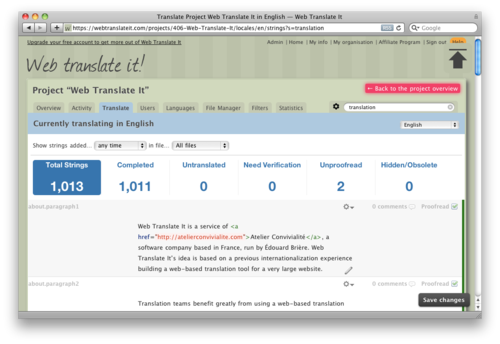
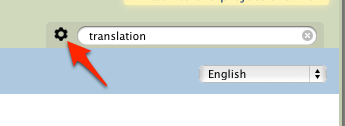
There is now a second way to search for a string: Advanced Search, for more advanced users. Click on the little cog brings you to the Advanced Search page.
There, you can do a very precise search queries with many criterias: in which language you want to search, what you are looking for (anything, key, text and developer comment).
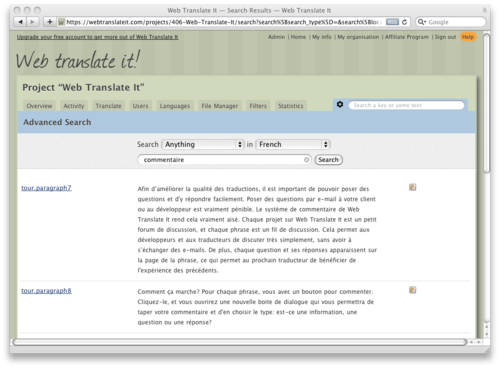
This is great way to search for strings on a large project. On top of that you can also use advanced search queries to find more precisely what you are looking for.
I hope you will enjoy this improvement, thank you for using Web Translate It!
By Edouard · February 23, 2010
I am really excited to announce a really nice update to Web Translate It’s plans, and I am reasonably sure everyone will appreciate it.
One common remark made to the current price grid is that there is a huge gap between the Free plan and the Medium plan starting at 39€ a month for 2,000 strings. Also, 39€ per month is quite a lot of money for starting businesses, especially when converted into dollars (that’s currently $53).
I thought I should try to do something about that.
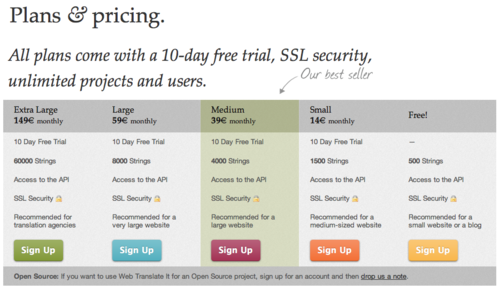
I just added a new plan: Small. Small is affordable: it costs 14€ per month (that’s just $19) and can hold up to 1,500 strings. It’s a great deal as it has almost the same capacity that used to offer the Medium plan at 39€ per month.
Small is a great plan at a fantastic price tailored for start-ups working a middle-sized application.
The price remains unchanged for all other plans, but to mark the difference with the new Small plan I increased the string limit for all plans.
The medium plan now offers 4,000 strings instead of 2,000 and the Large plan now offers 8,000 strings instead of 6,000.
No action is required on your side in order to obtain the new capacity: if you subscribed to a Medium or Large plan, you already have it. You can check your new capacity on the “Organisation” page.
Finally, the Extra Large plan, which used to be unlimited, is now limited to 60,000 strings. That’s quite a lot. If you ever reach that limit, please get in touch with me so we can talk about a custom solution.
I am thrilled by this announcement, and a lot of work has been made under the hood to make Web Translate It more affordable.
I will have more exciting news to announce soon, so stay tuned and follow @webtranslateit on twitter, or subscribe to this blog’s RSS feed. Thank you for using Web Translate It, the web’s easiest translation tool.
By Edouard · February 17, 2010
I posted this teaser on Twitter yesterday:
Something cool is coming soon http://twitpic.com/13n9p4
It’s time to explain what it actually means! Github’s service hooks now include Web Translate It.

If you have an open-source project hosted on Github you want to translate, keeping your translation files in sync with your source code will be as easy as copy/pasting your API key. Github will let Web Translate It know if new translation files are available as you push new code. It can’t be easier!
For more information about this feature, please check the github integration documentation.
Thank you for using Web Translate It.
By Edouard · February 15, 2010
Investors say you should be able to explain your projet on the back of a business card. Describing it very simply is always a very difficult exercise, and it often validates whether a project is viable or not.
This is the same for the presentation pages of a web product: the fewest presentation pages the better. There should be only one page. Visitors won’t read them all and will miss some important points otherwise.
Before today, Web Translate It had 3 presentation pages besides the home page. There was “Why using Web Translate It?”, “Integrate your app with Web Translate It” and finally, the “Tour” page, which was horribly out of date.
Information was spread across these 3 pages, which were repeating themselves and weren’t up to date. The problem was:
So I deleted the 2 former pages and instead made a much better Tour page.
The page is more aerated, the font is more readable and invites people to read on. I also added more screenshots and a screencast.
It contains lots of useful information, and even if you are already a Web Translate It user, you can learn a few tips to work faster.
By Edouard · February 10, 2010
Some users have been recommending Web Translate It to their clients and friends. I am really grateful for your help and to encourage you recommending Web Translate It, I just launched an affiliate program.
In a nutshell, the affiliate program allows you to earn cash commissions when people sign up for a paying Web Translate It account.
The rules are pretty simple:
If the user your referred forgot to enter the referrer code, no sweat: just drop me a line and I will fix it for you.
If you have any questions about the affiliate program, send me an e-mail at [email protected].
Thank you for your trust and for using Web Translate It.
By Edouard · February 9, 2010
I just pushed a new feature to Web Translate It that will make it really easy to translate an open-source project hosted on Github.
There are many ways to update or sync your language files with Web Translate It.
On the File Manager, you can now specify the path to a language file hosted online.
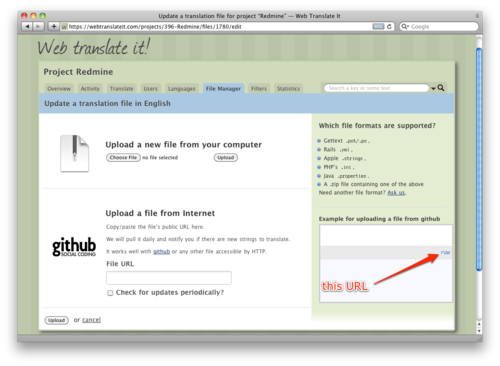
You can use this new feature to link to any file accessible by HTTP, like a RAW file hosted on github.
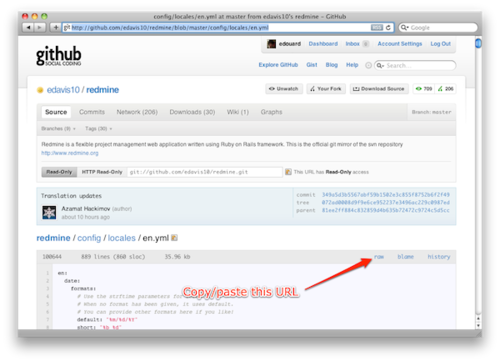
Tick the “Check for updates periodically” checkbox and we will check for updates on this file daily. If there are new strings to translate, Web Translate It will send you an e-mail to let you know.
We also have a post-receive URL that will check for updates on your file every time you push code to your github repository.
For more information, please refer to the documentation.
If you are not using github, you can still use this feature, as long as the language files are accessible via HTTP (using trac or gitweb for example). You can also use the post-receive URL feature, which works with every SCM.
I hope you will find this new feature useful. It makes it really easy to maintain translations of an open-source project hosted on github, and I hope it will help improving the translation quality of open-source projects.
Thank you for using Web Translate It.
By Edouard · February 1, 2010
January is a wrap and it has been a pretty busy month.
The service uptime for January was 99,94%. That means that is to say Web Translate It was down for 24 minutes last month. It is up from the catastrophic 98,43% (11 hours, 41 minutes down) in December. This is much better, but my goal for February is to improve this.
Response time is slightly lower than last month, which is good (lower is better). I always do everything possible keep the service working, and working fast.
Feature-wise, there were 7 releases in January:
Web Translate It is in very active development and it is very exciting to see it quickly improving. I am always happy to hear your feedback if you have any suggestions to share.
I plan to do 3 things: improve the Web Translate It plugin, improve the e-mail notifications and support Open Source projects better.
Well at its current state, it’s not really a plugin any more. If you don’t know it yet, Web Translate It has an open-source rubygem that provides a collection of useful rake tasks to sync back and forth your app’s language files with Web Translate It. If you use Ruby on Rails, there’s also a rack middleware built in that allow you to sync your files for each page requested.
A few weeks ago I pondered if I should make a plugin for other programming languages and frameworks. Now I think I won’t.
It would be a loss of time and energy. I would need to learn well different development frameworks in order to develop a plugin for them, and it would be a lot of work maintaining the different plugins and keeping up with their future versions.
I rather make one tool that works real good rather than three working poorly.
The next version of the plugin (or shall we call it client?) will be more generic, and the goal is to make it work well for any kind of project, as long as you have the programming language ruby installed on your machine.
Instead of rake tasks, the client will provide you with an handy executable you can run from any other programming language or framework. It will also be able to auto-configure itself as magically as possible.
If you want something native to your programming language, though, you can implement your own plugin, it is not very complicated.
To say it very frankly, Web Translate It’s e-mail notifications suck. If you have a large project with many translators, you just get too many e-mails and you probably already created a GMail filter for it. I will create some e-mail digests.
You will be able to choose the occurrence: once a week, once a day, every 4 hours or every 2 hours. Digests will only be sent if something happened since the last digest, and they contain a summary of your project’s activity since the last digest.
I will work on a seamless integration with projects hosted on Github. Github is one of the largest open-source software hub.
There are two reasons I want to focus on this now:
Translating your project on github will be as simple as copy/pasting the address of your github project, and selecting where are the language files you want to translate.
That will be it! If you have any feedback, please share on the support forum. Thank you for using Web Translate It!
By Edouard · February 1, 2010
I just deployed a few improvements on the commenting system and on the string history page.
Comments on the project page are now grouped by thread, with the most recent comments on top.
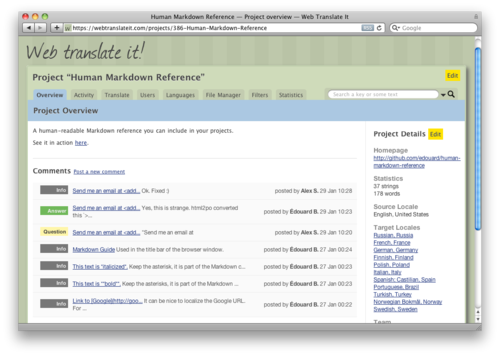
Commenting on a string now creates a new “forum thread”, and viewing your comments and understanding how your project is going is much clearer.
But that’s not all: the comment’s status is also flagged for each thread: red if the thread has an answered question, blue if the thread has unread comments.
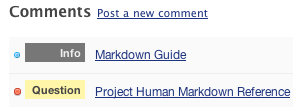
When you click on the link to read a comment, it will bring you to the comments section in the String History page, instead of on a specific comment page.
One new feature is the ability to comment on the project itself (as opposed as commenting on a string). When you click on “Post a comment” on the project page, a form appears.
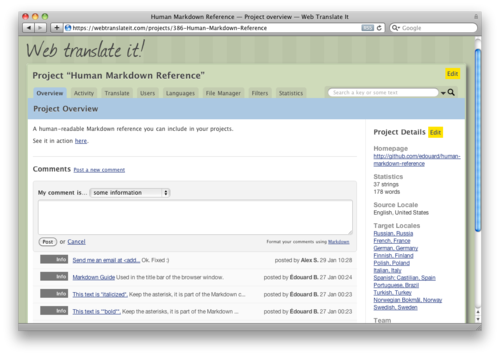
This will be really useful to discuss about the projects without having to go to a third-party communication system.
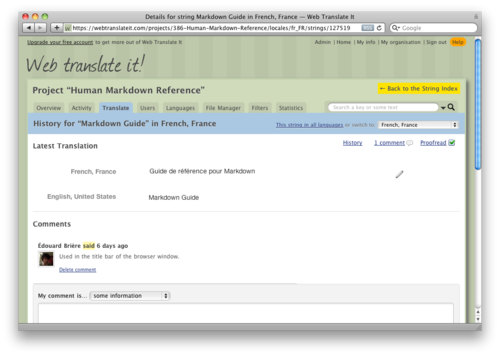
The string history really needed some improvements. It just got more useful. It is now divided into 3 parts.
Which basically show you the latest translation made. From there, you can also translate and proofread the string.
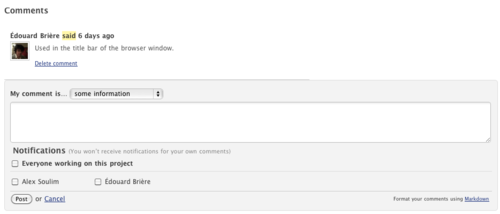
A list of comments made on the string.
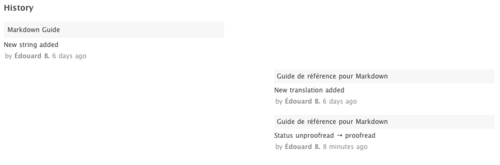
These are the changes in your translations over time. What’s new here is that the interface now displays the exact difference between the current version and the previous version. For example unproofread → proofread.
I hope you will enjoy this fresh round of improvements. Thank you for using Web Translate It!
By Edouard · January 26, 2010
I just rolled out a new version of Web Translate It. Projects can now be open to the public. This is useful for crowd-sourcing!
If you visit your project pages, you will notice it has been reworked quite a bit.
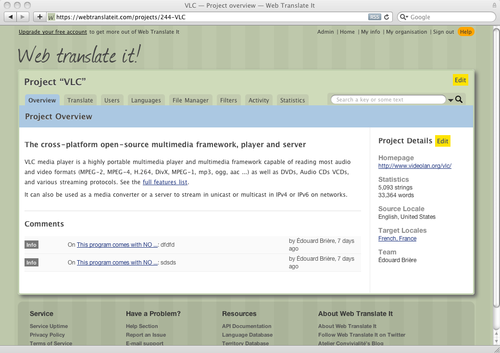
The activity feed has been moved to a dedicated tab, and the project home page now feature a list of the latest comments made on the project.
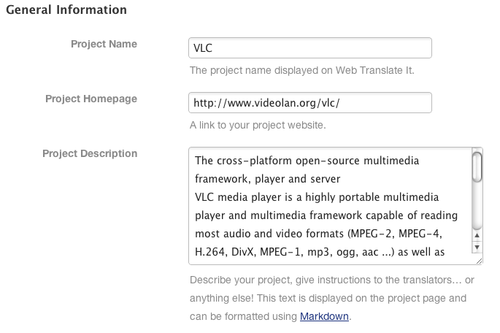
There are also a few new options in the project settings.
You can now put a description for your project and a link to your project homepage. The description is formatted using Markdown, so you’re not bound to write a description here: you can use this field to give general instructions to the translation team, or anything else you think can be useful.
And this… Well this is a bigger thing. You can now make your project public and browsable by everyone. By default, new and existing projects are set to private, and to be able to translate or comment on your project, users will have to request an invitation.

It seems to be a little change (it was definitely not!), but it is actually the first step to use Web Translate It to crowd-source your project’s translations. It is only the first step, and that was a tough one.
It is also great for Open-Source projects to improve their visibility.
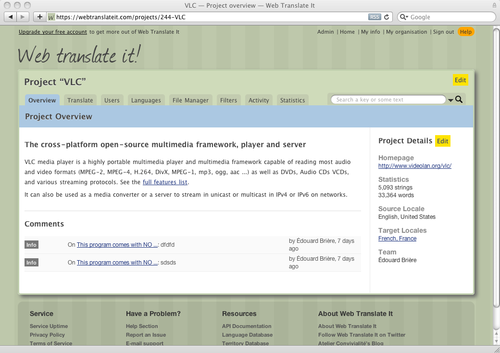
This is your project page you can see if you’re a project member.
If you make the project public, this is what everyone else will see. You can actually see it by yourself here.
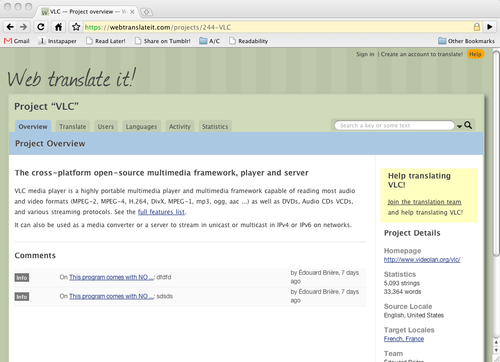
In order to join the translation team, the user will have to request an invitation to the project manager. The user can do so by clicking on the invitation link.
You can directly your users to the invitation request page and provide their e-mail address in the URL, too. For instance: https://webtranslateit.com/projects/244-VLC-unofficial-/[email protected]
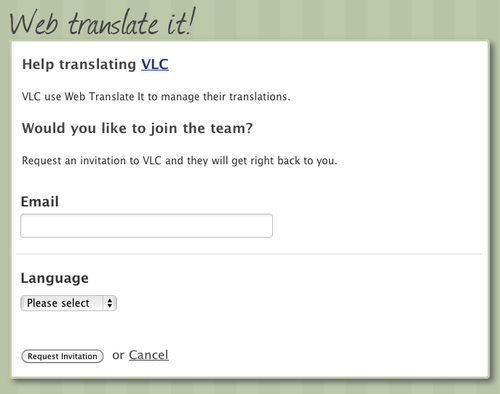
When the project manager will have accepted the invitation, the user will be able to translate the project.
This is really the simplest solution that could possibly work for this issue. This workflow will work fine for projects until you reach 3 translators per language. If your user base is very much larger than this and hundreds of users want to join the translation team (lucky you!), you will need a more advanced system to handle vandalisms, translation suggestions, and so on. I will progressively improve this feature in time with a voting system.
I hope you will find this new feature useful. Thank you for using Web Translate It.
By Edouard · January 23, 2010
Tomorrow Sunday the 24th I will be performing some database optimisations between 11AM and 12AM GMT.
The service will be up during most of this time. However these optimisations require to restart the database server, so Web Translate It might have the hiccup for a minute or two during this maintenance window.
Follow @webtranslateit for live updates.
By Edouard · January 20, 2010
I just set up a new customer support site at Tender for Web Translate It.
Support for Web Translate It is now located at help.webtranslateit.com.
You will find there a knowledge base, a forum and a helpdesk.
If you are not a Web Translate It user, you can ask questions without creating a user account. If you are a Web Translate It user, you should already have a user account there.
Finally, all support requests sent to [email protected] will be forwarded to the new support site.
By Edouard · January 19, 2010
I just pushed a new version of Web Translate It. This new version include a couple improvements as well as a few bug fixes.
The action buttons on the translate page were only visible when hovering the string. While it was great for reviewing strings, several users reported it was a bit confusing. Besides, the comment button was lacking too much visibility.
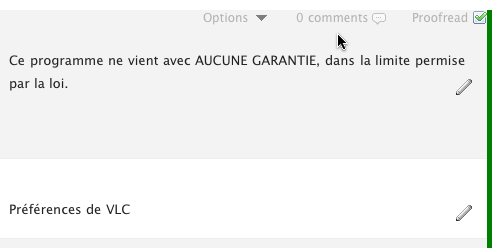
So I redesigned these action buttons. The goal was for them to gain enough attention, while staying fairly invisible to afford a comfortable reviewing of the strings.
The buttons were a bit jammed in the upper right corner. I gave them some more padding to give them some more importance. I also made them bolder, while making them more greyer. The result is that the buttons are more noticeable while being less visible.
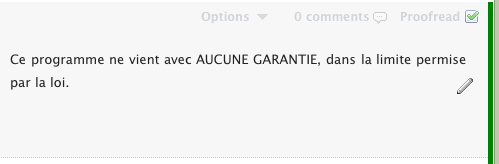
When hovering, the buttons gain some more contrast, making them more visible.
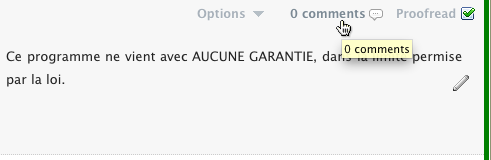
I think it is a good trade-off. I will tweak this up more in the upcoming releases, please let me know if you have any comments.
493,29KB. That’s how much Web Translate It did weight before this release.

The big guy was the Javascript framework PrototypeJS with Scriptaculous, served via Google AJAX API. The Javascript framework is served non minified by Google and was totalling 345KB. Ouch!
318,77KB. That’s how much it weights now. That’s still quite a bit but it’s 200KB less already, without removing any feature.

I switched the Prototype + Scriptaculous Javascript framework (345KB not minified) to the latest jQuery, which is served minified by Google: 68KB.
I had to rewrite all the Javascript front-end to make it work with jQuery but it worth it: everything is much simpler, and I killed a few bugs along the way. It is very likely you will notice some micro-improvements when using Web Translate It.
By Edouard · January 14, 2010
Today I improved and launched a new parser for the importer used for YAML files on Web Translate It. The previous parser was buggy and inefficient.
The default Ruby on Rails implementation for i18n, so-called “Simple” use YAML to store its files.
A YAML file looks like so:
fr:
  some_key:
    key: value
    # a comment
    hello: bonjour
The YAML parser used until today was home-made. It used to browse every line in the YAML file, extracted keys, values and comments.
Really good YAML parsers exist for pretty much every language, but they don’t allow me to extract comments and display them on the translation interface, and it was a no-go when I implemented this feature.
My parser was working fine with really simple YAML files. In practice many customers had problems importing their YAML files because my parser did not support some edge-cases.
As Web Translate It grows, a few more customers needed to be able to import YAML files. As a consequence, last night and today a few more import jobs failed for a customer. I am really sorry about that.
Being able to actually import YAML files is obviously more important that being able to extract comments. On top of that, my parser had become incredibly complex and I felt I would not be able to fix the issue in a simple way, and to maintain a such hullabaloo.
So I switched to the vanilla ruby YAML parser, which not only parses files really well, but also parses them really fast. The only downside is that it is not possible to extract and import comments from the YAML file any longer.
Be cautious when writing copy in your YAML file because everything your write in the file is interpreted by the parser (by your application as well as by Web Translate It). Words like true, false, yes, no are interpreted as the booleans True or False by YAML parsers.
Consider this YAML file:
en:
  date:
    true: foo
    false: bar
    yes: baz
    no: boo
It will be interpreted as:
en:
  date:
    true: foo
    false: bar
Because yes == true and false == no in YAML, the parser consider the compounds yes: baz and no: boo duplicate respectively true: foo and false: bar. If you must use yes and no as keys, wrap them around quotes, like so:
en:
  date:
    true: foo
    false: bar
    "yes": baz
    "no": boo
Same goes for the value. This:
en:
  date:
    a_key: yes
    b_key: no
will be interpreted as:
en:
  date:
    a_key: true
    b_key: false
So wrap them around quotes:
en:
  date:
    true: "yes"
    false: "no"
Thank you for your patience with this issue, and thank you for using Web Translate It.
