The WebTranslateIt Blog · Page 15

i18n news and Product Updates about WebTranslateIt · Page 15

New version of web_translate_it gem

By Edouard · May 14, 2010

I released Wednesday a new version of the web_translate_it rubygem. This update brings one new feature: the synchronisation console.

Introducing the Synchronisation Console

After installing the rubygem (gem install web_translate_it), go to your project directory and run:

wti server

It will start a server on the port 4000. Then, go over to http://localhost:4000 with your web browser and access the synchronisation console. It’s that easy!

The synchronisation console displays all your language files, and whether or not they have been committed to your repository (it only works if you use git) and if a new version of your language file is available on Web Translate it. You can also download the latest version of your language files by just clicking a button.

What is it for?

A translation team works on translating your application. Every time translators want to test their work in your application (to see if a translation fits or doesn’t break your app, for example) they have to ask a developer to pull the translation files from Web Translate It. Using this tool, they can now do it by themselves.

Setup wti server on a staging website, give your translation team access to both the staging site and the synchronisation console and you have an almost effortless way to increase the quality of your translations.

Advanced Usage

I made this tool very extensible. You can choose the host name and the port you want to start the server on. You can also setup hooks in the configuration file, so you can for example restart the application server after refreshing the language files, and regenerate the site if you work a static site.

To learn more about this, please refer to the tool documentation.

All credit goes to Tom Lea from Reevoo.com for his excellent rack-webtranslateit. I pinched his idea and made it less specific to ruby projects, so it can be used for pretty much any kind of application.

Support for HTML/XHTML, Microsoft .aspx, Markdown, Textile...

By Edouard · May 12, 2010

Web Translate It now support a bunch of new file formats:

  • HTML/XHTML,
  • Microsoft .aspx, which really is decorated HTML,
  • Markdown (.md, .markdown),
  • Textile (.textile)

So we now support a grand total of 10 different file formats. That’s plenty!

  • Gettext .pot/.po,
  • Ruby .yml,
  • Java .properties,
  • Microsoft .resx (.net),
  • Microsoft .aspx,
  • PHP .ini,
  • Apple .strings,
  • Markdown .md, .markdown
  • Textile .textile
  • Plain text .txt

Do you need another language file format we don’t support? Let us know on our support forum, and we’ll implement it within days.

New API endpoint and web_translate_it gem update

By Edouard · May 5, 2010

I just added a new endpoint to Web Translate It’s API: Create File. This endpoint will allow you to send to Web Translate It new master language files through the API.

This endpoint’s usage is explained in the documentation.

The rubygem has been updated to take advantage of this new endpoint. With the new version 1.6.7 you can now do:

wti add path/to/master_file_to_add

This will send this new master language file to Web Translate It. Note that is should only be used to send new master language files that are not already on Web Translate It.

Updating an existing master or target language file should be done using the usual wti push command.

More improvements are planned for the rubygem, such as the ability to send several files at the same time, or the ability to the language files you have locally that are not sent to Web Translate It.

I hope you will find this new endpoint useful.

Maintenance window today — 9PM-9.20PM GMT+1

By Edouard · May 4, 2010

If you use Web Translate It extensively you might have noticed a few error pages yesterday, when loading pages or saving strings.

The reason of these errors is that the database server is sometimes overloaded and crashes at peak time.

I take this problem very seriously, and in fact I think most of the issues are now fixed. I tuned the database server, pushed some important optimisations that will make the service much more reliable than yesterday. I will carry on working on optimising the service today.

Tonight I will also upgrade Web Translate It’s hardware, which will require to reboot the server. Rebooting the server should take less than 5 minutes, and the service should be completely operational a few minutes after that. Therefore I reserve a window of 20 minutes downtime tonight from 9PM to 9.20PM GMT+1.

I apologise for the short notice and for the inconvenience this downtime will cause, but this downtime will be very short and make the service a lot more reliable.

EDIT: The maintenance went well. The service was down for about 4 minutes, according to Pingdom, and it took another 5 minutes to restart the workers and search engine before the service was 100%.

I upgraded Web Translate It’s slice memory from 1.2GB to 1.5GB, and I increased the database cache. Some indexes were corrupted due to the crashing, so I also rebuilt the indexes.

Never miss a whitespace again

By Edouard · April 29, 2010

Here’s a tiny improvement to help you translate better complex strings.

Non-obvious white spaces are now indicated by tiny blue dashes. By non-obvious spaces I mean:

  • Space or spaces preceding a string

  • Space or spaces suffixing a string

  • Two or more consecutive spaces in a sentence.

In software, extra spaces are often here for a reason, and it is important for the translations to have them, too.

When you hover the string, spaces highlight, so you won’t miss them.

And finally, these highlighted spaces are really spaces, so you can select, copy and paste them as usual.

Batch operations and a few tiny improvements

By Edouard · April 28, 2010

Managers will find a new feature on Web Translate It’s translation interface: batch operations. This is a very powerful feature.

What does it do?

Batch operations apply a specific action on a batch of strings you selected.

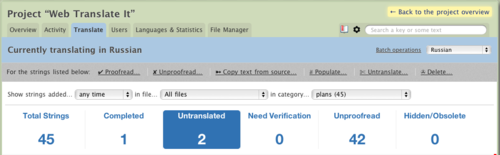
To use it, start by listing the strings you want to modify, using the filters by categories, files, date, status… When you’re happy with your list of strings, click on « batch operations », and choose one of the 6 operations available.

  • Proofread— proofread all the translated strings listed on the page.
  • Unproofread— unproofread all the translated strings listed on the page.
  • Copy text from source— copy the source text to the target strings, and flag these strings as “to verify”, so you can find them and translate them later. I think many WTI users will find this useful: a lot of Web Translate It users want to download their language files including source strings when translations are missing. You now can do it.
  • Populate— populate your translations with machine translations from, and flag your populated strings as “to verify”. It’s great for developers to quickly have a full language file to test their app, but really the translations often leave to be desired and have to be verified by a translator.
  • “Untranslate”— clean all your strings from their translations. Perfect to start over a translation.
  • Delete— delete all the strings listed.

Operations run in the background, so you can leave the page or close your web browser while it is running.

This feature has been designed to be as flexible and powerful as possible. These operations might overwrite your strings. For example, if you choose “populate” on all your strings, even the translated strings will be replaced by machine translations, which may or may not be what you want to do. We leave it up to you to refine your selection to for example, the untranslated strings.

With these 6 batch operations, Web Translate It now can really fit any kind of translation workflow.

Other improvements

  • new lines and spaces are now preserved when displaying source and target strings in the translation interface. Useful when translating code.

  • Very long strings now wrap and don’t break the layout.

  • Animations when editing a string have been removed. Editing a string is much faster now.
  • Support for 2 new file formats: Markdown (.md, .markdown) and Textile (.textile). We also extract strings to translate from HTML/XHTML files but this is still very experimental. This is great to translate user documentation.

For example, Web Translate It’s documentation, which is a mix of HTML and Markdown files, is translated with Web Translate It.

More tiny improvements are to be announced this week. Subscribe to this blog’s RSS feed or follow us on Twitter to keep up to date!

New feature: merge or overwrite your language files

By Edouard · April 26, 2010

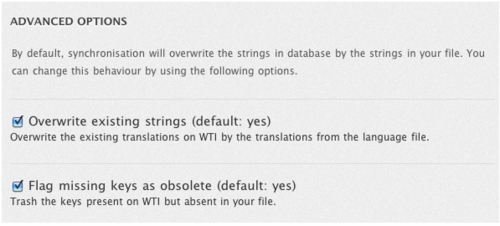
When you update a language file on Web Translate It, you will notice two new options:

  • Overwrite existing strings,
  • Flag missing keys as obsolete.

What does it mean?

These options control the importer’s behaviour when uploading a new language file. These are advanced options and you should only use them if you know what you are doing.

Overwrite existing strings

Let’s consider you have a project in which the source language is English, to translate into French and Italian. The project has these 2 strings already in Web Translate It’s database.

greetings: "hllo {{user}}"
welcome: "Wellcome"

These strings have been written by your developers, contain spelling mistakes, and are considered as placeholders. You want to update these strings from the web interface, so you just add the English language to Web Translate It, and edit these strings directly. Job done! You now have:

greetings: "hello {{user}}"
welcome: "Welcome"

That’s more like it.

Now bad news: the developer has decided to update his language file, which add one more string. The importer does a complete sync and therefore, overwrite your changes and flag all the existing translations as “to verify”. The strings in database are now:

greetings: "hllo {{user}}"
welcome: "Wellcome"
sorry: "Im not so good in Engrish"

So basically all your good work went to waste! Something is wrong, what can you do? The new overwrite option will help you with this problem.

Let’s go back to step 2 where you had:

greetings: "hello {{user}}"
welcome: "Welcome"

Now the developer upload a new language file containing the new additional string, and untick the checkbox “Overwrite existing strings”. Before doing any update, Web Translate It will now check whether this string already exist in database or not. If the string exist, WTI won’t alter it and therefore your changes are safe. You’ll now have in database your nice changes, plus a new string to proofread:

greetings: "hello {{user}}"
welcome: "Welcome"
sorry: "Im not so good in Engrish"

And you can fix the last string from the web interface:

greetings: "hello {{user}}"
welcome: "Welcome"
sorry: "I’m certainly not so good in English, but others can proofread!"

This will be really useful for you if your workflow include proofreading the source string.

Flag missing keys as obsolete

This second option is more straightforward. Let’s consider the same project than above. You have these strings in database:

greetings: "hello {{user}}"
welcome: "Welcome"
sorry: "I’m certainly not so good in English, but others can proofread!"

Now, the developer upload a file containing:

greetings: "hello {{user}}"
welcome: "Welcome"
funny_joke: "This last string should be replaced by a funny joke by the proofreader"

By default, the importer will flag the string “sorry” as “obsolete”, because it has been removed from the file and should not be translated. Additionaly, the new string “funny_joke” has been added.

But what if you never want to remove strings? You now can, by unticking this box. Instead of the above you would have get:

greetings: "hello {{user}}"
welcome: "Welcome"
sorry: "I’m certainly not so good in English, but others can proofread!"
funny_joke: "This last string should be replaced by a funny joke by the proofreader"

These two options can be combined, so it covers pretty much any kind of workflow. This is a very powerful feature.

API

This feature is accessible via the web interface, and also the Update File API endpoint. Optional parameters can now be passed:

  • merge=true, to disable overwriting strings (default is false)
  • ignore_missing=true, to disable obsoleting strings (default is false).

If you use the API without these parameters the importers will overwrite and obsolete strings as usual.

Web Translate It gem

The web_translate_it gem has been updated and the new version 1.6.6 now propose 2 new options:

  • --merge to force WTI to perform a merge of this file with its database.
  • --ignore_missing to force WTI to not obsolete missing strings.

You can use these options this way:

$ wti push --merge
$ wti push --ignore_missing

Or you can also combine them:

$ wti push --merge --ignore_missing

To update the web_translate_it rubygem to the latest version: gem install web_translate_it.

I hope you will find this feature useful. Web Translate It can now adapt to pretty much any kind of translation workflow!

Microsoft .net resource files (.resx) and text files support

By Edouard · April 21, 2010

Web Translate It now support 2 new file formats:

  • Microsoft .net resource files (.resx),
  • Plain text files.

These 2 new file formats extend our existing collection of Gettext .po/.pot, ruby .yml, Apple .strings, Java .properties and PHP .ini.

I am also working on HTML/XHTML file support, which will be great to translate static websites or documentation.

So far, the most popular file formats on the projects hosted on Web Translate It are Gettext and ruby .yml, but Java .properties is growing fast!

Do you need another language file format we don’t support? Let us know on our support forum, and we’ll implement it within days.

Short maintenance window tonight 8PM GMT+1

By Edouard · April 20, 2010

We’ll have a short maintenance window tonight at 8PM GMT+1 to account for the database problems we had today. I expect the downtime to be no longer than 5 minutes. I apologise for the short notice and the inconvenience it will cause.

Edit 20.07: Maintenance done. I also used this maintenance window to run a few optimisation scripts.

New documentation website

By Edouard · April 19, 2010

I just launched a new user documentation website for Web Translate It. It now lives at docs.webtranslateit.com.

This documentation is more organised and detailed, with explanations, screenshots and sometimes screencasts for every single feature of Web Translate It.

Have a look at the documentation page for the translation interface. Maybe you missed a feature that would make you life easier?

I will translate the documentation into French shortly.


For the nitty-gritty details, the documentation website is made with the help of Jekyll, a fantastic tool to create any kind of static website.

The source code of this documentation website is on Github.

Automate parts of your translation testing process

By Edouard · April 19, 2010

Now the File API is faster than ever, you should totally try out auto-fetch.

Auto-fetch allow you to automatically update your language files on your application when you refresh a page on your development or staging website (this is not suitable for production environment). Invite your translation team to access a staging website and they will be able to test their translations in context. Being able to test translations moments after having translated is an easy way to dramatically improve your translation’s quality.

If you have 2m30s to spare, watch this quick introductory video and you will immediately grok why and how it can help.

Introduction to “auto-fetch” from Édouard Brière on Vimeo.

(or watch it in HD at Vimeo)

If you are looking for manual synchronisation, but still want to allow your translators to refresh the language files without the help of developers, Tom Lea from Reevoo.com also made a great open-source tool to download the latest translation from Web Translate It by just clicking a button: rack-webtranslateit.

You should definitely check it out if you don’t like to connect to Web Translate It for every page requested.

We encourage you to use and abuse of Web Translate It’s API, and to build great tools on top of it.

Improving Web Translate It’s locales

By Edouard · April 16, 2010

When I started working on Web Translate It, I thought handling locales would be a piece of cake. Wrong I was.

Web Translate It’s locale builder knows in which countries a language is spoken, which scripts are used for which language, and really helps you creating locales that make sense. It also knows about the plural rules for most languages, which help translating sentences with plurals forms.

In the past two weeks I made two micro-improvements to the locale builder that worth mentioning: hyphened locale codes and default scripts.

Hyphened locale codes

Until two weeks ago locales using subtags used to look like so:

en_US
en_GB
fr_FR
pt_PT
pt_PT_Latn
ar_Arab
zh_Hans
...

These locale codes don’t comply to the IETF language tags, which suggests locales subtags should be separated by hyphens instead of underscores:

en-US
en-GB
fr-FR
pt-PT
pt-PT-Latn
ar-Arab
zh-Hans
...

The API endpoints have been updated and recognise both hyphened and underscored locales, so it is not much of a big deal, unless you use Ruby YAML with language subtags, in which case the root key has changed.

So, instead of getting:

zh_CN:
  contact: 联系

You will get:

zh-CN:
   contact: 联系

Of course, nothing has changed if you don’t use the country subtag for your locales. Hyphens really are a preferred syntax, and Ruby on Rails also use hyphened locale subtags.

Default scripts

One language can be written into different scripts. Some languages’ scripts depend on the country the language is spoken. For example, Chinese is written in Simplified Han in China, but in Traditional Han in Taiwan.

Another example: Kashmiri, spoken in India and Pakistan, can be written in Arabic, Devanagari or Latin.

So the big question when you just select “Chinese” or “Kashmiri” in Web Translate It is: which one do you mean?

Knowing the script is important for Web Translate It, because it relies heavily on the script you use for two important features: the translation memory and handling right-to-left scripts in the translation interface.

To fix these issues I set up a default, invisible script for all locales. When you choose Chinese (zh) it will assume you want to use zh-Hans (Simplified Chinese). When you choose zh-TW (Chinese, Taiwan) it will assume you want to use zh-TW-Hant (Chinese, Taiwan, Traditional Han). If you use ar (Arabic) it will assume you mean ar-Arab (Arabic, Arabic), etc.

These default locales also allow us to “fold” the locales by language and script to serve more relevant suggestions. For example, if you chose fr-FR (French, France), it will fold the locale and look up for fr-Latn, which extends the results to locales such as fr-CA, fr-BE, etc. This is now used for searching suggestions in the global translation memory.

New feature for Ruby YAML users: automatic string grouping

By Edouard · April 16, 2010

Last week I introduced a new feature for Gettext users: automatic strings grouping by category.

This feature is now available to Ruby YAML users. Users will have to re-upload their language files as categories are only added during the file import procedure.

(try it yourself on the translation project for Web Translate It)

The categories are based on the flattened keys. Technically speaking, categories are subkeys of depth 1, but only if the key group other keys.

For instance this YAML file:

en:
  hello: "Bonjour {{user}}"
  greetings:
    informal: Salut
    formal: Bonjour

will only create one category: greetings. I made experimentations and this depth gives better result. Using deeper keys give more precise results but then the category list is too long to be any useful.

The next step will be to add this feature to Java .properties files. Thank you for using Web Translate It!

Faster File API & direct file download in the File Manager

By Edouard · April 15, 2010

I rolled out an important update to Web Translate It’s File API. The upgrade is transparent to the users, and no changes are necessary on your side. If anything, you will probably only notice that downloading language files is much faster.

Instead of only saving the translations in database and generating language files on the fly, Web Translate It now maintain in parallel a language file, always fresh and ready to be downloaded.

This is so much faster. For instance, if you miss the HTTP cache, downloading a 5,000 strings project used to take 25 seconds. It now takes less than a second.

Web Translate It’s business is growing, and almost all the hosted projects use the API, so it was critical to make the File API work cheaper and faster.

Direct downloads from the File Manager

Now we have these always fresh language files handy you can download your files directly in the File Manager. No more export procedure with the progress bar. It is much easier to use and will save you a few seconds.

New feature for Gettext users: automatic string grouping

By Edouard · April 8, 2010

I just pushed a new feature to Web Translate It, and removed another one.

RIP Filters

Filters was a feature I introduced 6 months ago. It was a way to group strings by very specific criteria. For example, you could create a filter to group all the strings having the word bacon in their source text, or all the strings having their key starting by users.new. Then the filter would list all the strings matching these criteria. It was a very powerful feature, but it was too much work for the users to setup these filters manually.

Usage statistics show that this filter feature is not are not what users need: out of more than 1,6 million translations on Web Translate It, only 13 filters were created.

Automatic String Grouping

This new feature replaces the filters, and only applies to Gettext users for now. I will extend it to other file formats in the upcoming weeks —at least for Ruby yml, based on the string’s flattened key names.

To use this feature on your project (using the Gettext .pot/.po language file format), all you have to do is to upload a new version of your master language file (categories are only created during the language file import).

Web Translate It now uses the string location metadata that is included for each strings in pretty much all .po/.pot files.

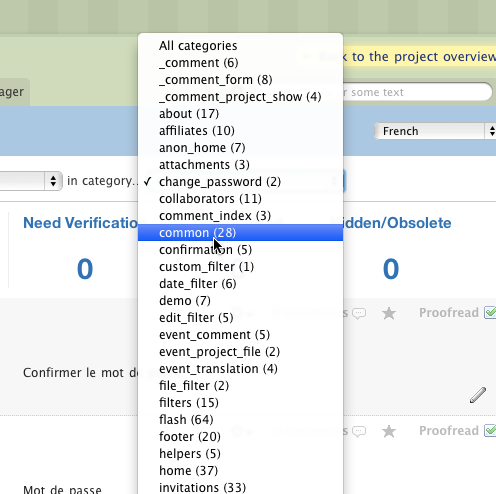
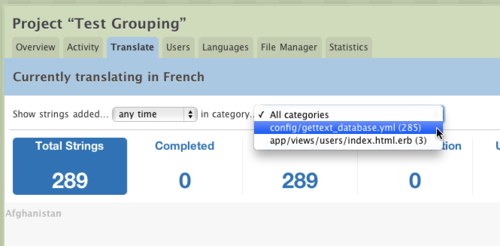
What it means is that the translation interface is now capable of grouping your strings by the file name they were extracted from.

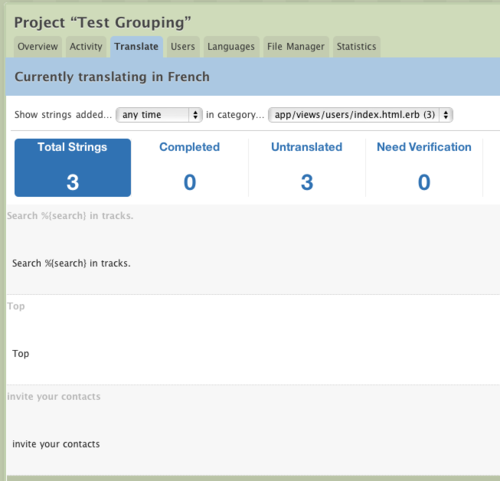
Select the category you want to filter by, and it will display only the strings that belong to that category. It makes it much easier to translate, because it restricts the size of the list of strings.

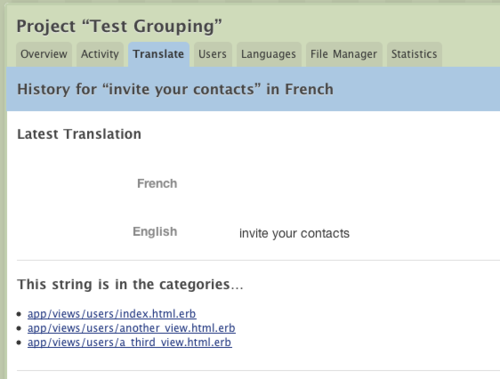
And, icing on the cake, you will see all the categories a string belong to on the String History page.

If you click on a category, it will bring you back to the translation interface, filtered by that category.

I hope you will find this feature useful. Thank your for using Web Translate It.

Now testing: Translation Memory

By Edouard · April 6, 2010

Yesterday I launched a brand new feature to Web Translate It: a translation memory.

It is very easy to use. To see it in action, watch this introductory video.

Introducing Web Translate It’s translation memory from Édouard Brière on Vimeo.

(view this video in HD at Vimeo)

Where do the translations come from?

So far, translations come from 3 sources:

  • Google Translate provides machine translations. It provides a result most of the time, but translation can be incorrect for the context of the string, or contain some spelling mistakes.
  • If your project is already partially translated, you will get suggestions from your own project. This is great because it helps you translate with consistency.
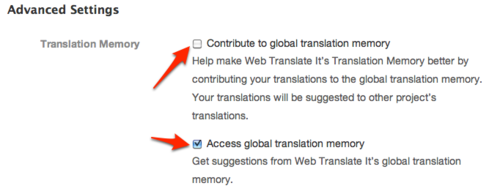
  • Finally, some suggestions come from the global translation memory. The global translation memory is a large translation memory made of more than a million software translations. If you want to, your can contribute your project’s translations to this memory and help other projects like yours. You can set these options in your project settings.

The suggestions are often good but still not perfect yet. They will get better the more translations you add, and I will enhance the suggestion algorithm throughout this week.

In the meanwhile, I hope you’ll appreciate this feature, which drastically change the way you translate on Web Translate It!

Web Translate It client 1.6.2 released

By Edouard · April 1, 2010

I released the version 1.6.2 of the Web Translate It gem today. It is merely a bug fixes release. Here are the changes:

  • Compatibility with Ruby 1.9,
  • Ability to run the rake tasks when installed as a Rails plugin,
  • Fix a few crashes occurring when accessing a non-configured project.

What is the Web Translate It client?

The Web Translate It client is an open-source tool programmed in Ruby. It helps you sync your project’s language files with Web Translate It, and it’s a real life saver for projects with dozen of language files.

After installing the gem, it provides:

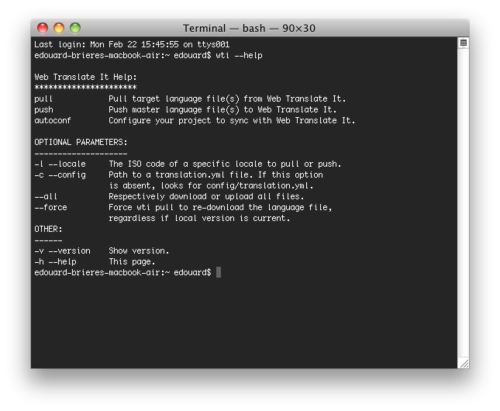
  • An executable, wti, that you can use to help sync any kind of projects (not only ruby projects), so long you have the ruby language installed (ruby is installed on most linux and Mac OS distributions nowadays). From your project directory, you can do wti push to send us your master language files, and wti pull to get your translated files.
  • A set of rake tasks and libraries you can build on top of. For example you can easily set it up to automatically update your language files as you request pages on your project.

To get it, follow the installation instructions on the Web Translate It page on Github.

File Manager update

By Edouard · April 1, 2010

The File Manager in Web Translate It just got a bit more clever.

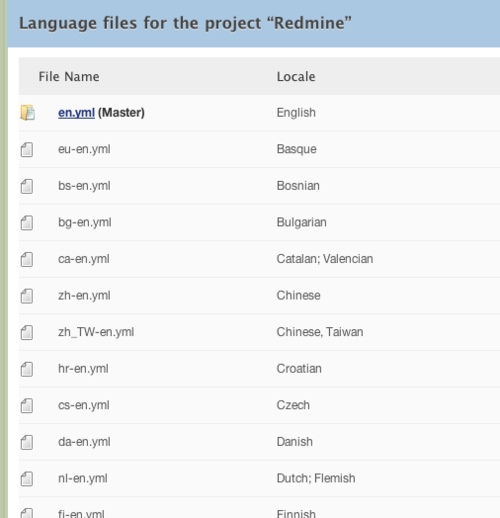
Since the last update, you need to setup the full path for each language file in order to map the files with the files used by the web_translate_it gem.

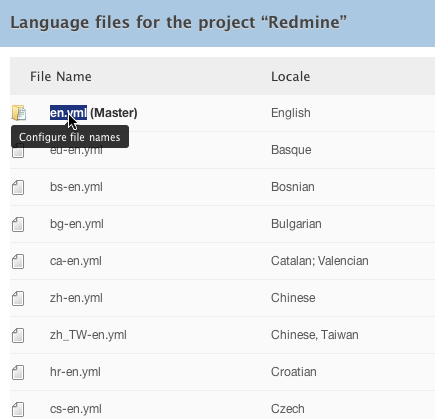
It means you basically had to manually edit each file name and change its name.

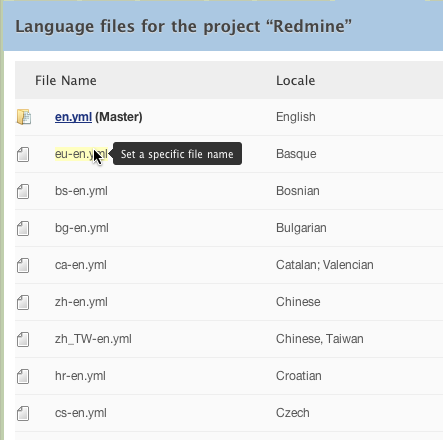
Cumbersome if you have 40 languages and 10 files! No longer. You can now edit all the file names at once. Click on the master language file.

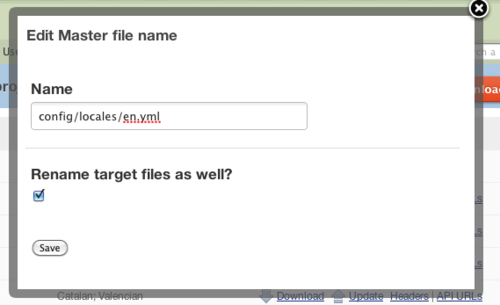
A box will pop up and will propose help you rename the file.

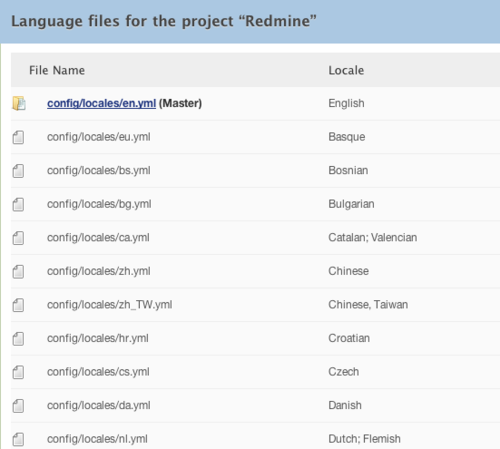
Tick the “Rename target files as well?” box, save and voilà!

I hope you will find this small update useful, thank you for using Web Translate It.

Upcoming changes to the Web Translate It client

By Edouard · March 22, 2010

A few changes have been made to the API and to the ruby client. Changes on the API are backwards compatible, so it won’t affect any projects. However you will need to make a very tiny change to your projects if you upgrade the client from the current version (1.5.2) to the next version (1.6). If you don’t use the Web Translate It client, no action is necessary.

Changes to the API

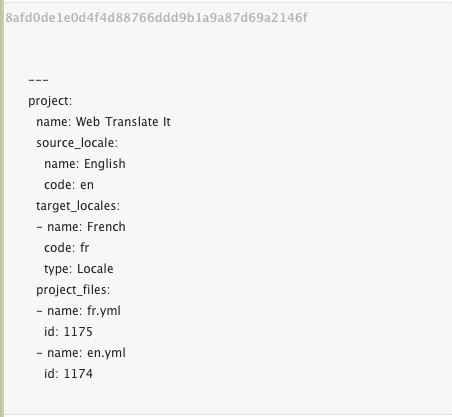
Until today, calls to the File API to download or upload a file were using the id of the “master language file”, even to access a target file.

For example, for the project Web Translate It, in which the source language is English and the target language French, calls had to be like so:

English: webtranslateit.com/api/projects/…/files/1941/locales/en

French: webtranslateit.com/api/projects/…/files/1941/locales/fr

From now on, you can also fetch the target language files by using the target language file ID, which gives:

English: webtranslateit.com/api/projects/…/files/1941/locales/en

French:

webtranslateit.com/api/projects/…/files/1942/locales/fr

It makes things easier when programming tools with the API. This change is backwards compatible, so it won’t affect the current client or any tool you developed.

Upcoming changes to the client

You currently have to setup a configuration file which looks like so:

api_key: 'sekret'
ignore_locales: :en

# A list of files to translate
files:
  1941: app/[locale].yml
  1943: defaults/[locale].yml

There are several problems with this approach.

  • it is a bit complicated to set up and requires the user to configure the project at two different places: on Web Translate It and on your project itself.
  • it makes too many assumptions. For example, it assumes that you want to have a file named pt_BR.yml for brazilian portuguese, although maybe you’d rather use pt-BR.yml. Also, sometimes the file extension changes depending of the language. For example you might want to have en.pot and de.po files.

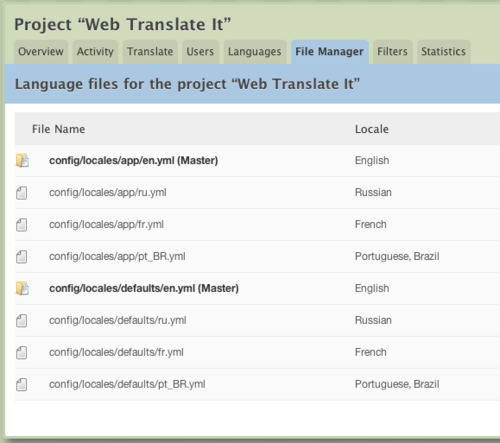
To fix these issues, the upcoming version 1.6 will take another approach. All the configuration will take place in the File Manager, in which you will to set up the complete relative path of your language files. Your configuration file will now be much simpler:

api_key: 'sekret'

The File Manager will have to have the complete file paths like so:

The upcoming version of the client will be released early this week. Thank you for using Web Translate It.

Upload files and images to your comments

By Edouard · March 16, 2010

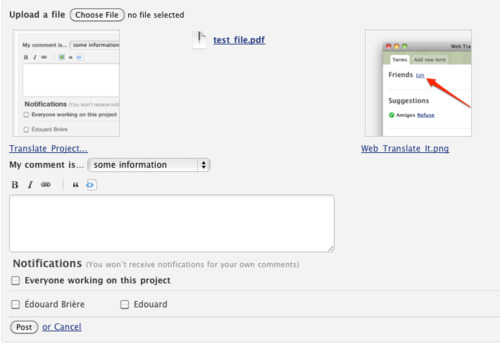
You can now upload and attach files to your comments on Web Translate It.

When you are typing a comment, click on “Upload File” and select a file. You can then type a comment (or leave the comment empty), then save it and the files will be automatically attached to the comment.

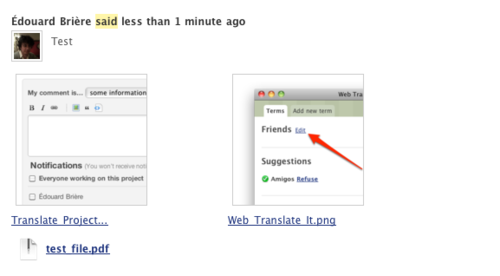
There is no limit: you can attach as many files as you want to a comment. You can attach anything: pictures (they will be resized), pdf files, zip files, anything.

Once your comment is saved, attachments will be sorted by file types and displayed underneath your comment. Click the cropped images to view them full size.

Since I was dealing with file uploads, I also added the ability to upload an avatar in your settings.

I hope you will find these improvements useful. Thank your for using Web Translate It.