The WebTranslateIt Blog · Page 17

i18n news and Product Updates about WebTranslateIt · Page 17

New in Web Translate It: project reporting

By Edouard · January 11, 2010

A bit more than a week ago, I announced that Web Translate It was using a new system to generate stats. If the new stats engine makes pages using statistics load faster —which is already a great feature— it was in fact the first part of a bigger feature: project reporting.

On your project page, you now have a new tab: Statistics.

If you have been using Web Translate It these past days you should already have enough data for populating this page.

Let’s have a quick tour and see what this new feature does.

Detailed stats

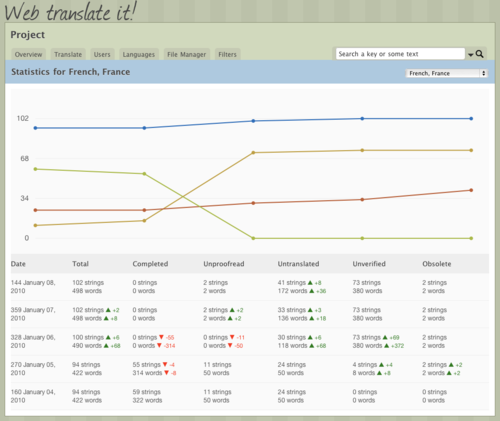
The new stats engine not only counts the amount of strings by status, it also counts the amount of words. The statistics page displays all this data.

Deltas

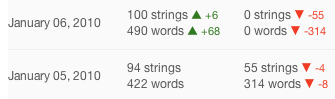
Web Translate It also calculates deltas. This is the variation of the amount of strings between one day and another.

If nothing happened on your project during some period of time (for example during the week-end), then there is nothing to display. In the example below, nothing happened between the 7th and the 11th of January.

Graphs

The graphs represent the amount of strings, by status, over time. Hover the graph and you will get a bit more information.

I hope you will find project reporting useful. Let me know if you have any suggestion or comments. Thank you for using Web Translate It.

More API improvements

By Edouard · January 9, 2010

I just updated the API with a few improvements and a new endpoint.

Improvements

The locale endpoint, which allows you to fetch a list of locales accepted by your project is now capable of returning xml, json or yaml by simply appending the format you want at the end of the URL.

For example, if you want your list of locales in YAML, you would call /api/projects/04b254da22a6eb301b103f848e469ad494eea47d/locales.yaml and it would return something like so:

--- 
locales: 
- name: French, France
  code: fr_FR

New Endpoint: Project information

This new endpoint can be very useful to develop an advanced integration between Web Translate It and your application.

It returns 5 things:

  • the project name,
  • a list of locales accepted by the project,
  • the project source locale,
  • the language file ids and names.

The data is available in xml, json or yaml.

An example of the data structure in YAML would be:

--- 
project: 
  name: Web Translate It
  source_locale: 
    name: English, United Kingdom
    code: en_GB
  target_locales: 
  - name: French, France
    code: fr_FR
    type: Locale
  project_files: 
  - name: fr.yml
    id: 1175
  - name: en.yml
    id: 1174

I hope these improvements will make easier for everyone to integrate Web Translate It with their application and develop awesome extensions.

For detailed API specifications, check API Information on Web Translate It.

New in Web Translate It: new API, updated plugin for Ruby on Rails

By Edouard · January 4, 2010

The API and on the Web Translate It plugin for Ruby on Rails. All of what follows use Web Translate It’s API which is only available on paying accounts.

API upgrade

The new API use a different URL and allow users to fetch their strings file by file. This is especially important for projects with several files to fetch their strings via the API.

The older API is deprecated, but will keep functioning indefinitely, so there is absolutely no need to update anything on your side if the endpoint you currently use works well for your project.

The other new feature is the ability to update a language file through the API. This can be really useful if you want to automatise the workflow between your project and Web Translate It.

What you do of it is entirely up to you. It could be used by a nightly or weekly task to upload an updated version of your master language file. This way new strings would be automatically added on Web Translate It.

For more information, I invite you to refer to the new API documentation for developers on Web Translate It.

Rails plugin upgrade

The plugin for integrating Web Translate It with Ruby on Rails projects has had a nice update today and now use the new API.

Once installed and set up, it allows you —if you want to— to sync the translations between your app with Web Translate It for every page requested. This is great for translators to test their work on a staging website.

It also comes with 3 rake tasks to help you manage your translations:

  • rake trans:fetch:all to fetch all your translations in all languages,
  • rake trans:fetch[fr_FR] to only fetch the french translations,
  • rake trans:upload[en] to send a new version of your language file to Web Translate It.

Grab it on Github if you haven’t already!

Thanks for using Web Translate It!

New in Web Translate It: new stats, Markdown help

By Edouard · January 2, 2010

Happy new year! Here are a bunch of improvements for 2010.

Statistics

This is not really a new feature, but rather a different way of calculating statistics. Instead of processing them on every page load and asking you to wait a few seconds until it loads, stats calculation is deferred and calculated in the background. This is the same system used for the language file importer/exporter and the search engine’s indexer.

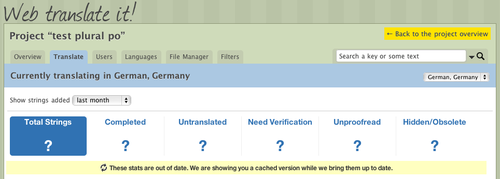
Since you don’t have to wait for the stats calculations to finish, the pages load much faster. You will sometimes see a notice indicating the stats are not up to date.

Web Translate It will then bring the stats up to date and automatically display them when available. It usually takes less than two seconds.

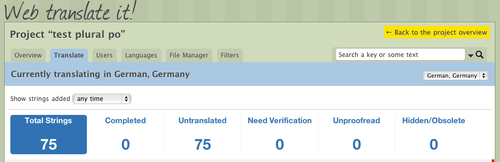
The filters and the stats section on the top of the translation interface have been redesigned to be clearer and easier to use.

This improvement is the first part of an upcoming new feature: project reporting. With reporting, you will be able to get detailed stats about your project over time. This requires the ability to generate costly statistics without making the website slower.

On top of the statistics improvements, many other tweaks have been done to make the translation interface load faster.

Progress bars on language page

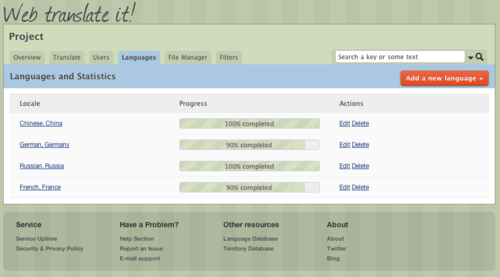
The language page now has a progress bar indicating the percentage of completed and translated strings for that project. Of course, it also use deferred calculations.

Better Markdown help

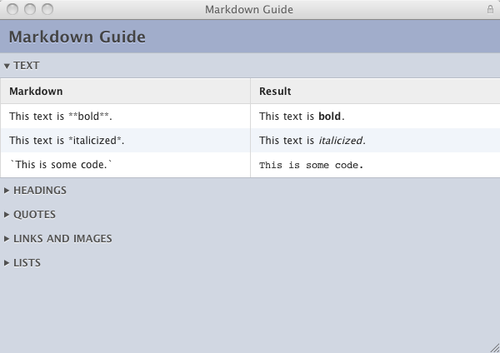
Comments on Web Translate It are formatted using Markdown, an easy to use markup language. The help section about Markdown was very poor. You now have a decent help page for helping you to write better comments.

I open-sourced it if you need this help page on your own project.

That’s it! I hope you will enjoy these improvements, thank you for using Web Translate It!

Coming up in 2010

By Edouard · December 18, 2009

Web Translate It is now on feature freeze. What I am currently working on right now is too big to be finished before the Christmas break. So that’s it for 2009!

What’s coming up next?

In the near future (January 2010), I will focus on enhancing existing feature. The stats and the API will be updated.

Stats

The new stats will be able to count strings, words, and keep a daily history. You will also be able to generate nice graphs displaying the amount of strings and words per language over time.

To make this work smoothly, some work has to be done under the hood. Calculations have to be deferred instead of being made again and again for every page load. This will use once again the same technology than the file import/export workers that proved to work really well. About 30% of Web Translate It’s calculations currently take place in the background.

The advantage is that not only you will have more detailed stats, but the pages using stats will load faster.

New API

The current API works really well, but doesn’t allow you to fetch a specific language file. This is a problem if you have several language files in your project.

The new API will allow you do just that. Although not advertised anywhere, it is actually already in production and used by some customers.

The API will also allow you to upload an update for a translation file. You could for example set up a periodic task on your server to update your translation files on Web Translate It nightly.

The Web Translate It plugin for Ruby on Rails 2.3 will also be updated to integrate these changes.

Crowdsourced translations

By the end of January, I will tackle crowdsourced translations.

I will chunk this large feature into several, simple iterations. For the first iteration I will focus on working a very simple, yet fully functional crowdsourcing interface.

  • Your own user community will be able to request for a translator account. I will implement login by OpenID to make it easier for everyone to register.
  • You will be able to accept or refuse these requests.
  • Your community will be able to suggest new translations or vote for existing translations.
  • You will be able to make the interface visible publicly or not.
  • You will be able to choose among 3 different translation strategies for each language. For example:
    • Traditional: let professional translators translate that language.
    • Half Crowdsourcing: Let your users translate and suggest translations, and hire professional translators to proofread their translations. You save a fair share of the translation cost, while having high quality translations.
    • Full Crowdsourcing: Let your users translate and vote to decide which translations will go live. It can work very well if you have a huge user community for that language. It usually doesn’t work so well for smaller user communities.

That’s pretty much everything I have planned for now.

I wish you a pleasant holiday, see you in 2010!

Web Translate It survey result

By Edouard · December 16, 2009

If you haven’t had a chance yet, please take the survey. It’s always good to get your voice heard, and I always consider all of your suggestions.

The results have been incredibly useful. Thank you everyone!

Appreciation Rating

Everyone who took the survey think Web Translate It’s service and support is good: 100% of you would recommend it. This is fantastic, I am glad you appreciate it, and thanks for all the kind words in the survey, I appreciate that :)

Pricing

When it comes to pricing, the answers depend on whether the interviewee is a developer or a translator.

Translation agencies, translators and large websites find the price well adjusted. Translation agencies use Web Translate It quite a lot, so the ratio time/monthly price is fair.

Development agencies and freelance developers think Web Translate It a bit pricey. I understand it just “doesn’t worth it”. The entry level is 39€/month, this is a big cost for a freelance developer or a small development agency for something you don’t need all the time.

I want to fix this. I will get back to this topic later in this post.

Features

This is not very surprising, the most wanted features also differ from the interviewee’s job. Everyone want features to make their work easier.

Developers want integration to a Version Control System, a better API (to upload files), the ability to attach files and images to comments and have a term base.

Translation agencies would rather have better translation tools: Search and replace comes first, the ability to branch translations and a have translation memory.

It helped me establishing my roadmap for the next few months. I will share it with you in another post this week.

Suggestions

Pricing

Someone suggested a pricing based per project. You would upload your strings, you would pay a certain sum, and then you’d get access to Web Translate It for as long as you want. If later you have more strings to translate, you upload them, pay for them and off you go.

It makes sense for developers who work on projects that have very little changes over time: once the project is translated and live, they don’t need Web Translate It much.

I completely understand that Web Translate It is overpriced for this kind of use. It’s a bit like taking a Hummer to go to the supermarket.

It was the business idea I had when I started working on Web Translate It. After more thought, I noticed this business model wouldn’t work well for me.

Web Translate It is a service, and I see two ways of selling a good and reliable service:

  • either by selling it monthly at a certain price. This price includes the time my customers don’t use it (week-end, holiday, when no work). This is what companies do with their employees.
  • or by selling it only when my customers need it. This extra flexibility comes at an extra price. This is what companies do when hiring consultants and freelancers: they are usually paid more than employees, but if used sparingly, they cost less to the company.

Consultants and freelancers’ businesses would not work if they were paid once and used indefinitely. There has to have a time limit.

What I am going to do

You will be able to top-up your Web Translate It account with some credit. This credit will stay on your account as long as you want and won’t lose value over time (unlike some dirty phone companies). With that credit you will be able to buy time on Web Translate It, depending on your needs of the moment.

To keep things simple, time will be divided by day —the day pass— or by month —the monthly pass.

It’s a pretty good deal: for example, if you translate a small project, you probably only need a few days. You can buy day passes, which give you access to Web Translate It for the time you need. After that, if you don’t need to translate anything for a while, it won’t cost you a thing.

When the time is up, your project will be automatically locked, so you won’t be able to access or edit it, unless you use another day pass or monthly pass.

The date is not defined yet. I believe it will be implemented sometime during the first semester of 2010.

Pricing is not defined either, but the idea is that if you have an occasional use of Web Translate It, this will be really cheaper than subscribing a monthly plan. Of course, if you use Web Translate It daily, monthly plans will be cheaper. I will announce more about it when I’ll have decided it.

Work offline

Someone suggested to have the ability to work offline, and I am really enthusiastic about this idea. I for one love to cut the wire sometimes.

I can’t promise a date for this, as I have a lot of pressing feature to implement, but I will definitely keep this suggestion in mind, thanks for sharing!

Do you have other suggestions?

If you have other suggestions or ideas to share, please let me know by e-mail or on the support forum.

Thank you for all the feedback, and thank you for using Web Translate It!

Week-end project: public language and territory database

By Edouard · December 13, 2009

Web Translate It has a rather large database of languages, territories and scripts that is used internally.

It is used to display language lists, or for the importers to figure out the plural forms. I thought some of this data could be interesting and valuable to other people.

This week-end I decided to expose this data to everyone. Here you go:

It is pretty cool, I am navigating through the links since an hour now :)

You could probably find this information on Wikipedia, but the difference here is that is structured and to the point. For example, we know the relationships between a language, a territory and a script.

French for example is spoken in Belgium, Canada, Switzerland, France, Luxembourg, Monaco and Senegal.

Or, Mongolian is spoken in and is written using the scripts Cyrillic and Mongolian

The other interesting data is the plural forms rules and code. When you translate a plural string from one language to another, Web Translate It automatically creates the plural rule for the target language, using the right plural forms.

For example, here is the plural rule for Russian, and here another one for Polish.

Making this data available to the public could also let people report eventual mistakes in this data.

I don’t have plans to make this data editable by users, like a wiki. This data is very critical to some Web Translate It features, so I’d rather be the sole maintainer.

Changes on the free trial

By Edouard · December 10, 2009

I am progressively refining Web Translate It’s plans. The first step to that process is that effective immediately, new subscriptions will now offer a 10-day free trial. This is less than before, as it used to be a 30-day free trial.

This only affects new accounts. If you are currently on free trial, nothing changes: you will get all of the 30-day trial as promised.

Why?

Because offering 30 days of service for free is a bit hard on us at the moment. Web Translate It’s service is very young —it launched merely 2 months ago— and 30 days is half of our age.

Besides, I believe 10 days is still plenty of time to evaluate Web Translate It and actually know if this is the right service for you. Web Translate It’s service is pretty simple and new customers usually know after using it for a few minutes if this is the tool they need or not. If you need more time for evaluation, drop me an e-mail at [email protected] and I will be happy to extend your trial period.

Also, besides the free trial, we offer two other ways to evaluate Web Translate It for free.

First, the free account which affords translating up to 500 strings. This is ideal for small projects, like an iPhone application or a small website.

Or if you have bigger needs, you can try the demo account, which lets you upload as many strings as you want. The only limit is time —3 hours, after which your account is deleted.

New in Web Translate It: Hide Strings

By Edouard · December 7, 2009

Quite often when translating a project, some strings added to the language file are not meant to be translated. Letting the translators know that these strings are not to translate is complicated. What about just removing them from the interface?

Managers now have the ability to hide these strings directly from Web Translate It’s interface.

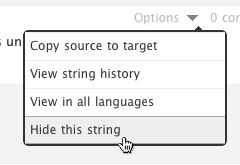
To hide a string, it’s easy: from the translation interface, click on “options” and then click “hide this string”.

Hidden strings can be seen in the “Strings not to translate” category. From this category, you can also make a string visible to the translators, just the same way you hid it.

I hope you will find this very small improvement useful. Thank you for using Web Translate It.

Holiday Season

By Edouard · December 7, 2009

Atelier Convivialité’s technical support will close for christmas holiday from the 19th until the 27th of December.

Obviously, Web Translate It’s service will be open as usual, there’s no such thing as website holiday :)

Server migration completed

By Edouard · December 5, 2009

Following the server saga, the server migration worked without encountering any issues. Web Translate It’s service has been down for merely 20 minutes.

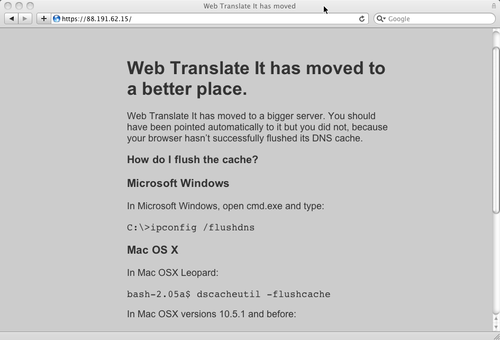
You should be properly directed to the new server by browsing https://webtranslateit.com. If you are not, you should see this page which will give you detailed instructions to flush your DNS cache.

You will notice a speed boost when loading pages, especially for the slow pages such as the translation interface or the API.

The previous server was a dedicated server, with a single processor having one core, and 1GB or ram. We completely grew out of this server, especially with regards to memory consumption. The server was running the whole website and only 1 worker, used for import/export of your language files, as well as miscellaneous resource-intensive tasks such as project deletion, search engine indexing and e-mail sending.

The new server is a Virtual Private Server from Linode with two processors having four cores each, and also 1 GB of ram. Surprisingly, the faster processors have drastically reduced the server’s overall memory consumption: this server can now run the whole website, as well as 3 workers and still have a comfortable memory overhead. With 3 workers, you will never have to wait long for your import or export jobs to complete.

Also, the memory size is now extendable: if Web Translate It needs more memory, I can resize the server and instantly get more ram. No need to change server any longer.

I hope you will appreciate the increased speed and reliability it will provide.

Maintenance window on Saturday 9AM-11AM GMT

By Edouard · December 1, 2009

On Saturday the 5th of December between 9AM and 11AM will be a maintenance window on both Web Translate It and on the beta version of Web Translate It.

During these two hours the website will be inaccessible as I will migrate the database and the application to a new server. The API will be accessible during the maintenance so it won’t impact your website.

Downtime post-mortem: Tuesday 1st December

By Edouard · December 1, 2009

Yesterday has been the busiest day of Web Translate It’s history. We completely outreached the number of visits and pages viewed. Many new visitors have been trying Web Translate It’s demo which resulted in a fairly high, although sustainable server load.

Around 5AM GMT the cron job that back up our database started. This backup is usually done in less than 5 minutes. Due to the high server load we were experiencing, after more than 30 minutes the backup was still not finished, at which time another resource-hungry task started. This abnormal accumulation of heavy tasks at the same time jammed our web server, at which point the service became unresponsive.

Around 9AM GMT I noticed the service was not responding and I rebooted the server, which instantly restored Web Translate It’s service back to business.

I am really sorry about this downtime. This is the biggest downtime in Web Translate It’s history. I strive for delivering high quality and highly available software to my customers, which I failed to provide this morning.

I will take the following actions:

  • I will set up the monitoring system to send e-mail and SMS when the server load is extremely high. At the moment I am only notified when the server goes completely down.

  • I will migrate Web Translate It to a more beefy server. I was planning such a migration after Christmas holiday but I will do my best to order a new server and migrate the entire service before the beginning of next week.

Again, I am very sorry for any and all problems this has caused and hope that you will give us a chance to re-earn your trust and continued business.

It’s beta time!

By Edouard · November 27, 2009

I just finished a new feature for Web Translate It and it is so much a change I would like you to try it first and get your feedback before rolling it on the main website.

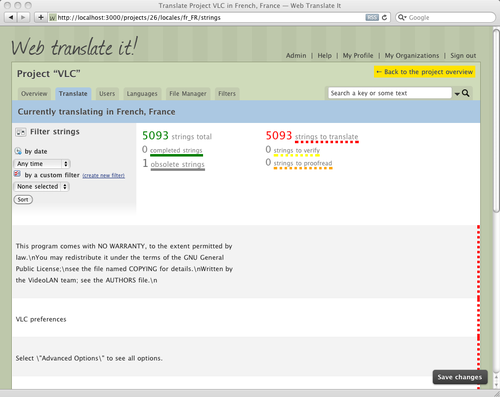
This new feature is a completely rethought translation interface. I hope it makes it more efficient to work. Let’s see what’s new in this interface.

Enough said, go over at beta.webtranslateit.com and give it a try. Please note that the data used on this site is the live data and sync with the regular Web Translate It. It use the same database.

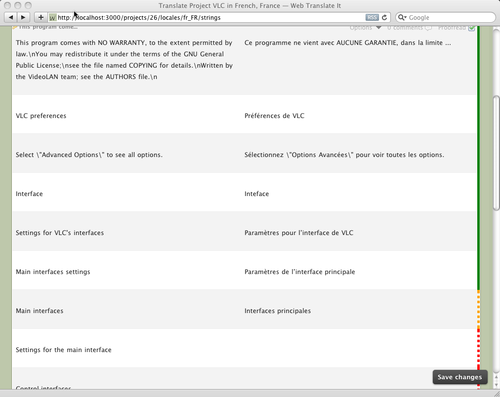
The first thing you will notice is that there is no more pagination. The page is endless: the more you scroll, the more strings are automatically loaded. This is very convenient to translate hundreds of strings in a row: you don’t have to interrupt your work to click on “next page” and wait for the next page to load: the next page is loaded when you’re about to be out of strings to work.

The interface is also much more minimalist than the current one. By default nothing is displayed but the content to translate. This is a great for reviewing your work.

When you hover a string, more information appear. Namely the key name of the string and a few options.

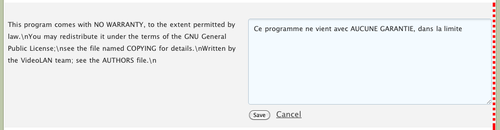
When you click on a string, a text area appears and let you compose or edit your translation.

When you are done, click save or just leave it for later: you can also save your translations in batch with the “Save my changes” button, which is much more efficient than the current “Save all” button.

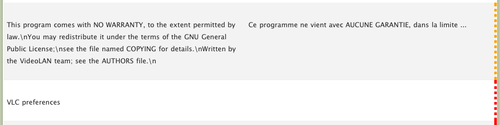
Once the string is saved, your will notice the color in the right border has changed to red to orange: this is the status indicator. It means the string was “not translated” and it is not “not proofread”.

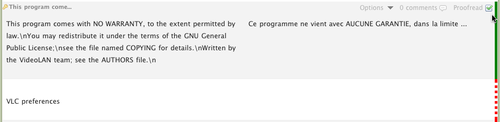
To proofread the string, click on the proofread button, and the status color dynamically update from dotted orange to plain green.

This is the scheme everywhere on Web Translate It: dotted stuff are things to do, plain stuff are things done. The colours give you a more precise indication of the status: green is for “done”, orange is for “not proofread” and red is for “not done at all”.

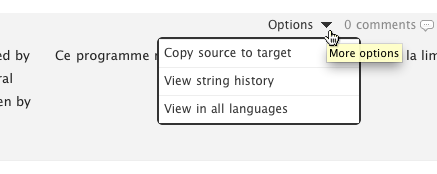
Less frequently used functionalities are gone in a menu you can activate by clicking on “Options”.

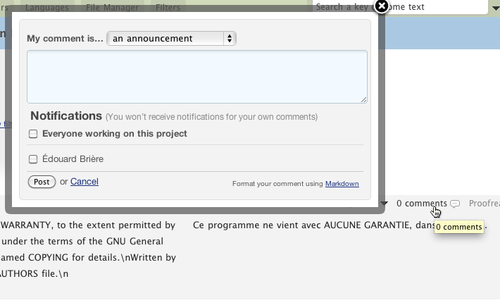
The most used functionalities such as commenting or proofread/unproofread are visible and usable by directly clicking the button.

I think you’ve got it! A finished project should look like a very long green line. Any string to do is easily identifiable.

Please share what you think about this on our forum.

If you haven’t tried Web Translate It yet, create a demo account with unlimited access that will allow you to try it after just one click.

New in Web Translate It: Demo Accounts

By Edouard · November 26, 2009

I am pretty excited about this. When you are new to the tool or never heard of it, choosing a plan and creating a user account sure is intimidating. “What are the implications of what I am doing? Will I have to pay anything?”

If you only want to take a look at it, why not skipping this part?

In just a click you will get access to the full-fledged, top of the line Web Translate It plan. You can try it for 3 hours for free, at which point we will delete your demo account and all of its data.

To make your testing experience more enjoyable, this demo account come pre filled with an example project.

Give it a try!

Maintenance window tonight at 9PM GMT

By Edouard · November 23, 2009

A maintenance window is planned tonight for Web Translate It between 9PM to 9.30PM GMT as we are migrating our assets (Javascript and CSS and images) to a proper CDN.

If everything goes according to the plan there should be no downtime and you should only notice a nice speed boost :)

Edit 9.45PM: I am a bit late, but it is done. All Web Translate It’s static content (images, Javascript and CSS) are served by 4 different buckets (or instances of) Amazon S3. This should speed up the loading of these assets and give WTI’s server a bit more overhead to serve actual pages to you.

Web Translate It mini-update

By Edouard · November 18, 2009

I just pushed a very small update to Web Translate It to fix a few user interfaces I had gripes with. Yep, it’s the second update of the day. The differences are quite subtle but I think they make a difference. Read on.

Better Activity Feed

The activity feed show the last activity on your project. It displays the last translations, the last comments and the last files uploaded to the system. The problem is that showing all the translations is sometimes a little bit too much information, which makes the activity feed useless in practice, because you miss the important things.

To fix this issue, the feed about translations are now grouped by author and language.

You can see the hidden translations by clicking on “XX worked a few more strings”. It toggles the rest of the translations the translator has worked on.

Comments

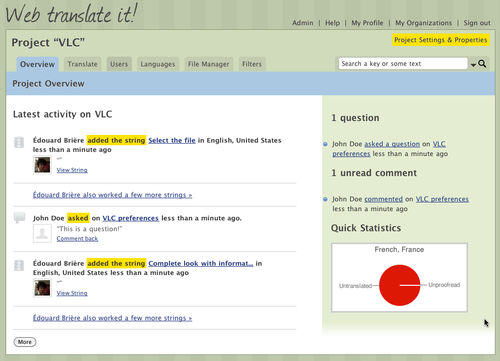
On the project page you can now see the comments you haven’t read yet. This is useful if you deactivated the email notifications for Web Translate It in your settings page.

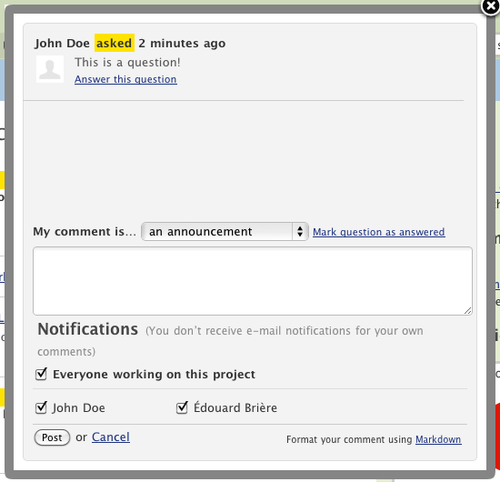
There are also two subtle UI touches on the comment popup. The first one is the “Answer this question” button.

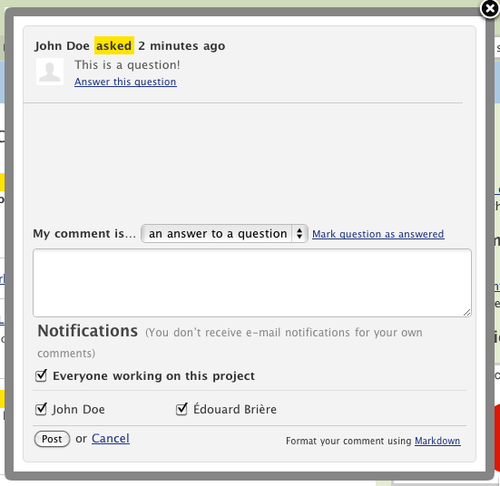
When you click it, it prepares your answer: the drop-down is automatically set to “answer” and the text area gets the focus. Like so:

The second new feature here is the “Mark as answered” button. It basically close the question without answering it. This is useful because sometimes the question has been answered via another medium (email, chat or phone).

Better language switch

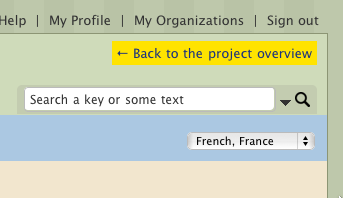
There are more language switch throughout the pages and they are better. The old javascript-y toggles have been replaced by a simple drop-down, which are more efficient to use. Often simpler is better.

I hope you will appreciate this (very tiny) update, which should make your commenting experience much better!

Thank you for using Web Translate It.

Web Translate It update

By Edouard · November 18, 2009

These last two weeks have been hectic. Features-wise there is not much new, but a lot of important work has been done.

More supported browsers

Web Translate It now support Internet Explorer 7 and 8. We also support Firefox 3, Safari 3 and 4.

We don’t support and don’t have plans to support Internet Explorer 6. You will have a better experience using Web Translate It with a recent web browser such as Firefox 3 or Safari. We will work on supporting Firefox 2 in the next weeks.

Better comments

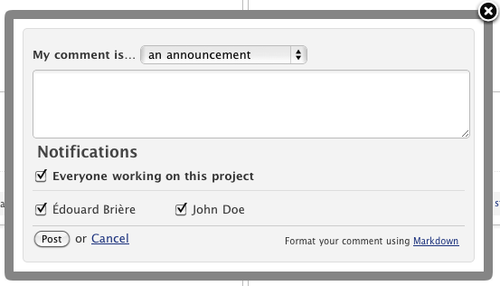
The commenting system is much better. You can now notify users from a comment.

This is very useful to ask a question about a string to whom it may concern.

Word counter

One useful feature for translators is the ability to count the number of words in a project. You can now request this data and Web Translate It will send you an e-mail with this information.

Payment system

Finally Web Translate It can accept payments. The payment system use Paypal for now. That was not an easy treat to implement and it took much longer than I expected.

Try Web Translate It

Web Translate It is getting better and better. Have you a website or software to translate, Web Translate It can help to make this task simpler. Check out our plans, they all come with a 1 month free trial.

If you have any questions, please let us know on our support forum or directly by email.