The WebTranslateIt Blog · Page 8

i18n news and Product Updates about WebTranslateIt · Page 8

Export your projects as a TMX file

By Edouard · February 11, 2013

Last August I added the ability to download a whole project content as a CSV file that you can open with any spreadsheet tool.

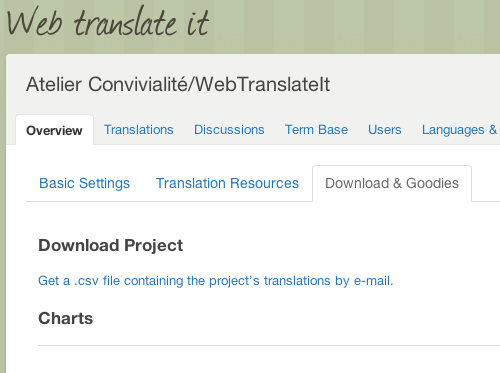
Getting your data out of WebTranslateIt is a important as getting it in, so you can now download your project as a TMX file.

TMX (Translation Memory Exchange) is a standard to share translation memories between tools. So you can now re-use your translations from WebTranslateIt to use them in another tool’s Translation Memory.

This feature is located in your project settings, under “Download & Goodies”.

Multilingual batch operations

By Edouard · February 11, 2013

I improved the Batch Operation feature today. You can now run a multilingual batch operation.

Multilingual batch operations are great if you need to run the same operation for all the languages of your project. For instance you could want to proofread all the translations of your project in all languages.

Before this update you had to run a separate batch operation for each language. You can now do this in just one click.

New in WebTranslateIt: Paste your files

By Edouard · February 7, 2013

You can now create or update master files from the web interface by pasting its content in the File Manager.

You will find a new Clipboard button which lets you do that.

This feature is useful if you want to create a file directly from WebTranslateIt instead of creating it on your computer and then uploading it to WebTranslateIt.

New in WebTranslateIt: A quicker way to add terms to your TermBase

By Edouard · February 7, 2013

You can now quickly add terms to your WebTranslateIt TermBase without leaving the translation interface.

In the translation interface select a word or a group of words, click on “Add to TermBase” in the toolbar and a modal window will let you add the term your selected to your TermBase.

It’s a great way to add new terms on the go.

I hope you will find this improvement useful. Thank you for using WebTranslateIt!

New in WebTranslateIt: Project Activity Feeds

By Edouard · December 17, 2012

I just released a new feature to WebTranslateIt: Project Activity Feeds.

Project Activity Feeds are a great way to see what is happening on a project. All the actions happening on a project are logged and displayed on your project overview page, where you can easily see who did what, and why it happened.

By default, recurring actions are grouped by type and displayed as a short excerpt.

You can dive into the details by clicking on “See changes”.

Need to see what a colleague did on a project recently? You can filter the activity feed by user:

Click the user’s name to view her activity:

If you’re into RSS, Project activity feeds are also available as an Atom feed. Just click on the “Atom Feed” icon to get your project activity.


I hope you will find this new feature useful. Thank you for using WebTranslateIt.

Voting for terms translations

By Edouard · November 16, 2012

New in WebTranslateIt: voting for translations in the Term Base is now a bit more democratic! Every translator in the project can now upvote or downvote a translation.

Using this feature, your team can now easily decide of the translation of the key words of your application.

New in WebTranslateIt: upload spreadsheet files to your TermBase

By Edouard · November 15, 2012

Do you use a TermBase file made of a spreadsheet file (Microsoft Excel .xls or .csv files) or perhaps you have a TermBase Exchange (.tbx) file?

You can now upload these files to your WebTranslateIt TermBase in order to get useful suggestions while translating.

WebTranslateIt recognize 2 kinds of term files: Term Base Exchange (TBX) files and spreadsheet files (Excel or CSV).

If you’re using a spreadsheet file, it must to be organized in a very specific way. At a minimum, WebTranslateIt requires your spreadsheet file to be organized like this:

You can optionally add a Part of Speech (eg. noun, verb), which will be imported in the TermBase:

Or a definition:

Or both:

I hope you will find this new feature useful. Thank you for using WebTranslateIt.
New in WebTranslateIt: Disaster Recovery

By Edouard · November 1, 2012

As WebTranslateit grows, emergency support e-mails asking “I deleted a file and all of its translations. What can I do?” become more frequent.

When this happens, I can always recover your deleted language files in a matter of minutes. I store every customer’s language files in a huge git repository, updated every five minutes, which is backed up on a secondary server.

But while this solution is efficient, it isn’t elegant. First, you’d loose all your discussions, translation history and statuses, and you need me to do it. And it would go faster if you recover your data by yourself, wouldn’t it?.

Introducing Disaster Recovery

Disaster Recovery is a new feature in WebTranslateIt. When you delete a project, a file, a language or a segment, it will act as if it was deleted. But in fact, we keep all the things you deleted around for 3 months. After 3 months, you probably won’t ever need this data and we delete it forever.

This feature comes for free: deleted resources don’t count against your segment limit, so you can keep the same plan and enjoy this additional safety net.

What’s best is that you can recover your deleted things by yourself, and it’s super easy to do so.

Recovering Projects

Let’s assume you deleted a project by mistake. Head over to your organization page. On the “Projects” tab, you’ll be greeted with this message.

Click on the message to view the deleted projects, and recovering them by clicking on “Recover”. That’s it!

Recovering Files, Languages and Segments

It’s just as easy to recover files, languages or segments. If you deleted something you shouldn’t have, head over to your project settings. There, click on the new “Recover Deleted Data” tab.

You can filter your deleted data by kind: files, languages or segments. When you’re ready to recover something, click on the “Recover” button and… that’s it!


I hope you will find this new feature useful. Thank you for choosing WebTranslateIt!

Removed Bing Translate v1 support

By Edouard · October 25, 2012

Last July I announced a few changes to the Bing Translator API were coming.

The reason behind these changes is that Microsoft deprecated their free Bing Translate API to replace it by a new Azure Marketplace Bing Translate API. The new API is just about the same as the old, but is no longer free.

Today I removed support for the Bing Translate API v1, which was deprecated. If you used to depend on Bing Translate’s suggestions, please update your project settings to either use the new Azure Marketplace Bing Translator or Google Translate services. You will find some help about that in WebTranslateIt’s documentation.

Don’t hesitate to contact me if you have any questions and I will get right back to you. Thank you for choosing WebTranslateIt.

New in WebTranslateIt: Set a size limit for translations

By Edouard · September 7, 2012

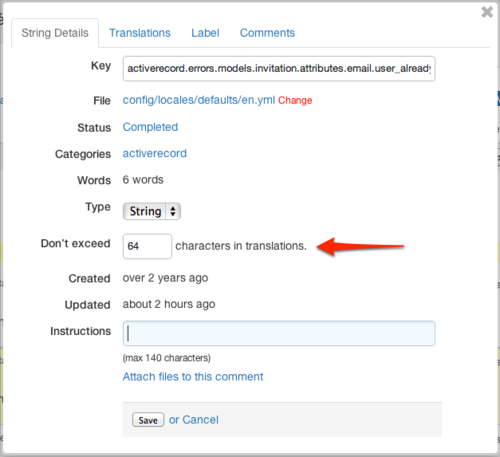
I just added the capability for managers to set a maximum size for translations in WebTranslateIt.

It’s really easy to use. Managers are able to set a maximum translation translation size under the String Details window:

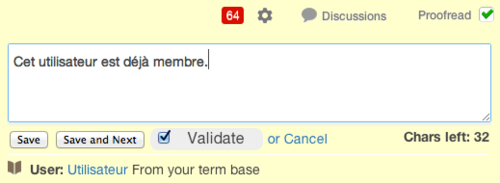
When a translation size limit is set, translators will identify segments having a translation length limit by looking for a specific badge:

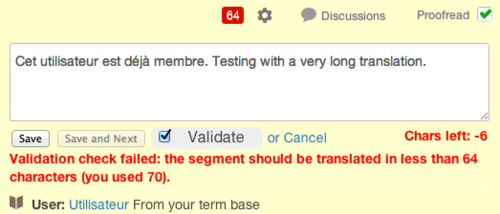
If a translator exceeds the size limit, the following error message will be displayed when saving the translation:

In order to save the segment, the translator should try to reduce the size of the translation, or bypass the validation by unticking the “validate” checkbox.

That’s all there is to know about this new feature. Thank you for using WebTranslateIt.
New in WebTranslateIt: Export a project to a CSV file

By Edouard · August 17, 2012

I added the ability for managers to export a whole project’s translations to a CSV file.

To get your CSV file, head over to your project settings, “Downloads & Goodies” and click on “Get a CSV file”.

WebTranslateIt will create a CSV file for you and will send it to you by e-mail as soon as it is ready.

You can then open your CSV file with any spreadsheet tool (Microsoft Excel, Apple Numbers, Google docs, …)

New in WebTranslateIt: HiDPI icons

By Edouard · August 17, 2012

I released a visual update to WebTranslateIt’s interface.

The interface icons have been the same since I launched WebTranslateIt in 2009. Since then technology and techniques have greatly improved and with retina display products —which become more and more mainstream— it becomes important for websites to have the interface look good at any zoom level.

The updated WebTranslateIt interface use the SymbolSet webfonts and leverage CSS3 techniques such as rounded corners and gradients to make sure the interface looks great on any screen at any zoom level.

(Click to view a larger version)

I hope you’ll find this improvement enjoyable. Thank you for using WebTranslateIt.
web_translate_it rubygem v2.0.3 released

By Edouard · August 9, 2012

I released a new version of the web_translate_it gem, the open-source synchronization tool for Web Translate It.

This version 2.0.3 is a minor new version which includes a few improvements and bug fixes. It also restores the compatibility with ruby 1.8.6.

You can read about all the changes in the history file on Github.


Install or Upgrade

To install web_translate_it, please refer to the gem documentation.

To upgrade web_translate_it to its latest version, type in a terminal: gem install web_translate_it.

Search Improvements

By Edouard · July 6, 2012

This week I released a few improvements to segment searching to WebTranslateIt.

Under the hood, I completely rewrote the search engine feature. Search was previously powered by Sphinx. While this is an extremely fast search engine, it had several important drawbacks which prevented me to implement often requested features, so I decided to rewrite search to use SQL queries directly against the database.

New feature: search for a key name or a translation

The new search system can now let you search specifically for a segment’s key or for a source or target translation.

It is really easy to use: type a query, then select whether you’d like to search for a key, or a text from the source translation or target translation. Of course, you can always search by all criteria like before, which is good to quickly find something.

Power users: regular expression search

You can now also search for a segment or a translation using a regular expression.

You can also combine this new feature with specific segment key or translation searching.

(Click to view larger)

What’s great is that all these advanced search results can also be combined with the usual filters, categories, statistics and batch operations, so this is really powerful.

On the following example, I search for all completed segments located in the file config/locales/default/en.yml whose key matches the regular expression ^activerecord(.*)blank$.

(Click to view larger.

You can see this specific query live here)

Other improvements

The new search feature should be more reliable. The previous system kept an index of your segments and required to be fully re-indexed from time to time. The drawback was that it wasn’t possible to search for segments while it was reindexing, which means you couldn’t actually use search for several minutes.

This is no longer the case. You segments should now always be searchable.

On top of that the search results should also work much better with foreign characters.


I hope you will like this batch of improvements to the search facility and that it will make your localization work easier. Thank you for using WebTranslateIt.
Changes to the Bing Translator API

By Edouard · July 3, 2012

Microsoft is deprecating its current Bing Translator API in favour of a new API you can find on the Azure Marketplace. From now on, all new API tokens delivered by Microsoft aren’t compatible with the current implementation of Bing Translator in WebTranslateIt.

Today I released an update to WebTranslateIt to support the new Bing Translator API, so you can now use the new Bing Translator credentials delivered on the Azure Marketplace with WebTranslateIt.

Note that since the new Bing API use a new authentication mechanism, your older credentials aren’t compatible with the new Translator API either.

How to use it?

First, head over to WebTranslateIt’s documentation to learn how to get your new Bing Translator API credentials.

Once you have your Client ID and Client Secret tokens, go to your project settings and paste these credentials to the respective fields and that should be it.

I currently use the older version of Bing Translator API. Should I migrate to the new system?

Yes. I heard Microsoft will decommission their old API soon, so you should definitely migrate your project to the new Bing Translator API.

How much does it cost?

The new Bing Translator API is no longer free with unlimited access. They offer different plans, including a free plan depending on your usage.


Should you have any questions, please visit the support site and I will get right back to you. Thank you for using WebTranslateIt.

web_translate_it rubygem v2.0.2 released

By Edouard · June 7, 2012

I released a new version of the web_translate_it gem, the open-source synchronization tool for Web Translate It.

This version 2.0.2 is a minor new version which includes one improvement and one bug fix.

Support for pagination on String and Term APIs

If you are using the WebTranslateIt::String.find_all and WebTranslateIt::Term.find_all methods, you’ll be happy to know these methods now automatically paginate to fetch all your strings and terms. So if you have thousands of segments to fetch you can implement something like this:

https://gist.github.com/2881038

Better error messages

The WebTranslateIt API was recently changed to return error messages as JSON hashes. The web_translate_it gem was updated to implement this improvement.


Install or Upgrade

To install web_translate_it, please refer to the gem documentation.

To upgrade web_translate_it to its latest version, type in a terminal: gem install web_translate_it.

Update to the Stats API endpoint

By Edouard · May 11, 2012

I just released an update to the Stats API endpoint.

This endpoint —which lets you gather statistics about a project— now takes optional parameters, such as:

  • file: the File ID you want to filter by,

  • date_range: The amount of time since the strings were added. Accepts a string such as 1.day.ago, 27.days.ago, 3.months.ago, 2.years.ago.

  • category: The category ID to filter by.

  • label: The label ID to filter by.

  • s: The search to filter by.

Using these new parameters, you can now access very detailed project stats.

I hope you will find this improvement useful. Thank you for using WebTranslateIt.